000
2. Preparation
26
Using the XDCA-FS7
You can add functions to the camcorder, such
as a V-shoe battery or external sync signal, by
attaching an XDCA-FS7 Extension Unit (option) to
the camcorder.
Attaching the XDCA-FS7
[Notes]
The camcorder battery pack cannot be used when an
XDCA-FS7 unit is attached to the camcorder. You must
attach a battery pack to the XDCA-FS7 or connect an
external power supply.
Attach/remove the XDCA-FS7 while the camcorder is
turned off.
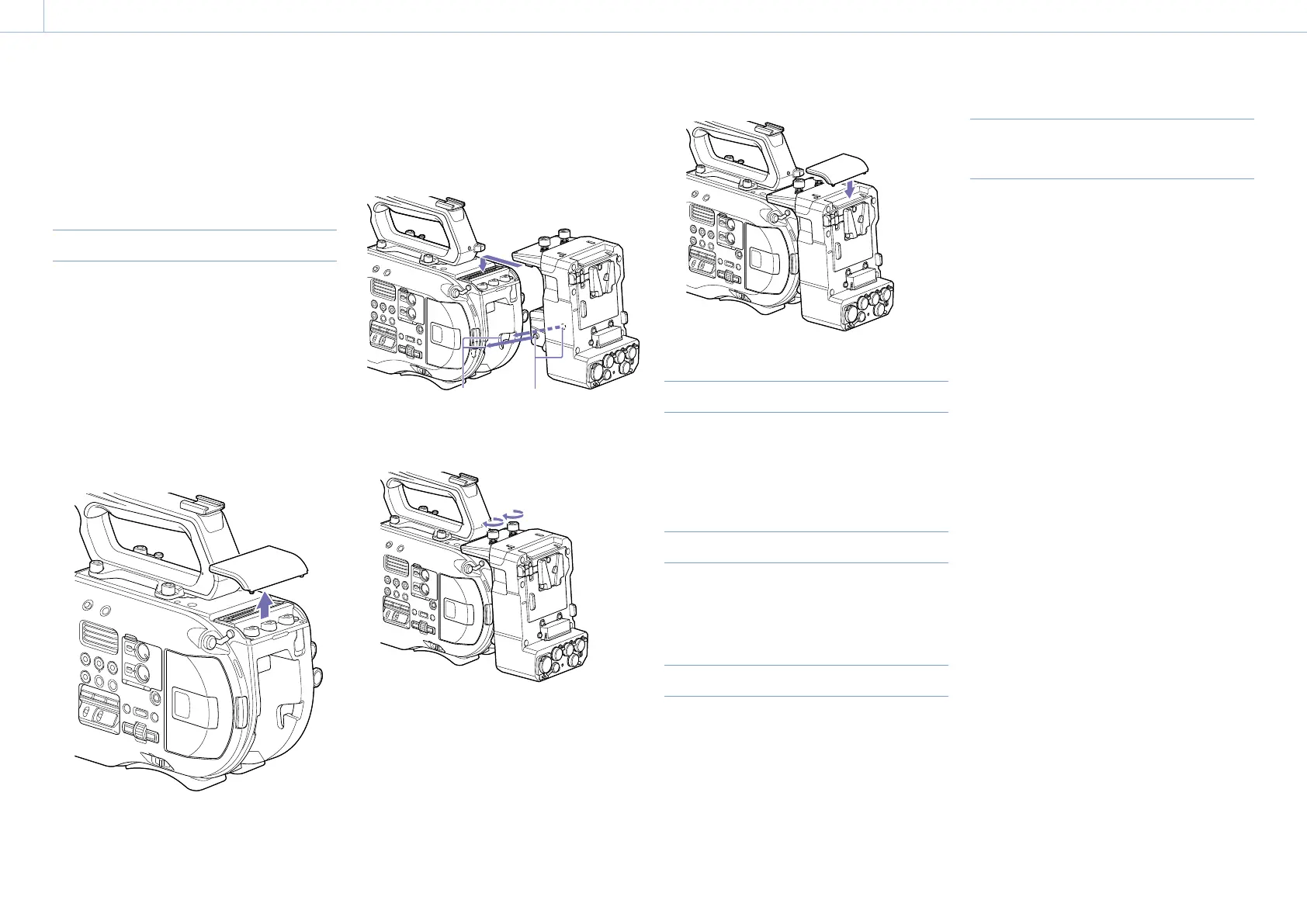
1 Remove the battery pack (page 13) attached
to the camcorder.
2 Remove the cover of the extension unit
connector section.
3 Align the protrusions of the XDCA-FS7 with
the left and right grooves of the camcorder
and slide all the way in, then slide the XDCA-
FS7 down into the connector section.
Grooves
Protrusions
4 Tighten the two screws on the top of the
XDCA-FS7 to secure the XDCA-FS7.
The cover of the extension unit connector
section can be inserted into the top of the
extension unit.
Removing the XDCA-FS7
Loosen the two screws on the top of the
XDCA-FS7, and remove the XDCA-FS7 from the
camcorder.
Attaching the Battery Pack
Insert the battery pack into the battery pack
attachment on the XDCA-FS7.
Removing the Battery Pack
Pull the battery pack out from the battery pack
attachment on the XDCA-FS7 while holding down
the BATT RELEASE button.
Switching the Timecode Input/
Output
You can switch the timecode input/output using
the TC IN/OUT switch (page 8).
For details, see page 77.



 To Next Page