000
7. Appendix: Output Formats and Limitations
85
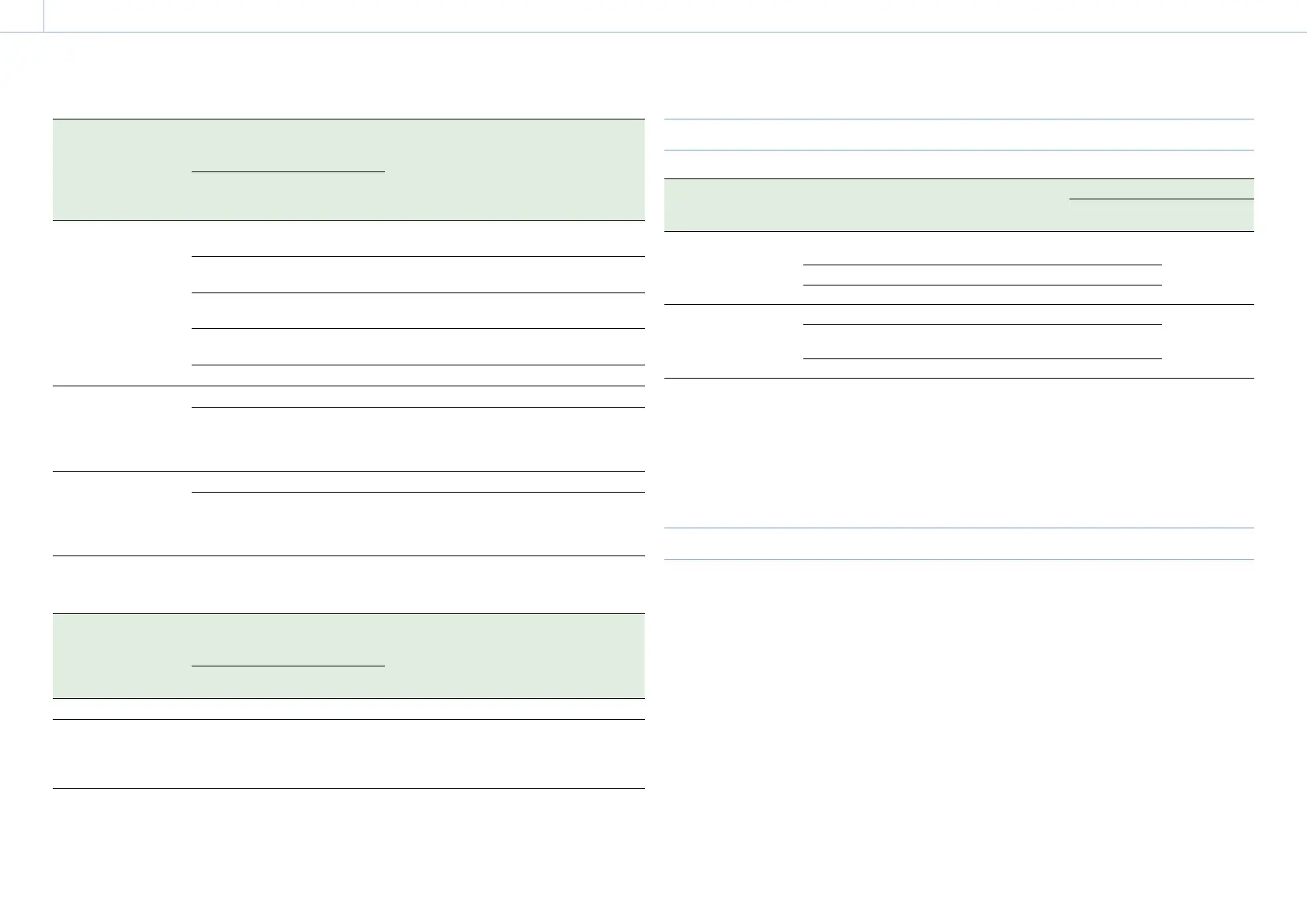
Recording format
settings
(Rec Format >RAW
Output Format and
Video Format in the
System menu)
SDI/HDMI output settings
(Output Format >SDI and HDMI
in the Video menu)
SDI output signal HDMI output signal
SDI HDMI
RAW Output Format
2048×1080 50P
Video Format (fixed
value)
1280×720 50P
2048×1080P
(Level A)
– 2048×1080 50P
Level-A
No output
2048×1080P
(Level B)
– 2048×1080 50P
Level-B
No output
1920×1080P
(Level A)
1920×1080P 1920×1080 50P
Level-A
1920×1080 50P
1920×1080P
(Level B)
– 1920×1080 50P
Level-B
No output
1280×720P 1280×720P 1280×720 50P 1280×720 50P
RAW Output Format
4096×2160 25P
Video Format (fixed
value)
1920×1080 25P
2048×1080PsF – 2048×1080 25PsF No output
1920×1080PsF 1920×1080i 1920×1080 25PsF 1920×1080 25PsF
RAW Output Format
2048×1080 25P
Video Format (fixed
value)
1920×1080 25P
2048×1080PsF – 2048×1080 25PsF No output
1920×1080PsF 1920×1080i 1920×1080 25PsF 1920×1080 25PsF
When using extension unit (ProRes 422)
Recording format
settings
(Rec Format >Video
Format in the System
menu)
SDI/HDMI output settings
(Output Format >SDI and HDMI
in the Video menu)
SDI output signal HDMI output signal
SDI HDMI
1920×1080 50i 1920×1080i 1920×1080i 1920×1080 50i 1920×1080 50i
1920×1080 25P 1920×1080PsF
1920×1080PsF
SDI OUT 1
1920×1080 25P
SDI OUT 2
1920×1080 25PsF
1920×1080 50i (PsF)
HDMI Output Settings for HDMI Target Devices
Output Setting >HDMI
Target Device in the
Video menu
Output Display >SDI/HDMI in the Video menu HDMI output
OSD On/Off MLUT On/Off
Recorder (default) SDI=On, HDMI=On (default)
* Grayed out, cannot be selected.
– Follows SDI1
SDI=On, HDMI=Off Off
SDI=Off, HDMI=Off Off
Monitor SDI=On, HDMI=On (default) On Follows SDI2
SDI=On, HDMI=Off
* Grayed out, cannot be selected.
–
SDI=Off, HDMI=Off Off
[Notes]
If the current Output Display setting becomes unavailable for selection after changing HDMI Target Device, the Output
Display setting changes as follows.
– Forcibly changes to the default value.
– If the default value is not available for selection, forcibly changes to “SDI=On, HDMI=On.”
HDMI Target Device cannot be set to Recorder if Codec is set to ProRes.
States When Monitor LUT Cannot be Configured Independently
In the following cases, Monitor LUT >SDI2, HDMI, and Viewfinder in the Video menu cannot be set
individually. They are synced with the SDI1 & Internal Rec setting.
When Output Format >HDMI in the Video menu is set to 4096×2160 or 3840×2160
When S&Q Motion >Setting in the Recording menu is set to On
When Lens >Distortion Comp. in the System menu is set to Auto


 To Next Page