35
DVD Playback
Playback Options
Z
X
.
x
SUR
ZOOM
REPEAT
MENU
H
M/m/</,,
ENTER
Number buttons
O RETURN
>
/
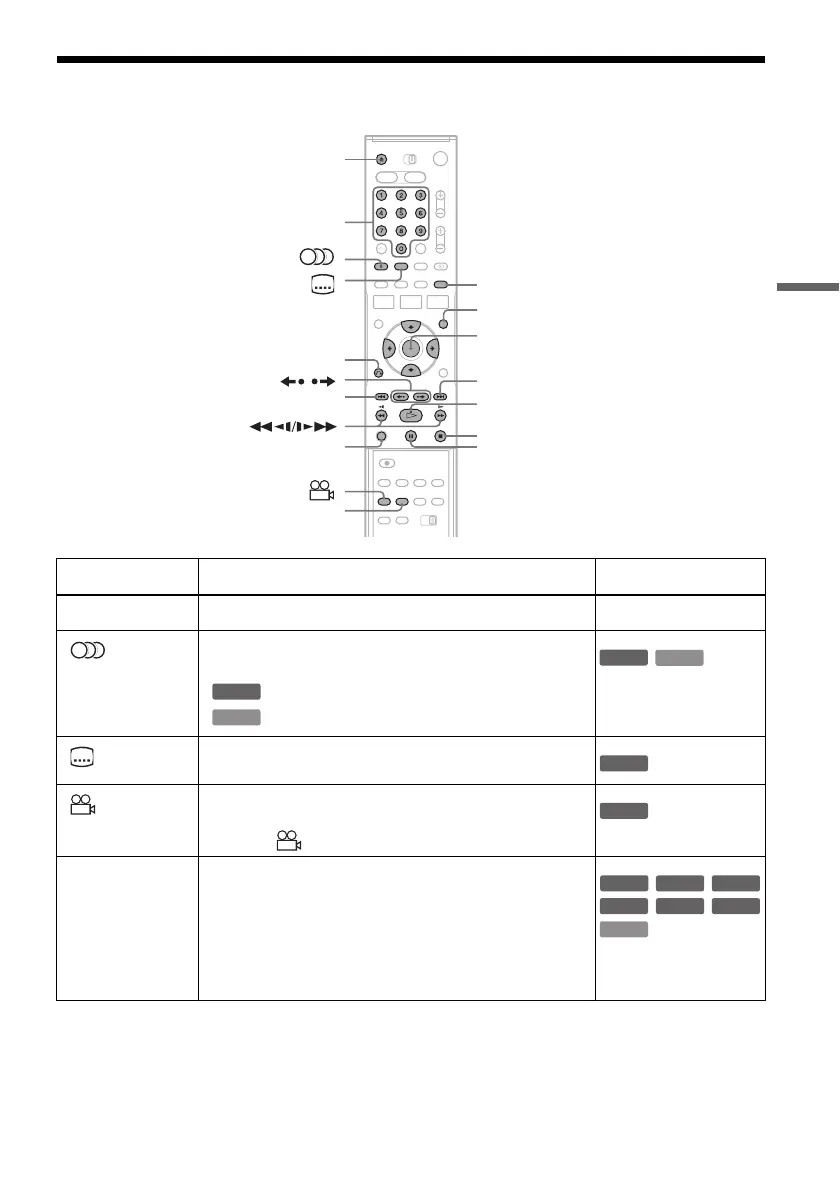
Button Operation Disc
Z (open/close) Stops playing and opens the disc tray. All discs
(audio) Selects one of the audio tracks recorded on the disc when
pressed repeatedly.
: Selects the audio source.
: Selects stereo or monaural audio tracks.
(subtitle
) Selects a subtitle language when pressed repeatedly.
.
(angle) Selects an angle when pressed repeatedly.
If various angles (multi-angles) for a scene are recorded on
the disc, “ ” appears in the front panel display.
ZOOM Zooms into a scene during playback or still mode when
pressed repeatedly.
Magnification changes as follows:
normal t ×2 t ×4 t normal
The zoom function may not work depending on the DVD.
To zoom in a JPEG image, see page 44.
DVD
VCD
DVD
VCD
DVD
DVD
DVD
VCD
+
RW
-
RWVR
-
RW
Video
-
R
+
R
,continued



 To Next Page