14
Step 3: Connecting to Your TV
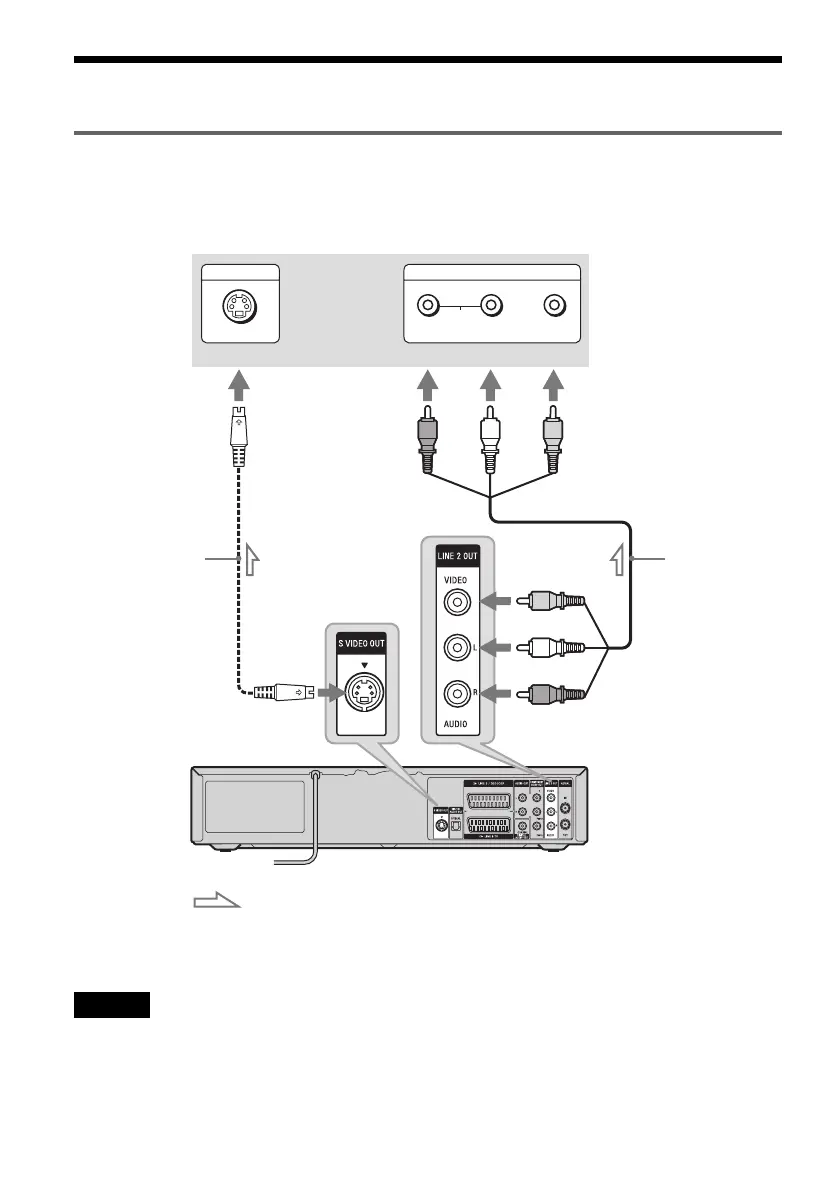
Connecting to the LINE 2 OUT jacks
Connect the supplied audio/video cord to the LINE 2 OUT (VIDEO/AUDIO L/R) jacks of the recorder.
To enjoy higher quality images, connect an S video cord (not supplied) instead of the yellow (video) plug.
When using this connection, be sure to connect the audio cord to the LINE 2 OUT (AUDIO L/R) jacks.
When playing “wide screen” images
Some recorded images may not fit your TV screen. To change the picture size, see page 101.
Notes
• During DVD recording, you cannot watch VHS pictures by pressing VIDEO, as the S VIDEO OUT jack will output
DVD video signals only.
• Do not connect your TV’s audio output jacks to the LINE 2 IN (AUDIO L/R) jacks at the same time. This will cause
unwanted noise to come from your TV’s speakers.
AUDIO
INPUT
R L VIDEO
INPUT
S VIDEO
: Signal flow
VCR-DVD recorder
TV or projector
(red)
Audio/video cord
(supplied)
to LINE 2 OUT (VIDEO/AUDIO L/R)
(white) (yellow)
(yellow)
(white)
(red)
to S VIDEO OUT
S video cord
(not supplied)


 To Next Page