DVD Editing
63
Changing the Name of a
Title
You can enter a title name of up to 32 characters.
Since the displayed number of characters is
limited, their appearance in menus such as Title
List may be different. When the display for
entering characters appears, follow the steps
below.
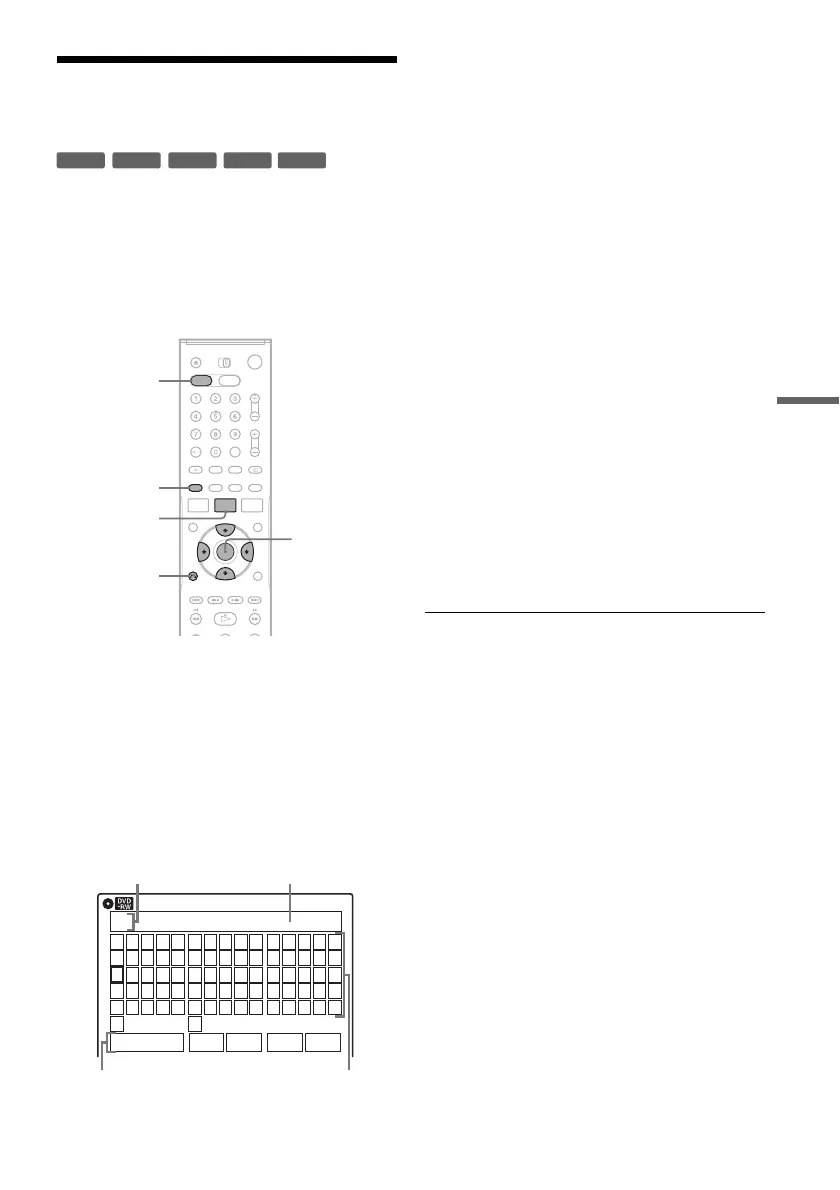
1 Press DVD to operate the DVD recorder.
2 Press TITLE LIST.
When editing a DVD-RW (VR mode), press
ORIGINAL/PLAYLIST to switch to the
“Title List (Original),” if necessary.
3 Select a title, and press ENTER.
The sub-menu appears.
4 Select “Title Name,” and press ENTER.
The “Title Name” display appears.
5 Select the character you want to enter
using M/m/</, and press ENTER.
The selected character appears in the input
row.
You can only enter characters and symbols
that are displayed.
• To change the cursor position, select the
input row using M, and press </,.
• To erase a character, select either of the
following setting buttons and press ENTER.
“Backspace”: Erases the character to the left
of the cursor.
“Delete”: Erases the character at the cursor
position.
“Clear”: Erases all the characters in the input
row.
• To insert a space, move the cursor to the
desired position, select “Space,” and press
ENTER.
• To insert a character, move the cursor to the
desired position, select the character and
press ENTER.
6 Repeat step 5 to enter the remaining
characters.
To return to the Title List without renaming
the title, press O RETURN.
7 Select “Finish,” and press ENTER.
z Hint
You can also rename a disc (page 69). Follow steps 5 to
7 above when the “Disc Name” display appears.
+
R
-
RWVR
-
RW
Video
+
RW
-
R
M/m/</,,
ENTER
O RETURN
TITLE LIST
DVD
ORIGINAL/
PLAYLIST
Title Name
K
_
A B C D E
F G H I J
K L M N O
P Q R S T
U V W X Y
Z
a b c d e
f g h i j
k l m n o
p q r s t
u v w x y
z
1 2 3 4 5
6 7 8 9 0
- _ + = .
~
!
@ # $
%
^
& ( )
Backspace Space Delete Clear Finish
10:10
Input rowCursor
Setting buttons Character palette



 To Next Page