72
Playback Options
*1
Can be pressed up to four times to forward about
two minutes.
*2
For 10 seconds in SP or LP mode/for 15 seconds in
EP mode.
To resume normal playback, press H.
Notes
• The sound is muted during playback at various speeds.
• The picture may show noise during high-speed reverse
play.
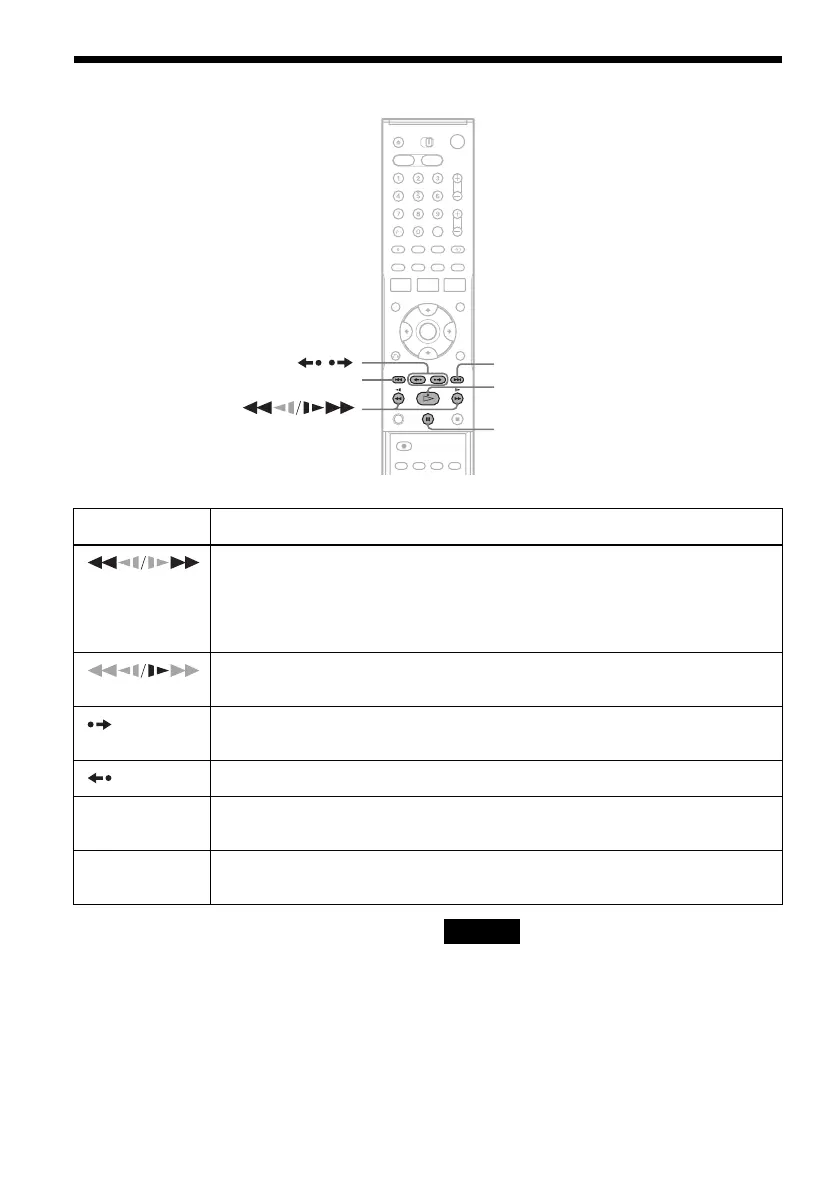
Button Operation
(fast reverse/fast
forward)
• Fast reverses or fast forwards when pressed during stop mode.
When you hold down during fast reverse or fast forward, you can view the picture.
• Plays at high speed when briefly pressed during playback.
When you hold down the button during playback, the high-speed play continues until
you release the button.
(slow)
Plays in slow motion when pressed in pause mode.
(advance) • Advances one frame for each press in pause mode.
• Fast forwards the current scene for 30 seconds when pressed during playback.
*1
(replay) Replays the previous scene when pressed during playback.
*2
./>
(previous/next)
Press during playback. Playback speed changes with each press:
–×7 y –×5 y –×3 y STILL y SLOW y PLAY y ×2 y ×3 y ×5 y ×7
X (pause) Pauses playback.
If you pause playback for more than five minutes, playback starts automatically.
X
>
/
.
H



 To Next Page