64
Creating a Playlist
Playlist titles allow you to edit without changing
the original recordings (see “Edit options for
DVD-RWs (VR mode)” on page 58). You can
create a Playlist title by combining up to 99
sections (scenes) from original titles.
Note
If you erase an original title used in a Playlist, that Playlist
is also erased.
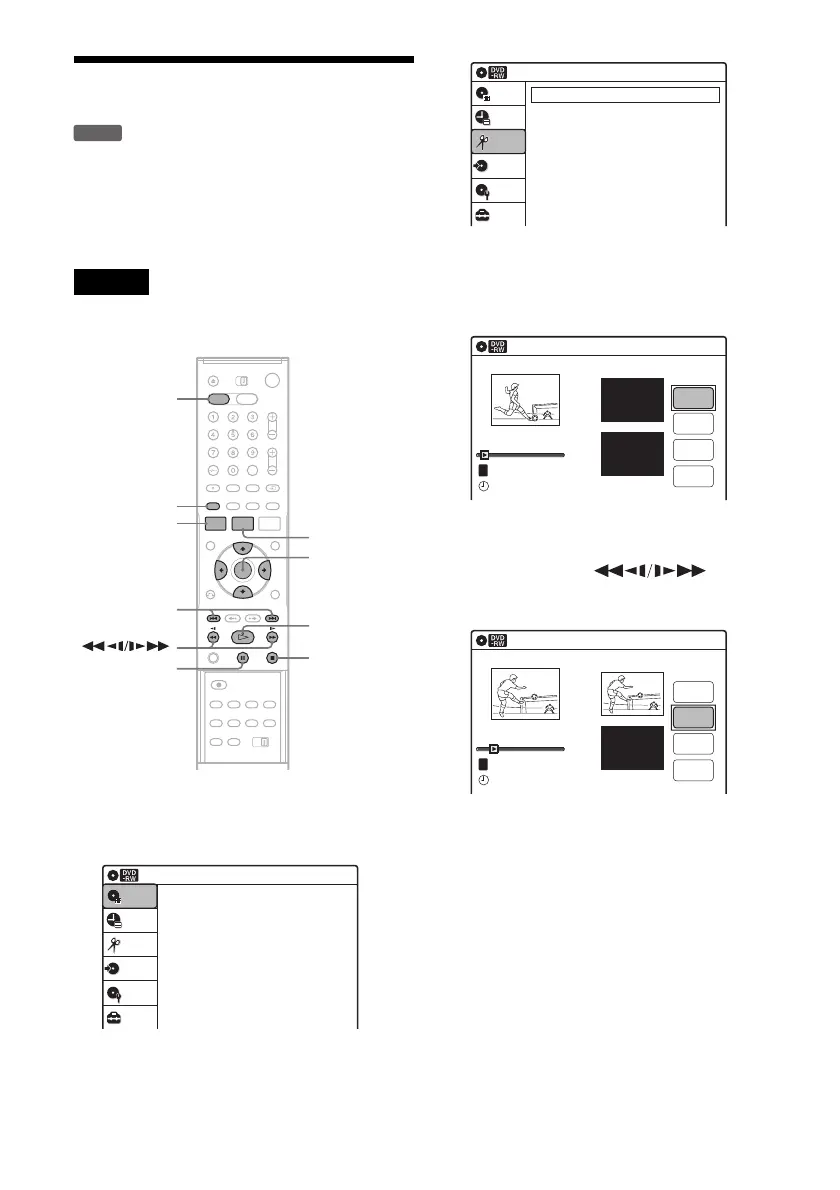
1 Press DVD to operate the DVD recorder.
2 Press SYSTEM MENU while the recorder is
in stop mode.
3 Select “Edit,” and press ENTER.
4 Select “Create Playlist,” and press ENTER.
The display for creating a Playlist appears.
“Start” is selected.
5 Press ENTER at the start point.
You can use H, , ./
>, x, and X to find the point.
“End” is selected.
6 Press ENTER at the end point.
“Make” is selected.
To reset the start or end point, select “Start” or
“End” and repeat step 5 or 6.
7 Press ENTER.
The selected section is captured as a scene. To
continue, repeat from step 5.
8 When you finish capturing scenes, select
“Finish” and press ENTER.
-
RWVR
M/m/</,,
ENTER
SYSTEM
MENU
H
TITLE LIST
x
X
DVD
ORIGINAL/
PLAYLIST
./>
Press ENTER :
Title Menu for DVD Title List.
Title List (Original)
Setup
Disc Setting
Edit
Title List
Timer
Dubbing
10:10
Create Playlist
Edit Playlist
Edit
Setup
Disc Setting
Edit
Title List
Timer
Dubbing
10:10
Create Playlist
Scene No.01
End 00:00:00
Start 00:00:00
T
Start
End
Make
Finish
00:00:07
Playlist No. 1
10:10
--.---.---- --:--
Scene No.01
T
Finish
00:00:10
Create Playlist
Playlist No. 1
End 00:00:00
Start 00:00:10
Start
End
Make
10:10
--.---.---- --:--



 To Next Page