85
VCR Recording
• You cannot change the timer settings for a recording
currently underway.
• The Timer List displays both the DVD recorder and
VCR timer settings.
Recording From Connected
Equipment Without a Timer
You can record from a connected VCR or similar
device. For connection details, see “Connecting
Another VCR or Similar Device” on page 26.
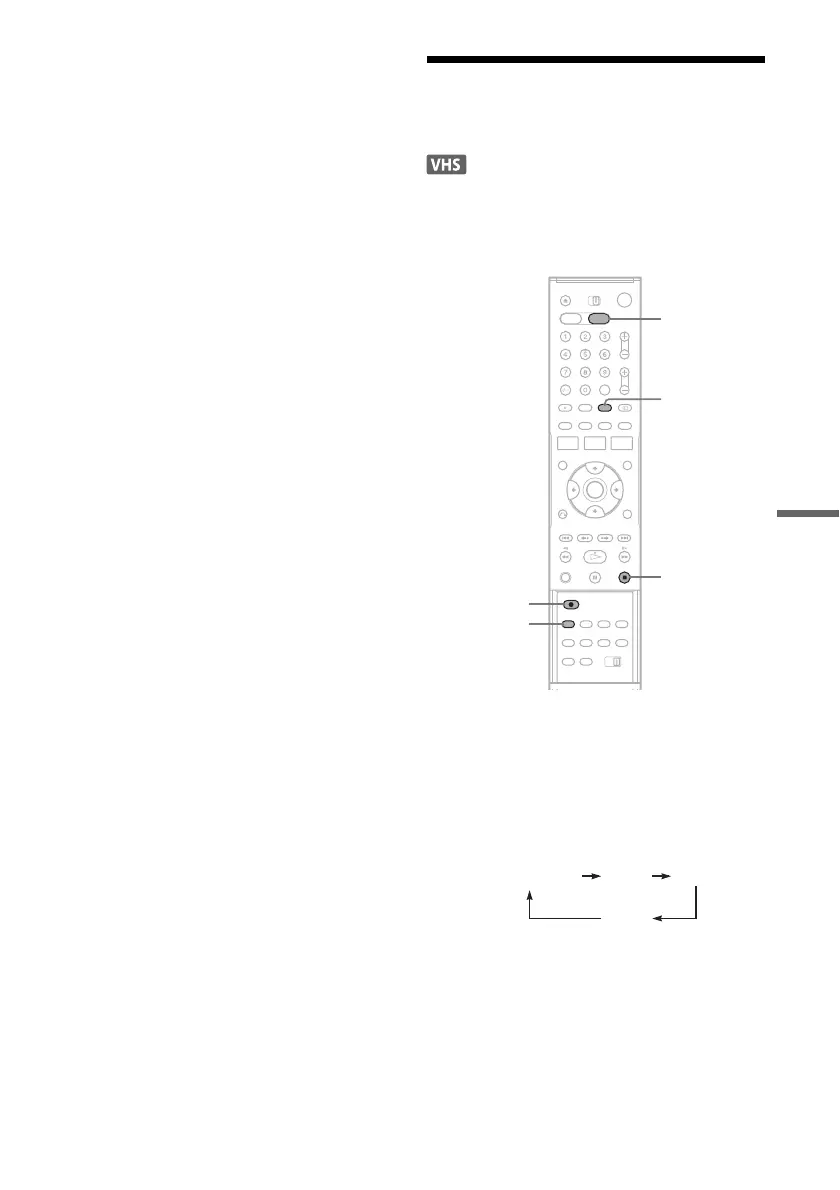
1 Press VIDEO to operate the VCR.
2 Insert a tape with its safety tab in place.
3 Press INPUT SELECT repeatedly to select
an input source according to the
connection you made.
The front panel display changes as follows:
4 Press REC MODE repeatedly to select the
recording mode, “SP” or “LP.”
5 Insert the source tape into the connected
equipment and set to playback pause.
INPUT
SELECT
VIDEO
z REC
x
REC MODE
LINE2LINE1
LINE3
Programme
position
,continued



 To Next Page