Wireless Connectivity
18
Table of Contents
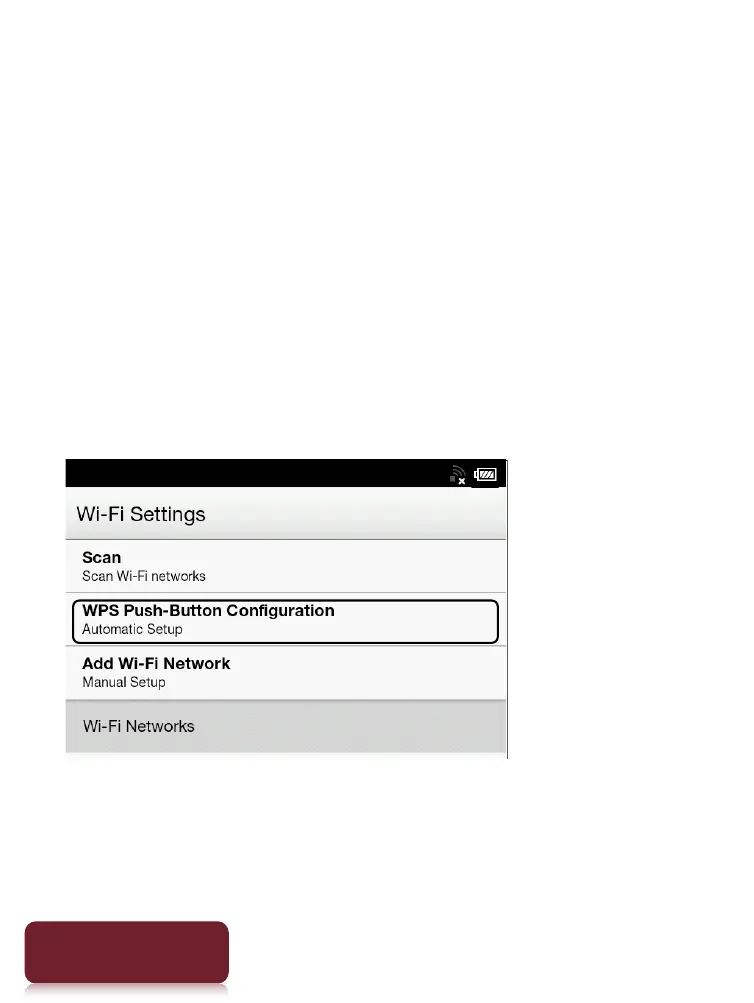
Case A: A WPS-compatible Wi-Fi router with WPS
button
The Reader is compatible with WPS (Wi-Fi Protected
Setup), which lets you easily make a Wi-Fi connection
using the “WPS” or “Connect” button on your WPS-
compatible Wi-Fi router. Make sure to turn on [Wi-Fi]
and tap [Wi-Fi Settings] on the [Wireless Network
Settings] screen. Alternatively, you can turn on [Wi-Fi]
by tapping the status bar and tapping [Wi-Fi Settings].
1 Tap [WPS Push-Button Configuration]
[Start].
2 On your Wi-Fi router, press the “WPS” or
“Connect” button within 2 minutes.*
The Reader automatically attempts to establish a













 To Next Page