[Home] Screen
59
Table of Contents
Icon Indication
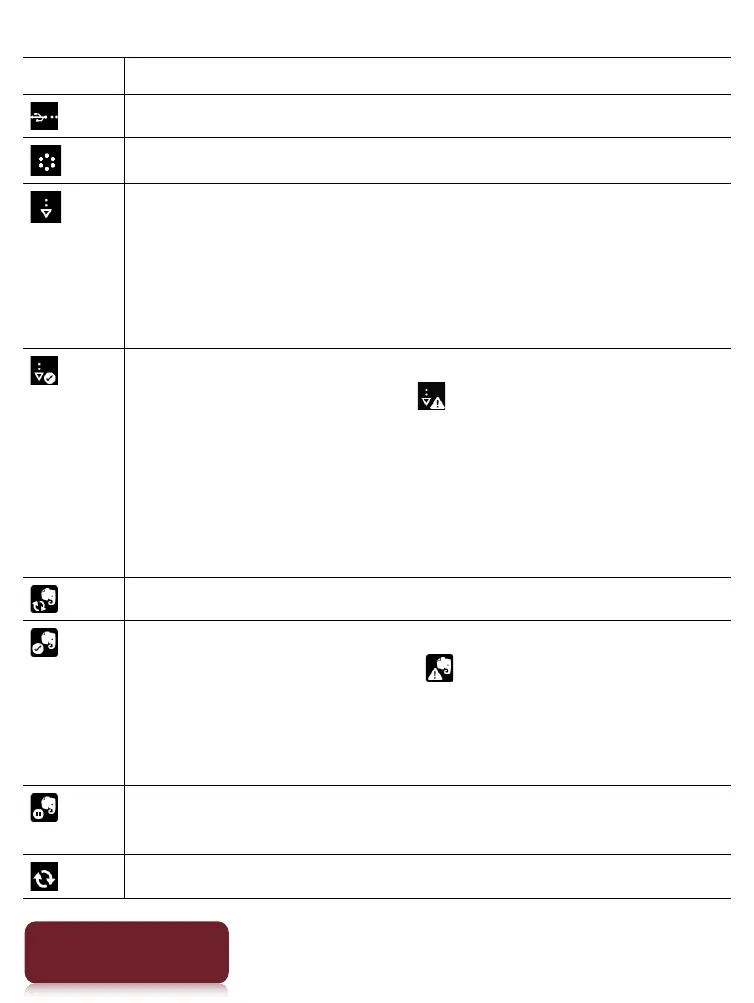
Connected via the USB cable.
Connecting to a network.
A download is in progress. When multiple
downloads are in progress, the number of
downloads is displayed next to this icon.
This icon is also shown when downloading the
firmware update.
A download has completed.
If downloading fails, the (Fail) icon is displayed.
The icon disappears when you open the
notification window and tap [Clear], or when you
tap the downloaded items in the [Notification] list.
This icon is also shown when firmware download
is complete.
Evernote synchronizing in progress.
Evernote synchronizing completed.
If synchronizing fails, the (Fail) icon will be
displayed. The icon disappears when you open the
notification window and tap [Clear], or when you
tap a synchronized item in the [Notification] list.
The icon appears when Evernote synchronizing
stops.
Updating database.













 To Next Page