Connections and Operations
Connections
GB
12
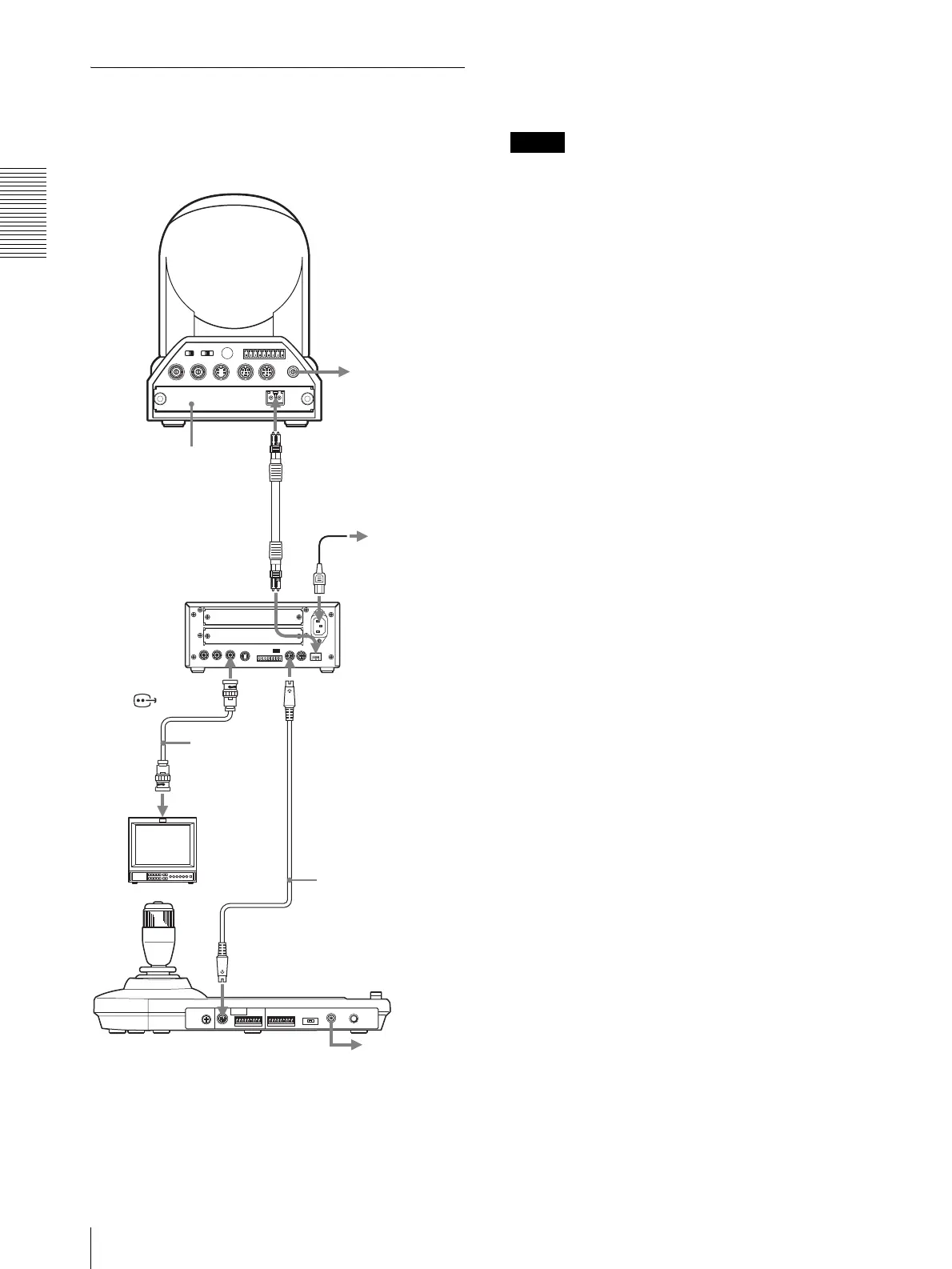
Connecting the BRU-300/300P
Optical Multiplex Unit
You can control the camera using this unit via the BRU-
300/300P Optical Multiplex Unit (not supplied).
For the BRC-H700 or BRC-Z700 camera, you can use
the BRU-H700 Optical Multiplex Unit to control the
camera with this unit. For details of the connection,
refer to the Operating Instructions supplied with the
BRC-H700 or BRC-Z700.
Notes
When using the VISCA RS-232C connectors or VISCA
RS-422 connectors, check the VISCA FUNCTION
switch on the rear of the Optical Multiplex Unit and the
DIP switch on the bottom of this unit (page 8) are set to
RS-232C or RS-422 correctly.
EXT SYNC IN
IR SELECT
75
1 2 3
OFF ON
IN VISCA RS-232C OUT
!
VISCA RS-422
1 2 3 4 5 6 7 8 9
DC IN
12V
R
VIDEO S VIDEO
to AC outlet
AC power cord
(supplied with the
BRU-300/300P)
CCFC-M100 Optical
Fiber Cable
VISCA RS-232C IN
to AC outlet
BRU-300/300P
Optical Multiplex
Unit
T VIDEO
(or S VIDEO)
75-ohm coaxial
cable (or S-
video cable)
Video monitor, etc.
RS-232C cable
(supplied)*
(SONY: 1-590-879-3X)
VISCA RS-232C
to AC outlet
* The VISCA RS-422 connection is also available if you use the
VISCA RS-422 connectors.
CAMERA
Camera BRC-300/300P
BRBK-303 Optical
Multiplex Card






 To Next Page