63
Default values
The state of each control block on the control
panel is given below.
• The ACTIVE button is on (button is lit) on the
co
lor adjustment block, lens control block, and
preset memory control block.
• The DIRECT RECALL button is on (button is lit)
on
the preset memory control block.
• The CAMERA 1 button is on (button is lit yellow)
on the
camera selection block. “1” (group
number 1) is displayed in the group number
display.
• The RM MENU button is on (button is lit) in the
m
enu control block, and the top menu is
displayed on the LCD panel.
All camera information in the
camera table is
cleared, and the settings for camera information
items are undefined.
The settings of all setup items in the RM menu
a
re returned to their default values, shown in the
following table.
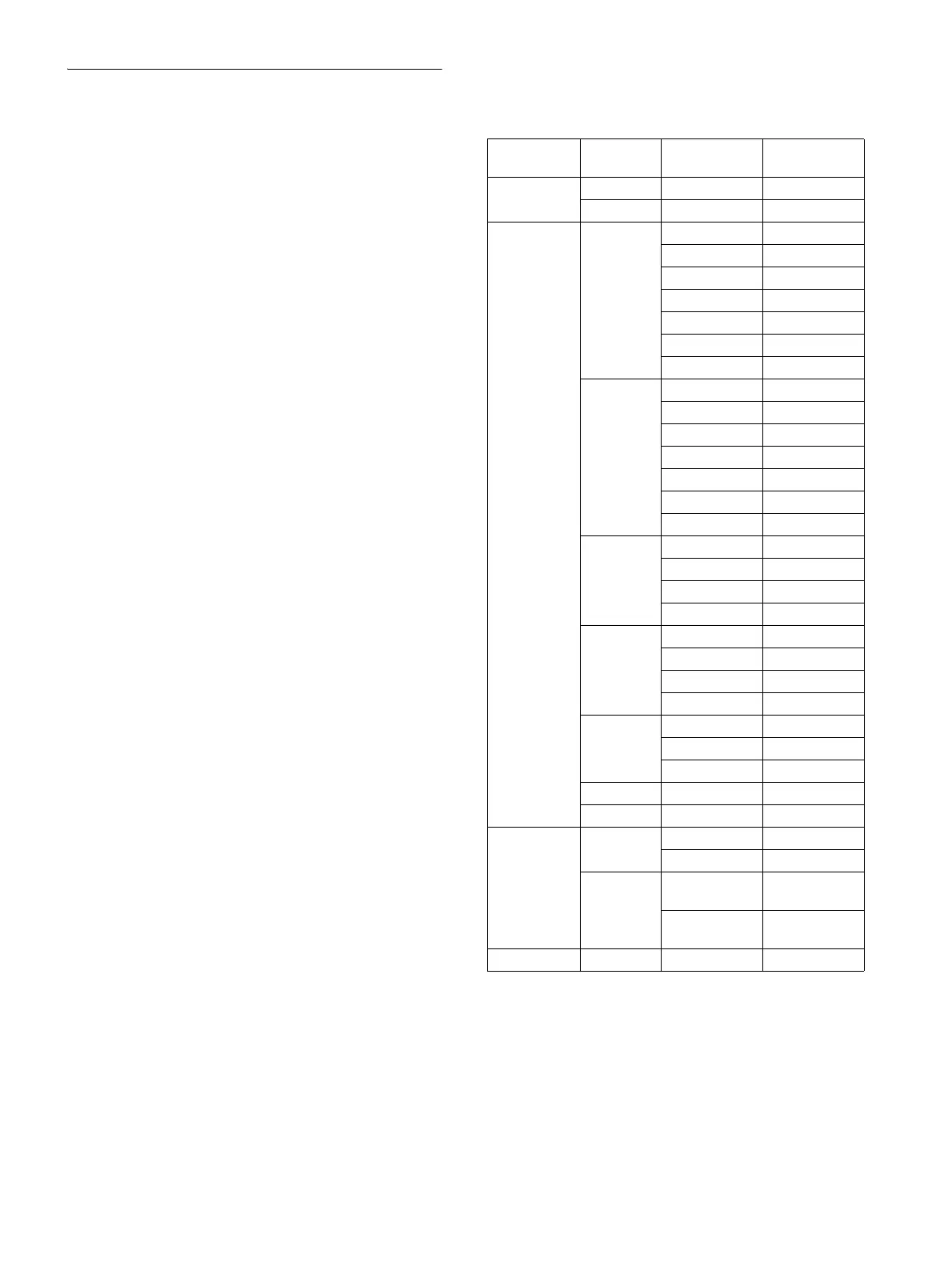
*1 ILME-FR7 only. When MEM.A is selected on the
camera, the WHITE knob adjusts the color
temperature and tint, respectively.
*2 Default value of 50 for models sold in China.
Menu item Sub menu
item
Setup item Default value
OPERATION WHITE WB MODE MEM.A T/T
*1
OTHER PRST SPEED 24
CONFIG RM SETUP AE CONFIG MANUAL
AE CONFIG2 ALL
CAM POWER EACH
ZOOM LEVER
CAMERA FREQ 59.94
*2
LCD BRIGHT 5
LAMP DIMMER 5
SW ASSIGN ASSIGN1 BACKLIGHT
ASSIGN2 FLICKER
ASSIGN3 STATUS
ASSIGN4 DETAIL
ASSIGN5 KNEE
ASSIGN6 AE LEVEL
IRIS KNOB IRIS
DIRECTION JOYSTICK PAN STANDARD
JOYSTICK TILT STANDARD
ZOOM LEVER STANDARD
FOCUS DIAL STANDARD
GPI I/O SETTING INPUT
TALLY MODE NORMAL
COMMAND SEL STANDARD
CAMERA LINK ON
LAN IP 192.168.0.10
SM 255.255.255.0
GW 0.0.0.0
SERIAL BAUD RATE 9600
CONTROL I/F LAN
AUTO IP SETUP SETUP IP [FROM] IP 192.168.0.1
[TO] IP 192.168.0.254
ASSIGN CAM [FROM] GROUP
NUM
01
[FROM] CAMERA
NUM
01
MAINTENANCE JOYSTICK SENSITIVITY 5












 To Next Page