8
GB
Tip
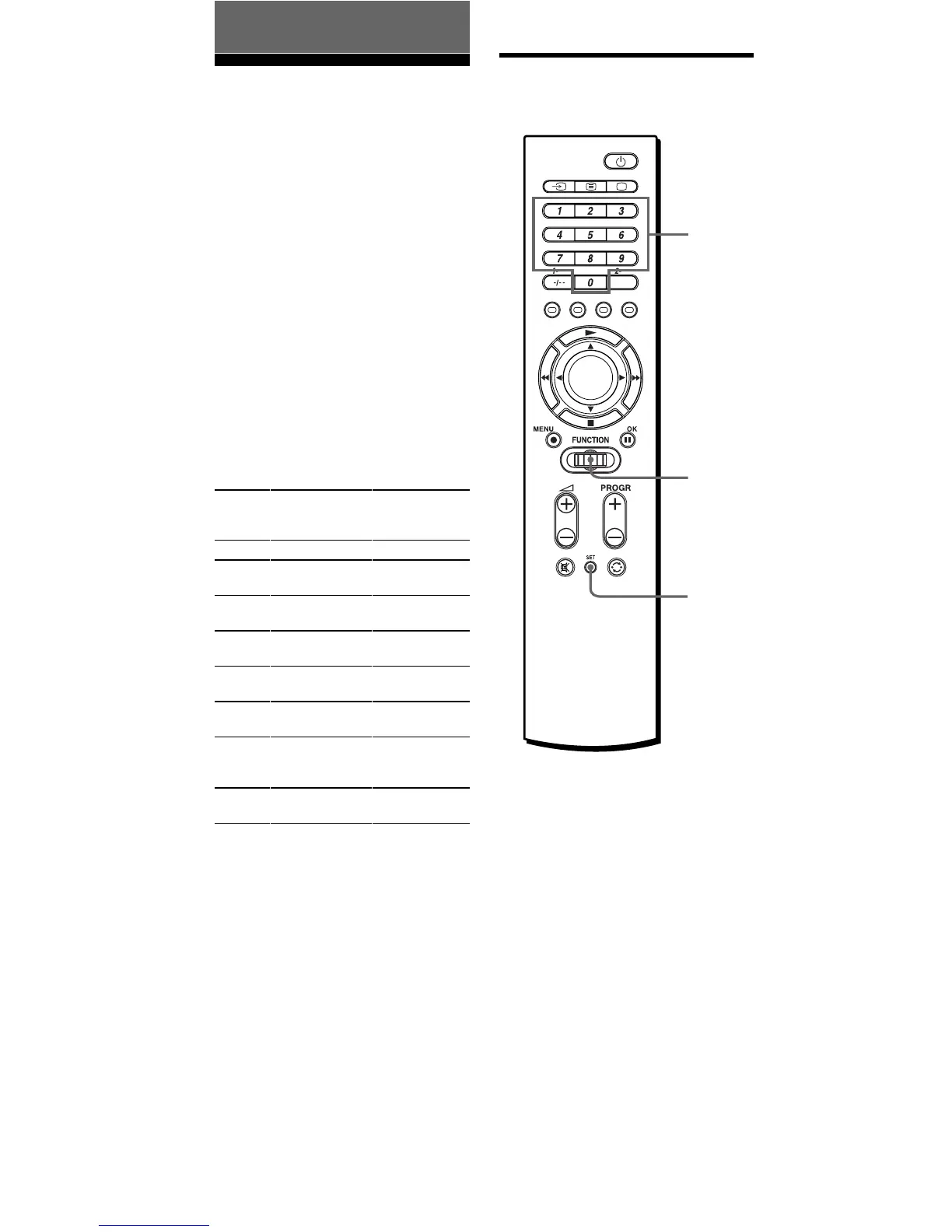
You can also press b/B instead of
turning the Jog dial to the left/right.
You can also press OK instead of
pressing the Jog dial.
Basic Operations
Setting the
Component Codes
The Commander is preset at the
factory to operate Sony brand AV
components (see the table below).
You can use the Commander with
other preset AV components also.
If you are using the Commander
with a factory-set Sony
component, skip the following
procedures.
To use with other AV components,
you need to follow the procedures
to set the correct codes for each
component.
You can set 8 different
components to 8 Setting position
numbers (S-1 to S-8).
* Analog audio compact cassette deck
Note
See “Table of Preset Functions” (page
38) for the functions of buttons as for
each component.
Setting by entering the
code number
Setting
position
number
S-1
S-2
S-3
S-4
S-5
S-6
S-7
S-8
Factory setting
Sony TV
Sony SAT
Sony VHS
VCR
Sony DVD
player
Sony CD
player
Sony MD deck
Sony cassette
deck
Sony amplifier
Display
TV
SAT
(Satellite tuner)
VCR
(Video player)
DVD
CD
MD
TAPE
(Cassette
deck*)
AMP
(Amplifier)
7
2
Jog
dial



 To Next Page