24
GB
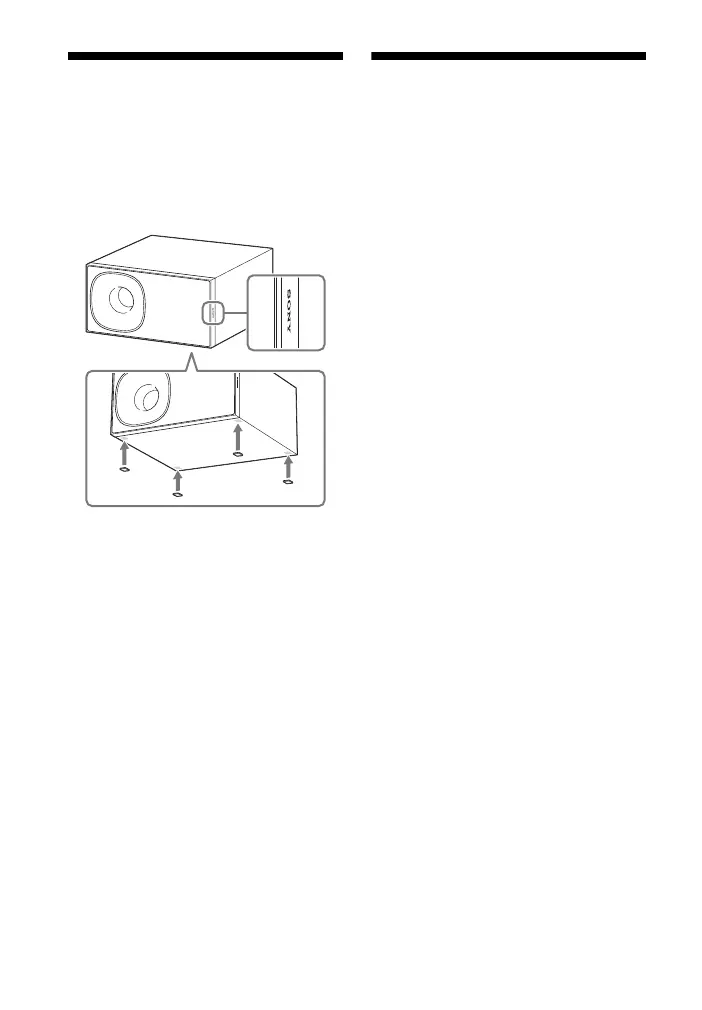
Installing the subwoofer
horizontally (HT-CT380
only)
Place the subwoofer on the right side
with the “SONY” logo facing front.
Linking the system (Link
to the subwoofer)
Set up the wireless subwoofer
connection again.
1 Press MENU.
2 Select [WS] with (select), then
press ENTER.
3 Select [LINK] with (select), then
press ENTER.
4 When [START] appears on the
display, press ENTER.
[SEARCH] appears, and the Bar
Speaker searches for a device that
can be used with Link. Proceed to
the next step within 1 minute.
To quit the Link function while
searching for a device, press BACK.
5 Press LINK on the subwoofer.
The on/standby indicator on the
subwoofer lights up in green. [OK]
appears on the display of the Bar
Speaker.
If [FAILED] appears, check to ensure
the subwoofer is turned on and
perform the process again from
step 1.
6 Press MENU.
The menu turns off.
Attach the supplied speaker pads.



 To Next Page