22
GB
Listening to a TV and
Other Devices
You can select the connected device
and play the sound of that device.
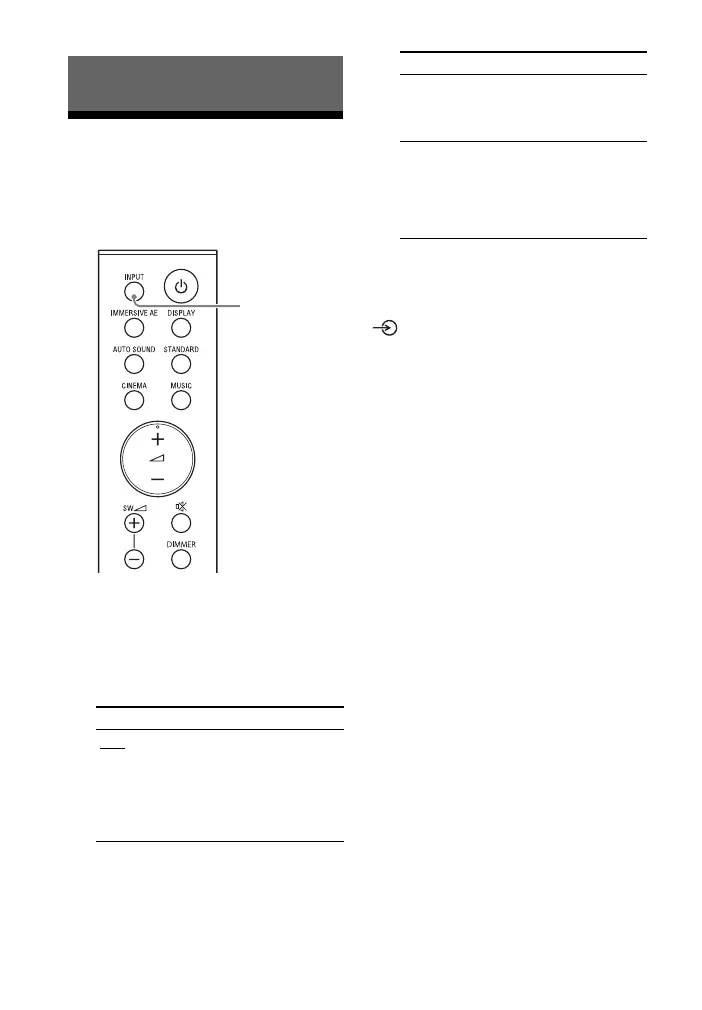
1 Press INPUT to select the input
you want to play.
Each time you press INPUT, the
selected input appears in the front
panel display cyclically as follows.
[TV] [HDMI] [BT]
2 Adjust the volume (page 23).
Tip
You can also select the input by pressing
on the bar speaker.
Listening to Music/Sound
Front panel display
[TV]
Selects the sound of the TV that is
connected to the TV IN (OPT) or HDMI
OUT (TV eARC/ARC) jack on the system.
You can set the playback input jack with
[HDMI] - [TV AUDIO] in the setup menu
(page 36).
[HDMI]
Selects the sound of the device that is
connected to the HDMI IN jack on the
system.
[BT]
Selects the sound of the device that is
connected to the system with the
BLUETOOTH function. For details, see
“Listening to Music/Sound with the
BLUETOOTH® Function” (page 24).
Front panel display


 To Next Page