5
US
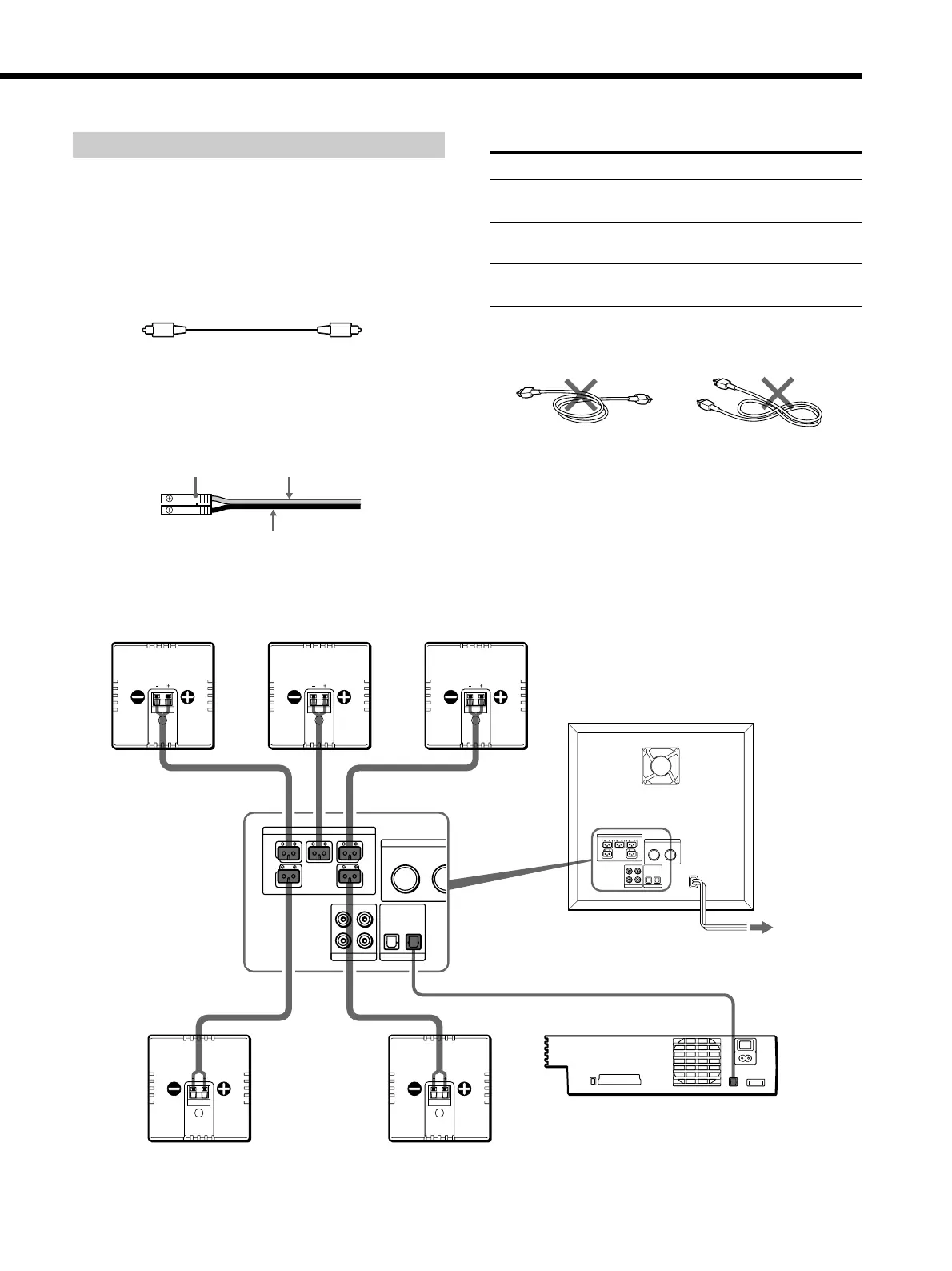
Connecting the “PlayStation 2”
Connect the “PlayStation 2” and the supplied satellite
speakers to the subwoofer.
Supplied connecting cords
• Optical digital cord (1)
Use this cord to connect the “PlayStation 2” to the
DIGITAL IN OPTICAL (1 or 2) jack of the subwoofer.
• Speaker cords (5)
Use these cords to connect the satellite speakers to the
SPEAKER jacks of the subwoofer by matching the
colors of the terminals and those of the plugs of the
cords.
SPEAKER FRONT L (white) and
R (red) terminals
SPEAKER REAR L (blue) and R
(gray) terminals
SPEAKER CENTER (green)
terminal
Terminals for connecting the speakers
Connect the To the
Front speakers
Rear speakers
Center speaker
Notes
• Do not bundle or knot the optical digital cord.
• Be sure to match the speaker cord to the appropriate terminal
on the components: + to + and – to –. If the cords are reversed,
the sound will be distorted and will lack bass.
ONLY FOR
SS-SPSD5
FRONT R CENTER
SPEAKER
FRONT L
REAR R REAR L
2
OPTICAL
2
MID
LOW HIGH
MIN
LEVEL FREQ
1
1
L
R
BASS CONTRO
AUDIO IN DIGITAL IN
ONLY FOR
SS-SPSD5
FRONT R CENTER
SPEAKER
FRONT L
REAR R REAR L
2
OPTICAL
2
MID
LOW HIGH
MIN MAX
LEVEL FREQUENCY
1
1
L
R
BASS CONTROL
AUDIO IN DIGITAL IN
Front speaker (R)
Center speaker Front speaker (L)
Subwoofer
Rear speaker (R) Rear speaker (L)
to AC outlet
(mains)
”PlayStation 2”
Plug
Gray (+)
Black (–)



 To Next Page