6
US
Connecting to other components
This system can be connected to digital audio/video
components such as a DVD player or CD player, and
analog components such as TV, VCR or PSone*
(PlayStation 1st generation).
* PSone is a product of Sony Computer Entertainment.
Connecting to a digital audio/video component
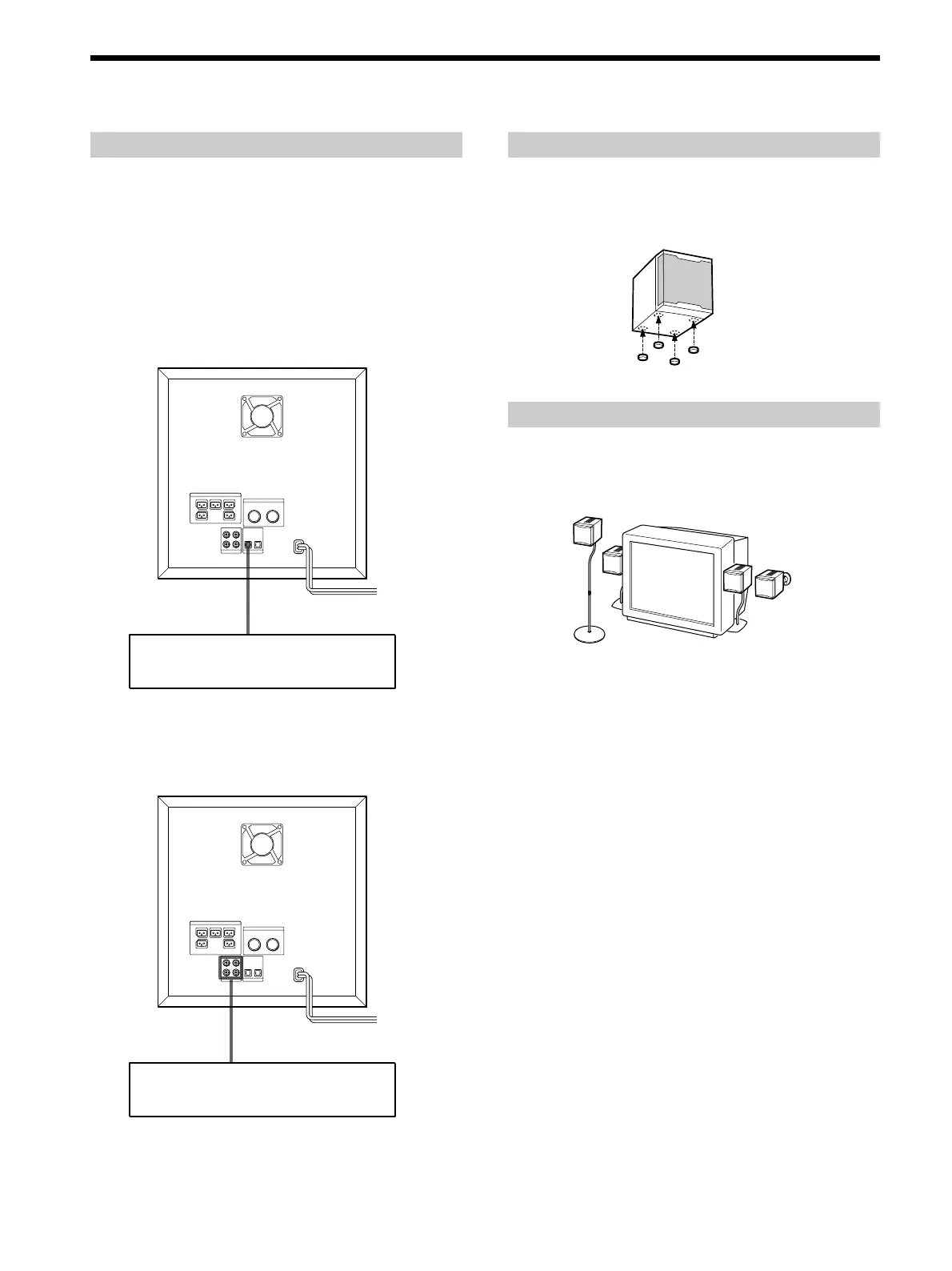
Connect the component to the DIGITAL IN OPTICAL (1
or 2) jack.
Connecting to an analog audio/video component
Connect the component to the AUDIO IN (1 or 2) jack.
WS-FV10A WS-TV10A
WS-WV10A
(for rear speakers)
Hookup
DVD player, CD player, etc.
TV, VCR, PSone, etc.
Steadying the speakers
To prevent speaker vibration or movement while
listening, attach the supplied foot pads to the bottom four
corners of the center speaker, front speakers, and rear
speakers.
Using the optional speaker stands
For greater flexibility in the positioning of the speakers,
use the optional speaker stands WS-FV10A, WS-TV10A,
and WS-WV10A (available only in certain countries).



 To Next Page