6
Getting Started
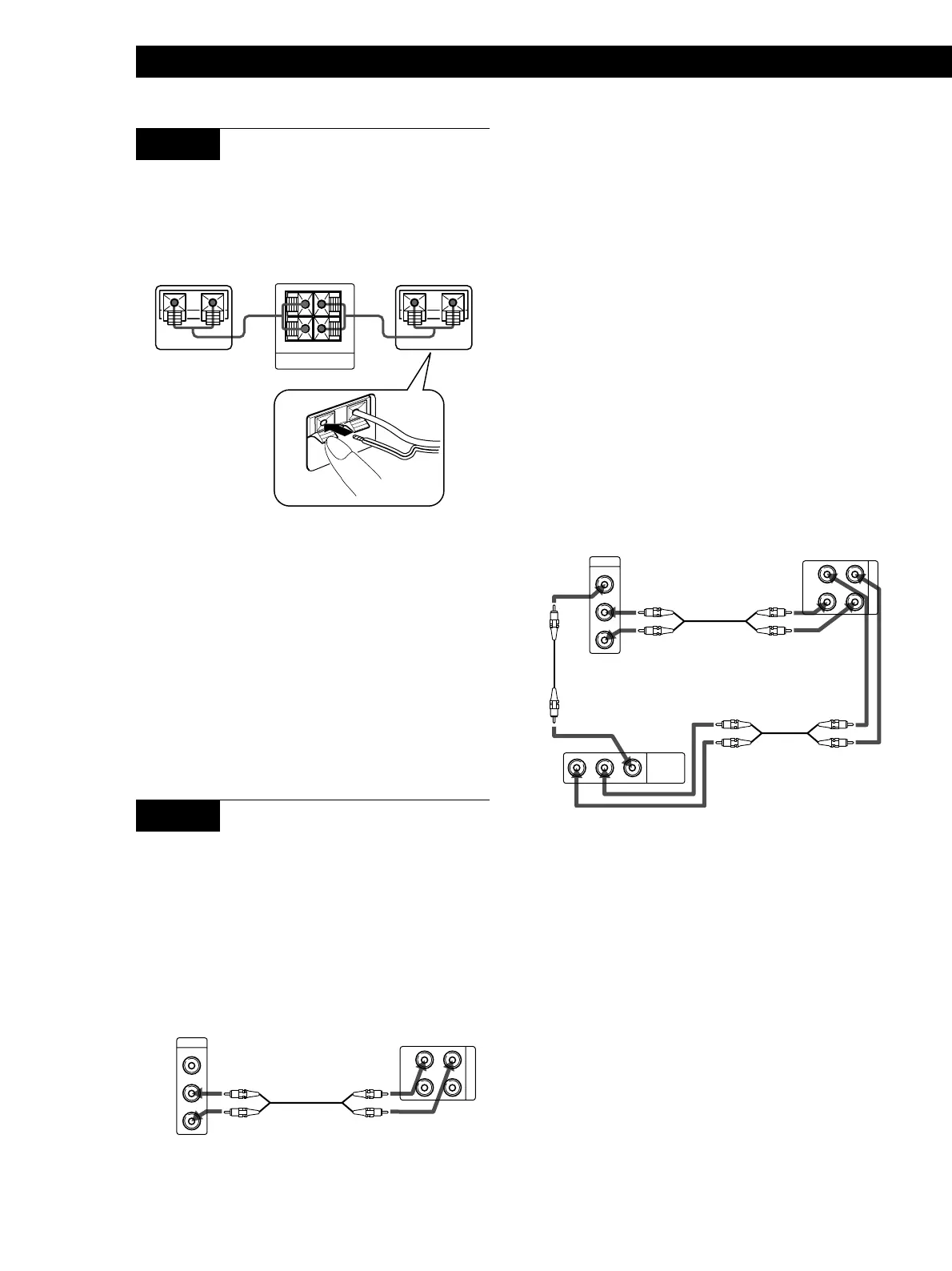
STEP 3 Connecting the rear speakers
Use the supplied speaker cords (10 m) to connect the
left and right rear speakers.
Insert the stripped wires into the speaker
terminals.
+
–
REAR SPEAKER
RL
+
–
+
–
IMPEDANCE 16Ω MIN
Be sure to connect matching speaker terminals (e.g., use
the solid-color wire to connect + to +, and use the
striped wire to connect – to –). If the connections are
reversed (+ to –), the sound will lack bass.
For customers in Canada
Use only the supplied SS-SR171 Rear Speakers for
connection to the REAR SPEAKER terminal.
If you use AUDIO OUT jacks marked VARIABLE
After making the connection as shown above, turn up
the volume on the TV. Use this speaker system‘s
volume control for regular volume adjustment.
Turning down the volume on the TV reduces the
AUDIO OUT signal level and may cause a loss in
sound quality and/or activate the auto-power off
function (see page 9).
For the best possible sound (or if your TV only has a
monaural AUDIO OUT jack, or no AUDIO OUT jacks)
Connect the speaker system directly to your VCR or
cable box.
The following connections suppress noise from the TV
and let you enjoy high-quality sound.
1 Connect your VCR or cable box to the 1 IN jacks on
the front speaker (left).
2 Connect your TV to the 1 OUT jacks on the front
speaker (left).
Ç
ç
ç
R
L
VIDEO
AUDIO
INPUT
IN
OUT
1
OUTPUT
LR VIDEOAUDIO
RL
Note
Do not connect any component other than your TV to the
1 OUT jacks on the front speaker (left).
Front speaker (left)TV
TV
Front speaker (left)
VCR/cable box
right left
STEP 4 Connecting your TV
If the audio and video output terminals on your TV
and VCR are already connected, and your TV has
stereo AUDIO OUT jacks, you can start enjoying
surround sound simply by connecting the speaker
system to your TV as shown below.
Important
If your TV has an on/off switch for its internal speaker, set
this to off, and enjoy the sound from this speaker system. If
not, set the volume on your TV to minimum.
ç
R
L
VIDEO
AUDIO
OUTPUT
IN
OUT
1
RL


 To Next Page