5
Speaker System Hookups
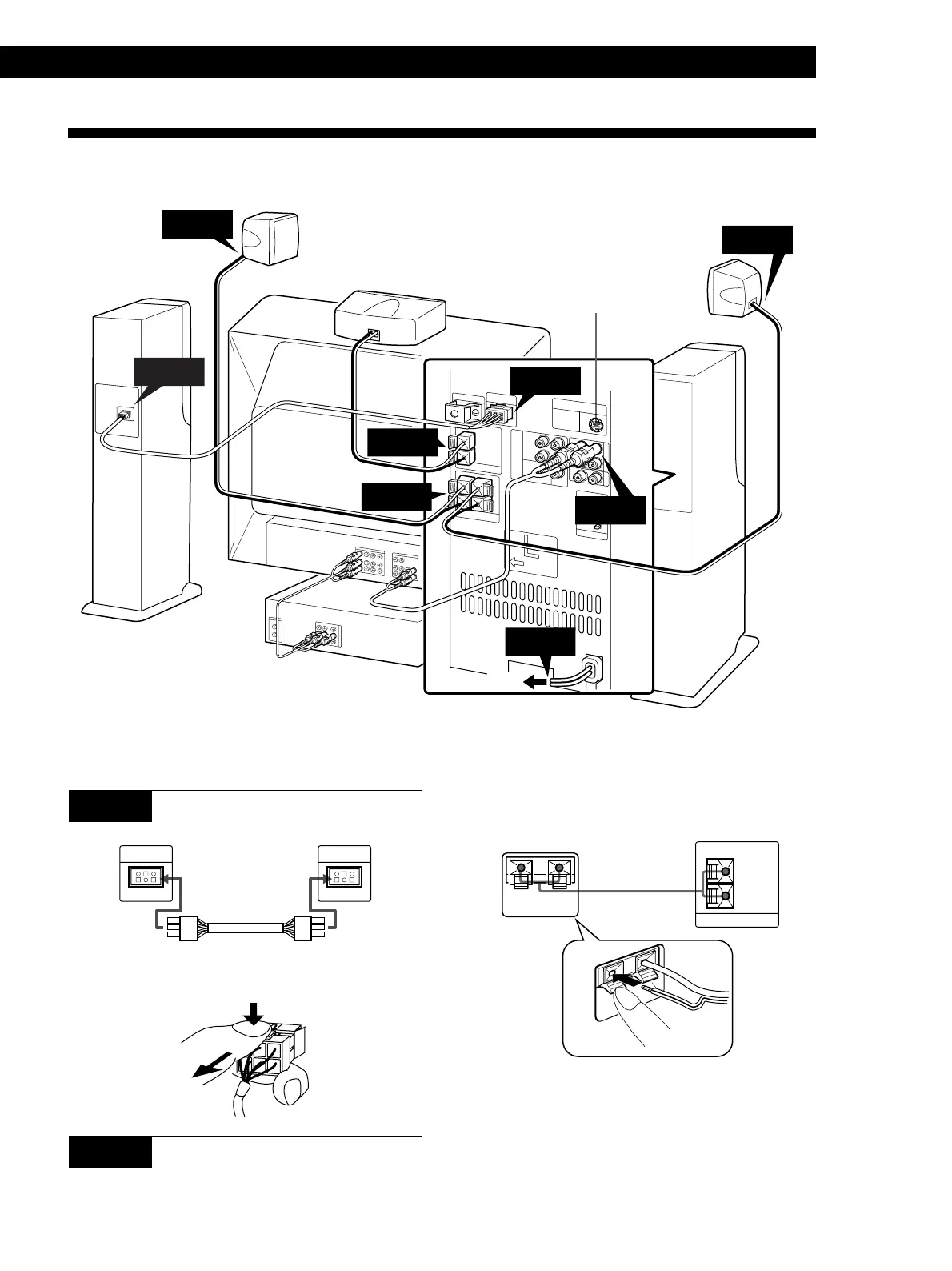
This section describes how to connect the speaker system to your TV and VCR.
Getting Started
Insert the stripped wires into the speaker
terminals.
+
–
Ç
EXTERNAL CENTER SPEAKER
+
–
IMPEDANCE
USE 8–16Ω
Be sure to connect matching speaker terminals (e.g., use
the solid-color wire to connect + to +, and use the
striped wire to connect – to –). If the connections are
reversed (+ to –), the sound will lack bass.
(Continued)
STEP 1 Connecting the front speakers
R-ch SPEAKER
OUTPUT
ONLY FOR
SAVA-29
R-ch SPEAKER
INPUT
ONLY FOR
SAVA-29
Ç
To disconnect the cord, pull the connector out while
pressing the release tab. Never pull the cord itself.
STEP 2 Connecting the external center
speaker
Use the supplied speaker cord (2.5 m) to connect the
external center speaker.
External center speaker Front speaker (left)
Rear speaker
Front speaker
(right)
TV
VCR
STEP 1
STEP 3
STEP 2
STEP 3
Rear speaker
Front speaker
(left)
Transmitter for Wireless
Rear Speaker* (option)
To wall outlet
STEP 4
STEP 5
STEP 1
STEP 3
External center speaker
The arrow ç indicates signal flow.
* If you use an SA-IF70 Wireless Speaker System
(optional) for the rear speakers, connect the transmitter
supplied with the SA-IF70 system to this connector. For
details, refer to the Operating Instructions provided
with the SA-IF70 system.
Front speaker (right) Front speaker (left)


 To Next Page