8
Getting Started
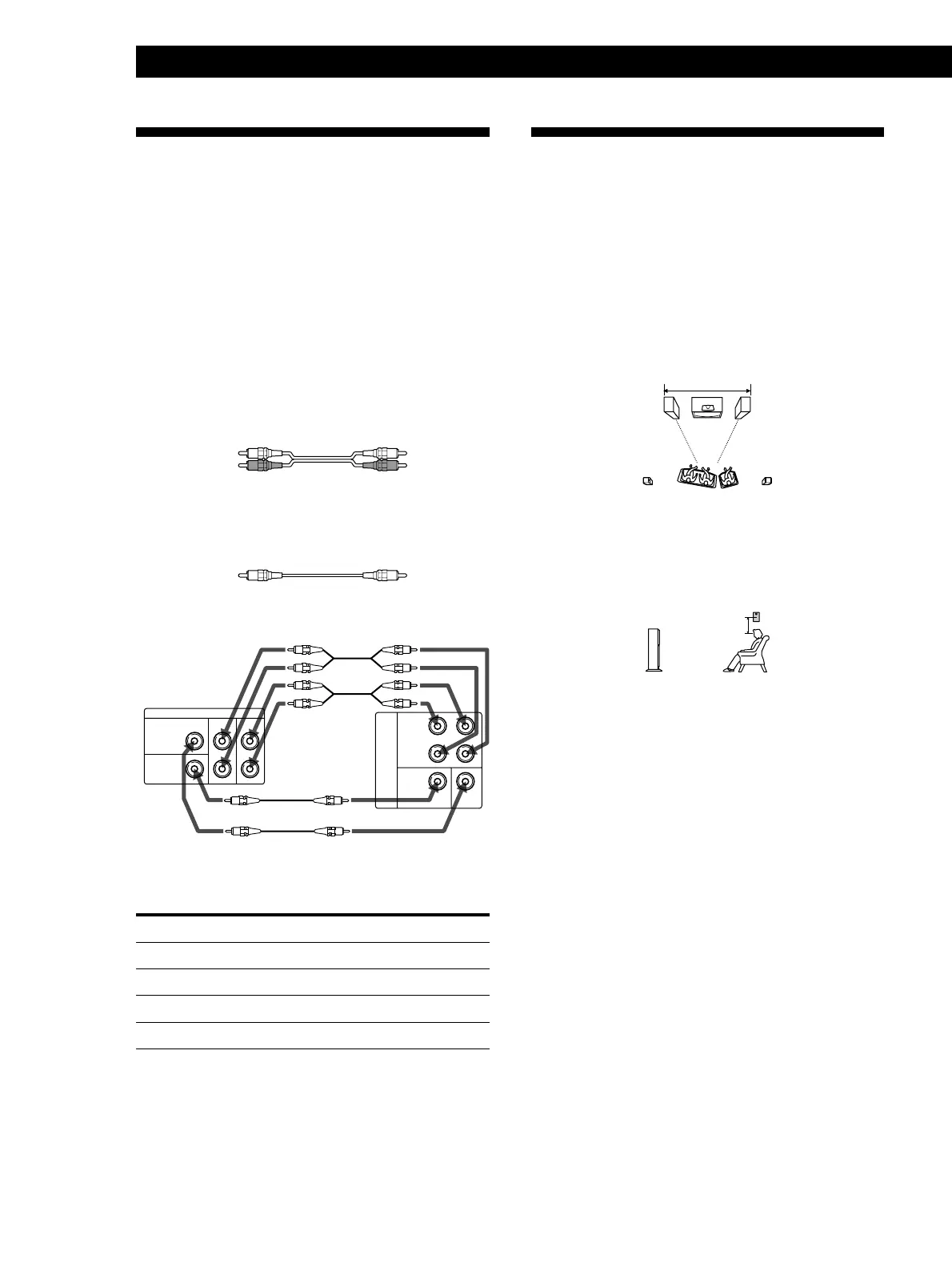
Choosing the Best Location
Front speakers
To obtain high sound quality and a proper sound
image from the front speakers, place the speaker with
the built–in operation panel to the left of your TV and
the other to the right of your TV.
For the best sound image, place the left and right
speakers within 2.5 m (8 ft) of each other and
equidistant from the TV.
Rear speakers
Place the rear speakers so that they face directly across
from each other about 60 to 90 cm (2 to 3 ft) above the
listener’s ear.
Caution
Before disconnecting the AC power cord of the front speaker
(left), turn off the system.
2.5 m (8 ft) max
60 - 90 cm
(2 - 3 ft)
5.1-channel Input Hookups
This speaker system is equipped with 5.1-channel
input (5.1 CH IN) jacks. By connecting your DVD
player or other digital video source through a multi-
channel decoder (e.g., Dolby Digital (AC-3) decoder,
DTS decoder) to these jacks, you can enjoy theater-
quality Multi-Channel Surround sound in your own
home. Refer to the instruction manual supplied with
your Dolby Digital (AC-3) decoder etc., for details on
the 5.1-channel input hookups.
Audio cords (not supplied)
Two for the 5.1 CH IN FRONT and REAR jacks
White (L) White (L)
Red (R) Red (R)
Monaural audio cords (not supplied)
Two for the 5.1 CH IN CENTER and WOOFER jacks
Black Black
ç
ç
ç
ç
5.1
CH
IN
FRONT
REAR
WOOFER CENTER
RL
R
L
5.1 CH OUTPUT
FRONTREAR
WOOFER
CENTER
Setting the Dolby Digital (AC-3) decoder
Specify the speaker type in the decoder‘s display as
below:
Specify by selecting
front speaker size LARGE
center speaker size LARGE
rear speaker size SMALL
sub woofer selection YES
To enjoy theater-quality Multi-Channel Surround sound
Press INPUT repeatedly on the operation panel until “5.1
CH IN” appears in the display or press INPUT 5.1 on the
remote.
Note
When 5.1-channel input is selected, the PRO LOGIC,
THEATER, HALL, STADIUM and GAME surround modes
do not function.
DVD player
incorporating
Dolby Digital (AC-3)
decoder or Dolby
Digital (AC-3)
decoder etc.


 To Next Page