Basics
Charging
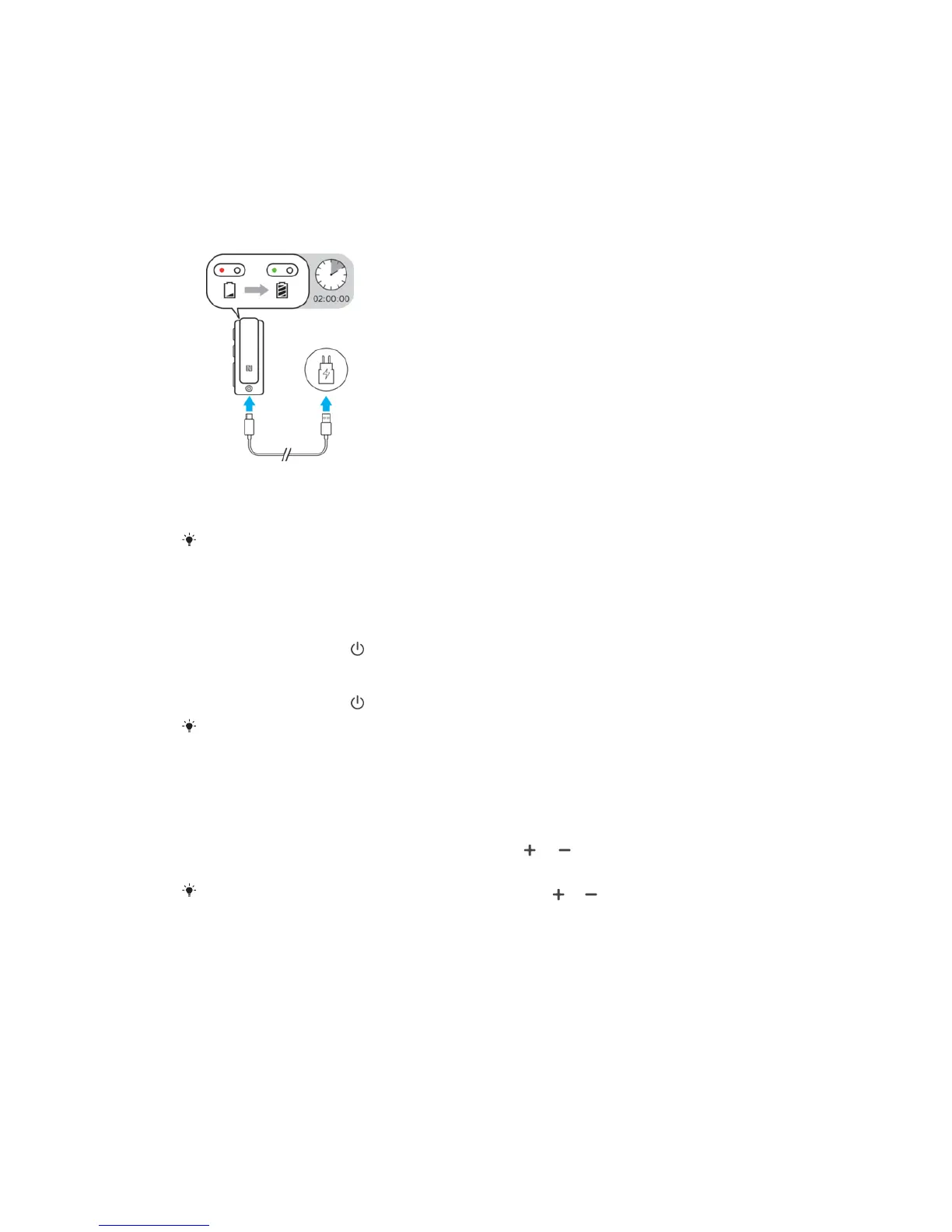
Before using your headset for the first time, it is recommended to charge your
headset for approximately two hours with an ocial Sony charger.
To charge the device
1 Connect one end of the USB cable to the charger or the USB port of a
computer.
2 Connect the other end of the cable to the USB Type-C port of your headset.
For the recommended AC adaptor, see
www.sonymobile.com/products/accessories/
.
Turning on and o
To turn on the device
• Press and hold down until the LED indicator flashes two times in green.
To turn o the device
• Press and hold down until the LED indicator flashes one time in green.
If the device is turned on but left idle, it will turn o automatically unless connected to an
Android or iOS device.
Adjusting the volume
To change the call or music volume
• During a call, or when listening to music, press or to increase or
decrease the volume.
If you are using the headset without headphones, press
or to adjust the volume of
the speaker.
5
This is an internet version of this publication. © Print only for private use.


 To Next Page