12
z
About the Control Panel
The Control Panel can be used to search for a specific scene, to playback
scenes in a different order, to change viewing angle, and so on.
The actual functions available may vary from disc to disc.
For more information on the Control Panel, refer to “Using various
functions with the Control Panel” in the PlayStation®2 console instruction
manual.
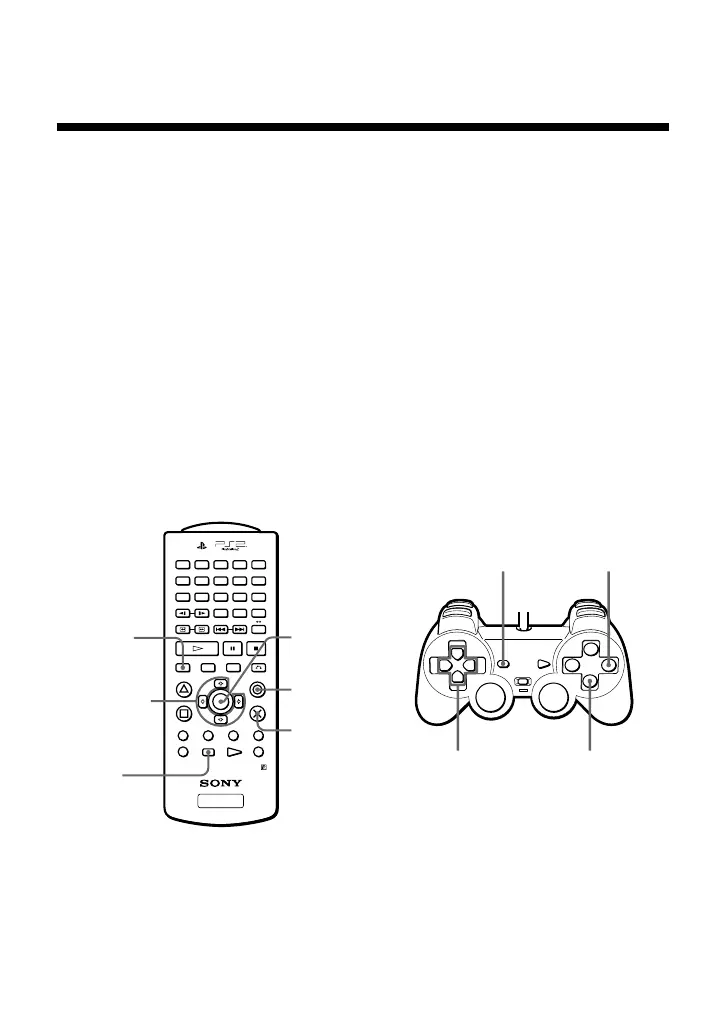
Direct item selection is also available.
A number of items can be directly selected using the buttons of the DVD
Remote Control or Analog Controller (DUALSHOCK®2). In this case, only
the selected items will be displayed. For more details, see “Using the DVD
Remote Control (for PlayStation®2)” on page 16, or “Direct button
operation with the Analog Controller (DUALSHOCK®2)” on page 18.
123
456
78
0
9
R
3
ENTER
DVD/
PLAYSTATION
R
1
L
1
R
2
L
2
L
3
AUDIO
SHUFFLE
ANGLE
PROGRAM
SUBTITLE
REPEAT
CLEAR TIME
SCAN
SLOW
PREV A BNEXT
PLAY STOPPAUSE
TITLE
SELECT START
DVD MENU
RETURNDISPLAY
DUALSHOCK
2
DISPLAY
button
Up, down,
right and left
directional
buttons
SELECT
button
ENTER
button
a button
(cancel)
✕ button
(enter)
Up, down,
right and left
directional
buttons
SELECT
button
a button
(cancel)
✕ button
(enter)
Viewing a DVD video (continued)



 To Next Page