16
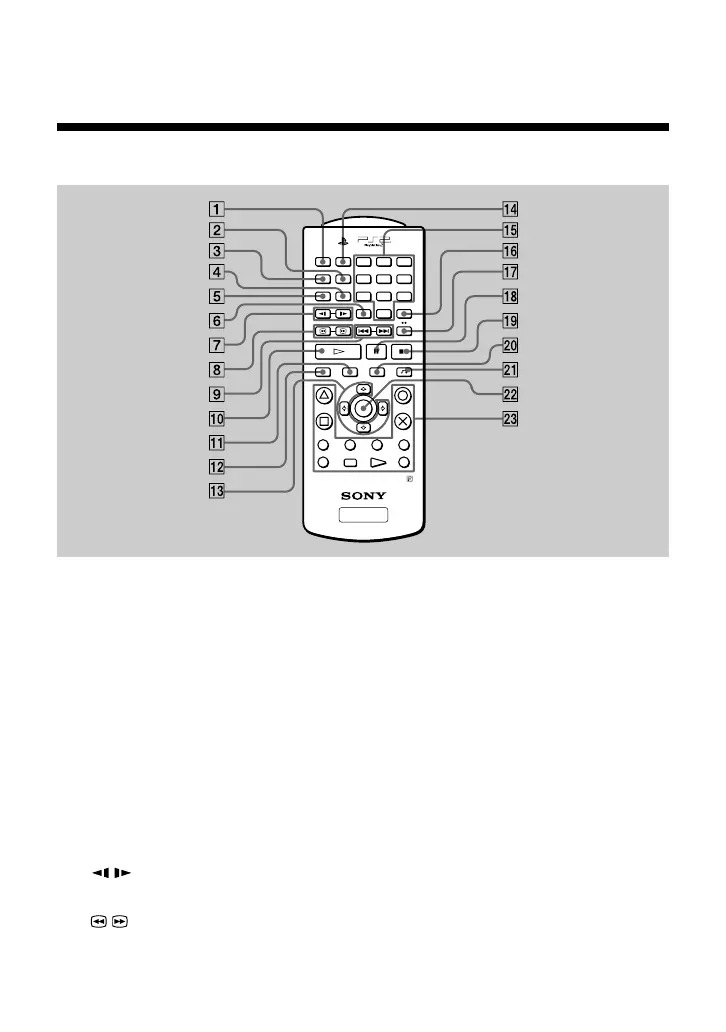
1 AUDIO button
Selects the audio languages available on the DVD.
2 PROGRAM button
Selects “Program Play”.
3 ANGLE button
Selects the viewing angles available on the DVD.
4 REPEAT button
Selects repeated playback.
5 SUBTITLE button
Selects the subtitle languages available on the DVD.
6 CLEAR button
Clears selected numbers or playback modes.
7 / SLOW buttons
Select slow playback of the onscreen image.
8 / SCAN buttons
Allow for search of the DVD while viewing onscreen.
123
456
78
0
9
R
3
ENTER
DVD/
PLAYSTATION
R
1
L
1
R
2
L
2
L
3
AUDIO
SHUFFLE
ANGLE
PROGRAM
SUBTITLE
REPEAT
CLEAR TIME
SCAN
SLOW
PREV A BNEXT
PLAY STOPPAUSE
DISPLAY TITLE
SELECT START
DVD MENU
RETURN
z
Using the DVD Remote Control (for PlayStation
®
2)
Viewing a DVD video (continued)



 To Next Page