30
z
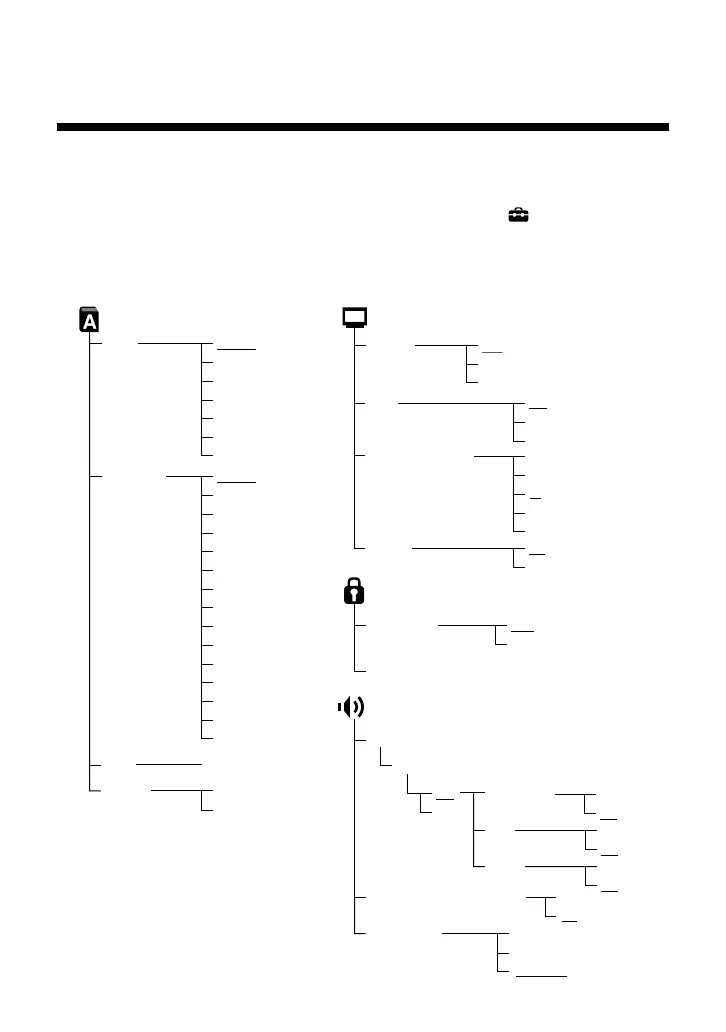
Setup display item list
Using the Setup display, you can change the various settings that are listed
below. You can go to the Setup display by choosing the (Setup) icon.
The default settings for each item are underlined. Refer to “Settings and
adjustments for the DVD Player” in the PlayStation®2 console instruction
manual for details.
On
Off
Screen Setup
DNR
Off
DNR1
DNR2
4:3 Letter Box
4:3 PAN SCAN
16:9
+2
+1
–1
–2
0
TV Type
Display
Outline Sharpening
Dolby Digital
Audio Digital Out
DIGITAL OUT (OPTICAL)
DVD Volume
Standard
+1
+2
Audio Track Auto Select Mode
Off
On
On
Off
DTS
Off
On
Audio Setup
Custom Setup
Pause Mode Auto
Frame
Parental Control ,
Off
On
MPEG
Off
On
Language Setup
Audio
(same as DVD Menu)
Subtitles
Audio Follow
(same as DVD Menu)
DVD Menu
Language Options ,
Chinese
Japanese
Italian
German
Spanish
French
Dutch
Danish
Swedish
Finnish
Norwegian
Portuguese
Russian
English
OSD
Italian
German
Spanish
French
Dutch
Portuguese
English
Using the Control Panel (continued)



 To Next Page