8
Startup with the supplied DVD Player disc
To use all DVD Remote Control functions, you may need to install the DVD
Player (for PlayStation
®
2) on a Memory Card (8MB) (for PlayStation
®
2)
(sold separately). For details, refer to the “Notes” section on page 9.
1 Press the MAIN POWER switch on the PlayStation®2 console rear
to turn the console on.
The 1 indicator turns red, and the console is in standby mode.
2 Press the 1/RESET button.
The 1 indicator turns green, and the console startup screen is displayed.
3 Press the A button.
The disc tray opens.
4 Place the disc into the disc tray with the label side facing up.
5 Press the A button.
The disc tray closes. Once the disc has started, the disc startup screen is
displayed.
Note
The DVD Player (for PlayStation®2) is software that allows playback of DVD
videos on the PlayStation
®2 console.
z
Installing the DVD Player on a Memory
Card (8MB) (for PlayStation
®
2)
The DVD Player must be installed on a Memory Card (8MB) (for
PlayStation®2) (sold separately). If you delete the DVD Player, you can
install it from the supplied disc again at any time.
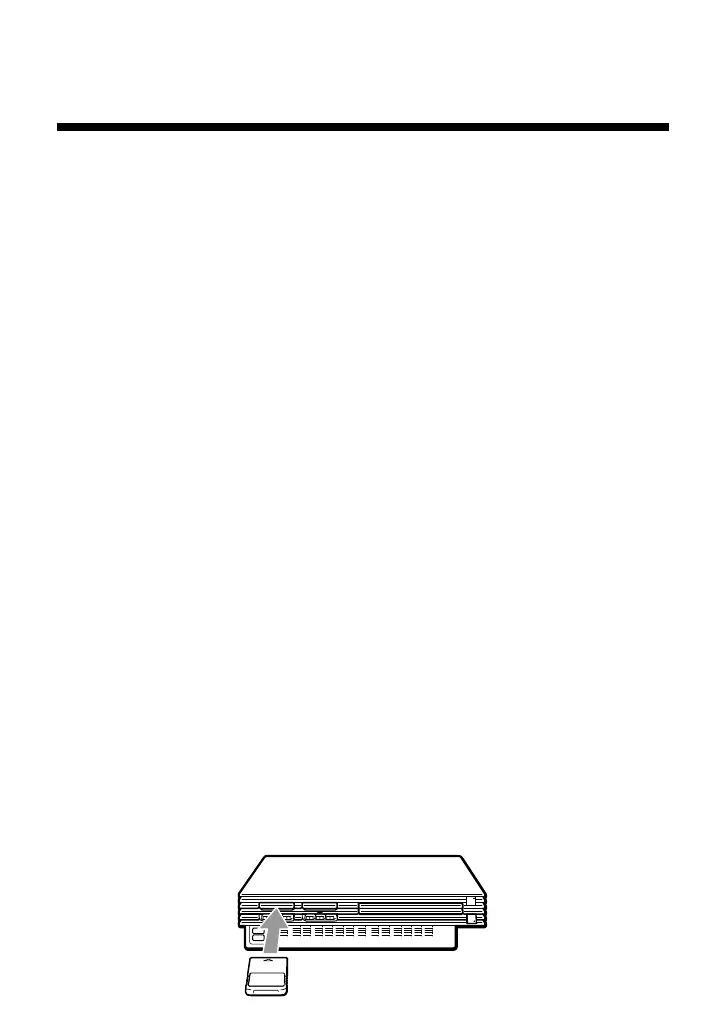
1 Insert the Memory Card (8MB) (for PlayStation®2) into MEMORY
CARD slot 1 of the PlayStation®2 console.



 To Next Page