EasyManua.ls Logo

Sony SEQ-555ES - Location and Function of Controls; Front Panel

Sony SEQ-555ES
46 pages
Print Icon
To Next Page IconTo Next Page
To Previous Page IconTo Previous Page
Loading...
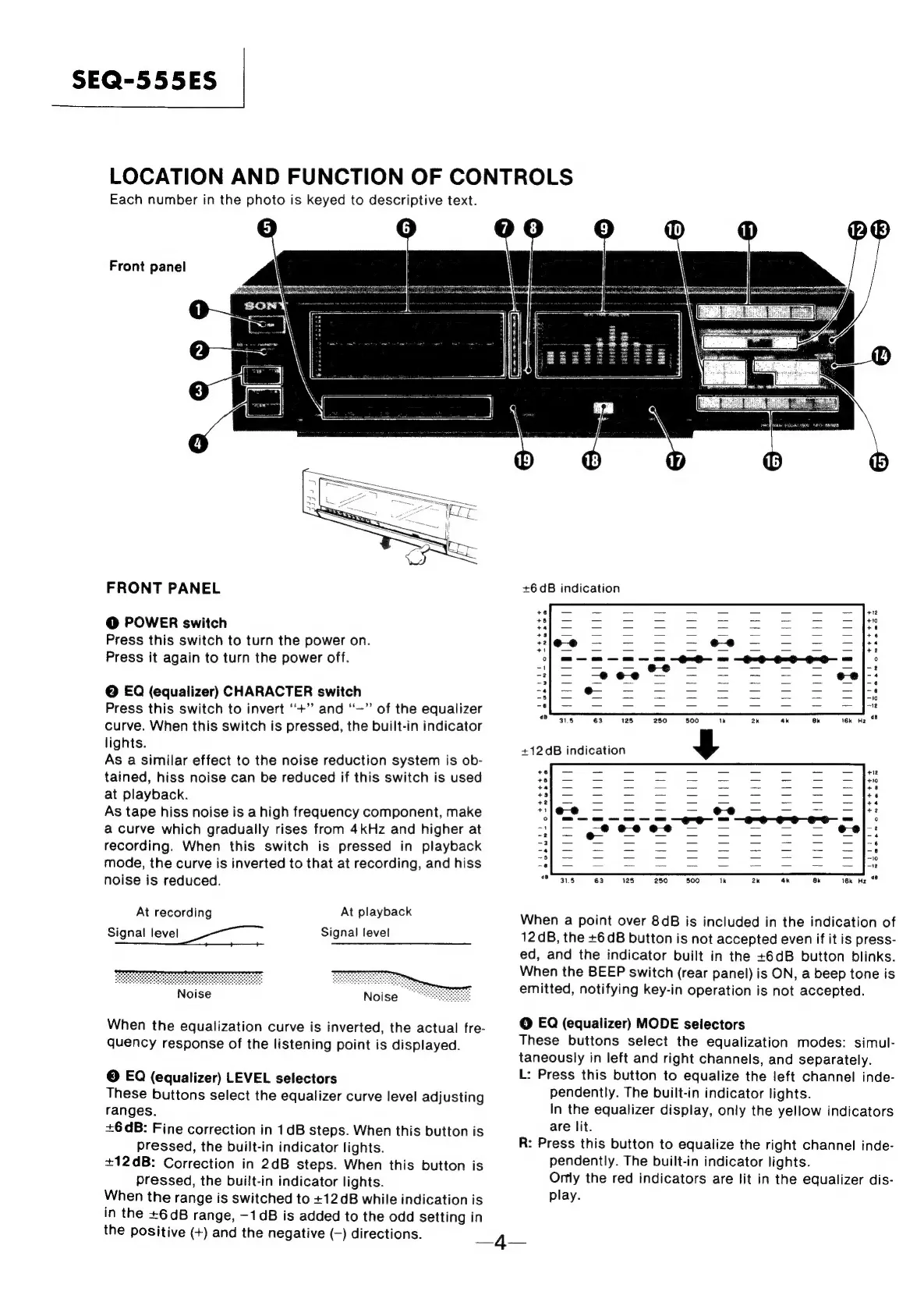
SEQ-555ES
LOCATION
AND
FUNCTION
OF
CONTROLS
Each
number
in
the
photo
is
keyed
to
descriptive
text.
6
Front
panel
FRONT
PANEL
@
POWER
switch
Press
this
switch
to
turn
the
power
on.
Press
it
again
to
turn
the
power
off.
@
EQ
(equalizer)
CHARACTER
switch
Press
this
switch
to
invert
“+”
and
‘“—”
of
the
equalizer
curve.
When
this
switch
is
pressed,
the
built-in
indicator
lights.
As
a
similar
effect
to
the
noise
reduction
system
is
ob-
tained,
hiss
noise
can
be
reduced
if
this
switch
is
used
at
playback.
As
tape
hiss
noise
is
a
high
frequency
component,
make
a
curve
which
gradually
rises
from
4kHz
and
higher
at
recording.
When
this
switch
is
pressed
in
playback
mode,
the
curve
is
inverted
to
that
at
recording,
and
hiss
noise
is
reduced.
At
recording
At
playback
Signal
level
ee
Signal
level
When
the
equalization
curve
is
inverted,
the
actual
fre-
quency
response
of
the
listening
point
is
displayed.
©
EQ
(equalizer)
LEVEL
selectors
These
buttons
select
the
equalizer
curve
level
adjusting
ranges.
+6
dB:
Fine
correction
in
1dB
steps.
When
this
button
is
pressed,
the
built-in
indicator
lights.
+12dB:
Correction
in
2dB
steps.
When
this
button
is
Pressed,
the
built-in
indicator
lights.
When
the
range
is
switched
to
+12dB
while
indication
is
in
the
+6dB
range,
—1dB
is
added
to
the
odd
setting
in
the
positive
(+)
and
the
negative
(—)
directions.
Wr
migii
Tigi
Hida
<P
318
63128
250
800
1k
2k
4k
ak
Yk
He
©?
+12
dB
indication
y
When
a
point
over
8dB
is
included
in
the
indication
of
12
dB,
the
+6
dB
button
is
not
accepted
even
if
it
is
press-
ed,
and
the
indicator
built
in
the
+6dB
button
blinks.
When
the
BEEP
switch
(rear
panel)
is
ON,
a
beep
tone
is
emitted,
notifying
key-in
operation
is
not
accepted.
@
EQ
(equalizer)
MODE
selectors
These
buttons
select
the
equalization
modes:
simul-
taneously
in
left
and
right
channels,
and
separately.
L:
Press
this
button
to
equalize
the
left
channel
inde-
pendently.
The
built-in
indicator
lights.
In
the
equalizer
display,
only
the
yellow
indicators
are
lit.
R:
Press
this
button
to
equalize
the
right
channel
inde-
pendently.
The
built-in
indicator
lights.
Orly
the
red
indicators
are
lit
in
the
equalizer
dis-
play.
—4—

Related product manuals