EasyManua.ls Logo

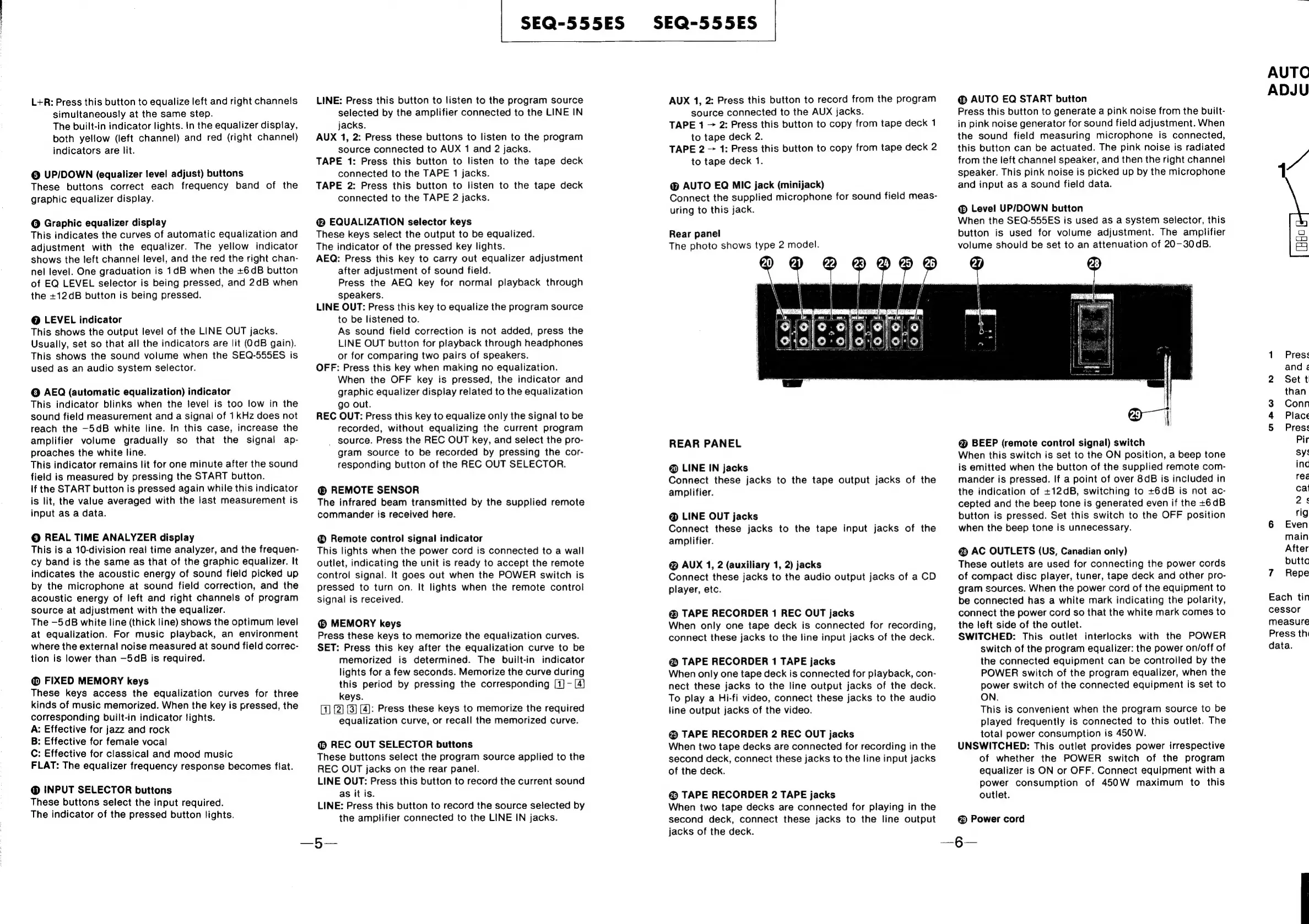
Sony SEQ-555ES - Rear Panel

Sony SEQ-555ES
46 pages
Print Icon
To Next Page IconTo Next Page
To Previous Page IconTo Previous Page
Loading...
L+R:
Press
this
button
to
equalize
left
and
right
channels
simuitaneously
at
the
same
step.
The
built-in
indicator
lights.
In
the
equalizer
display,
both
yellow
(left
channel)
and
red
(right
channel)
indicators
are
lit.
@
UP/DOWN
(equalizer
level
adjust)
buttons
These
buttons
correct
each
frequency
band
of
the
graphic
equalizer
display.
@
Graphic
equalizer
display
This
indicates
the
curves
of
automatic
equalization
and
adjustment
with
the
equalizer.
The
yellow
indicator
shows
the
left
channel
level,
and
the
red
the
right
chan-
nel
level.
One
graduation
is
1dB
when
the
+6dB
button
of
EQ
LEVEL
selector
is
being
pressed,
and
2dB
when
the
+12dB
button
is
being
pressed.
@
LEVEL
indicator
This
shows
the
output
level
of
the
LINE
OUT
jacks.
Usually,
set
so
that
all
the
indicators
are
lit
(dB
gain).
This
shows
the
sound
volume
when
the
SEQ-555ES
is
used
as
an
audio
system
selector.
©
AEQ
(automatic
equalization)
indicator
This
indicator
blinks
when
the
level
is
too
low
in
the
sound
field
measurement
and
a
signal
of
1kHz
does
not
reach
the
—5dB
white
line.
In
this
case,
increase
the
amplifier
volume
gradually
so
that
the
signal
ap-
proaches
the
white
line.
This
indicator
remains
lit
for
one
minute
after
the
sound
field
is
measured
by
pressing
the
START
button.
If
the
START
button
is
pressed
again
while
this
indicator
is
lit,
the
value
averaged
with
the
last
measurement
is
input
as
a
data.
©
REAL
TIME
ANALYZER
display
This
is
a
10-division
real
time
analyzer,
and
the
frequen-
cy
band
is
the
same
as
that
of
the
graphic
equalizer.
It
indicates
the
acoustic
energy
of
sound
field
picked
up
by
the
microphone
at
sound
field
correction,
and
the
acoustic
energy
of
left
and
right
channels
of
program
source
at
adjustment
with
the
equalizer.
The
—5dB
white
line
(thick
line)
shows
the
optimum
level
at
equalization.
For
music
playback,
an
environment
where
the
external
noise
measured
at
sound
field
correc-
tion
is
lower
than
—5dB
is
required.
@
FIXED
MEMORY
keys
These
keys
access
the
equalization
curves
for
three
kinds
of
music
memorized.
When
the
key
is
pressed,
the
corresponding
built-in
indicator
fights.
A:
Effective
for
jazz
and
rock
B:
Effective
for
female
vocal
C:
Effective
for
classical
and
mood
music
FLAT:
The
equalizer
frequency
response
becomes
flat.
@
INPUT
SELECTOR
buttons
These
buttons
select
the
input
required.
The
indicator
of
the
pressed
button
lights.
SEQ-555ES
SEQ-555ES
LINE:
Press
this
button
to
listen
to
the
program
source
selected
by
the
amplifier
connected
to
the
LINE
IN
jacks.
AUX
1,
2:
Press
these
buttons
to
listen
to
the
program
source
connected
to
AUX
1
and
2
jacks.
TAPE
1:
Press
this
button
to
listen
to
the
tape
deck
connected
to
the
TAPE
1
jacks.
TAPE
2:
Press
this
button
to
listen
to
the
tape
deck
connected
to
the
TAPE
2
jacks.
EQUALIZATION
selector
keys
These
keys
select
the
output
to
be
equalized.
The
indicator
of
the
pressed
key
lights.
AEQ:
Press
this
key
to
carry
out
equalizer
adjustment
after
adjustment
of
sound
field.
Press
the
AEQ
key
for
normal
playback
through
speakers.
LINE
OUT:
Press
this
key
to
equalize
the
program
source
to
be
listened
to.
As
sound
field
correction
is
not
added,
press
the
LINE
OUT
button
for
playback
through
headphones
or
for
comparing
two
pairs
of
speakers.
OFF:
Press
this
key
when
making
no
equalization.
When
the
OFF
key
is
pressed,
the
indicator
and
graphic
equalizer
display
related
to
the
equalization
go
out.
REC
OUT:
Press
this
key
to
equalize
only
the
signal
to
be
recorded,
without
equalizing
the
current
program
_
source.
Press
the
REC
OUT
key,
and
select
the
pro-
gram
source
to
be
recorded
by
pressing
the
cor-
responding
button
of
the
REC
OUT
SELECTOR.
®
REMOTE SENSOR
The
infrared
beam
transmitted
by
the
supplied
remote
commander
is
received
here.
Remote
control
signal
indicator
This
lights
when
the
power
cord
is
connected
to
a
wall
outlet,
indicating
the
unit
is
ready
to
accept
the
remote
control
signal.
It
goes
out
when
the
POWER
switch
is
pressed
to
turn
on.
It
lights
when
the
remote
control
signal
is
received.
MEMORY
keys
Press
these
keys
to
memorize
the
equalization
curves.
SET:
Press
this
key
after
the
equalization
curve
to
be
memorized
is
determined.
The
built-in
indicator
lights
for
a
few
seconds.
Memorize
the
curve
during
this
period
by
pressing
the
corresponding
[1]
-
[4}
keys.
[4]:
Press these
keys
to
memorize
the
required
equalization
curve,
or
recall
the
memorized
curve.
@
REC
OUT
SELECTOR
buttons
These
buttons
select
the
program
source
applied
to
the
REC
OUT
jacks
on
the
rear
panel.
LINE
OUT:
Press
this
button
to
record
the
current
sound
as
it
is.
LINE:
Press
this
button
to
record
the
source
selected
by
the
amplifier
connected
to
the
LINE
IN
jacks.
—5—
AUX
1,
2:
Press
this
button
to
record
from
the
program
source
connected
to
the
AUX
jacks.
TAPE
1
2:
Press
this
button
to
copy
from
tape
deck
1
to
tape
deck
2.
TAPE
2
1:
Press
this
button
to
copy
from
tape
deck
2
to
tape
deck
1.
AUTO
EQ
MIC
jack
(minijack)
Connect
the
supplied
microphone
for
sound
field
meas-
uring
to
this
jack.
Rear
panel
The
photo
shows
type
2
model.
(41)
21
mm
Ob
@
REAR
PANEL
@
LINE
IN
jacks
Connect
these
jacks
to
the
tape
output
jacks
of
the
amplifier.
@
LINE
OUT
jacks
Connect
these
jacks
to
the
tape
input
jacks
of
the
amplifier.
@
AUX
1,
2
(auxiliary
1,
2)
jacks
Connect
these
jacks
to
the
audio
output
jacks
of
a
CD
player,
etc.
@
TAPE
RECORDER
1
REC
OUT
jacks
When
only
one
tape
deck
is
connected
for
recording,
connect
these
jacks
to
the
fine
input
jacks
of
the
deck.
@
TAPE
RECORDER
1
TAPE
jacks
When
only
one
tape
deck
is
connected
for
playback,
con-
nect
these
jacks
to
the
line
output
jacks
of
the
deck.
To
play
a
Hi-fi
video,
connect
these
jacks
to
the
audio
line
output
jacks
of
the
video.
@
TAPE
RECORDER
2
REC
OUT
jacks
When
two
tape
decks
are
connected
for
recording
in
the
second
deck,
connect
these
jacks
to
the
line
input
jacks
of
the
deck.
@
TAPE
RECORDER
2
TAPE
jacks
When
two
tape
decks
are
connected
for
playing
in
the
second
deck,
connect
these
jacks
to
the
line
output
jacks
of
the
deck.
AUTO
EQ
START
button
Press
this
button
to
generate
a
pink
noise
from
the
built-
in
pink
noise
generator
for
sound
field
adjustment.
When
the
sound
field
measuring
microphone
is
connected,
this
button
can
be
actuated.
The
pink
noise
is
radiated
from
the
left
channel
speaker,
and
then
the
right
channel
speaker.
This
pink
noise
is
picked
up
by
the
microphone
and
input
as
a
sound
field
data.
Level
UP/DOWN
button
When
the
SEQ-555ES
is
used
as
a
system
selector,
this
button
is
used
for
volume
adjustment.
The
amplifier
volume
should
be
set
to
an
attenuation
of
20-30dB.
27
(4)
@
BEEP
(remote
control
signal)
switch
When
this
switch
is
set
to
the
ON
position,
a
beep
tone
is
emitted
when
the
button
of
the
supplied
remote
com-
mander
is
pressed.
If
a
point
of
over
8dB
is
included
in
the
indication
of
+12dB,
switching
to
+6dB
is
not
ac-
cepted
and
the
beep
tone
is
generated
even
if
the
+6dB
button
is
pressed.
Set
this
switch
to
the
OFF
position
when
the
beep
tone
is
unnecessary.
@
AC
OUTLETS
(US,
Canadian
only)
These
outlets
are
used
for
connecting
the
power
cords
of
compact
disc
player,
tuner,
tape
deck
and
other
pro-
gram
sources.
When
the
power
cord
of
the
equipment
to
be
connected
has
a
white
mark
indicating
the
polarity,
connect
the
power
cord
so
that
the
white
mark
comes
to
the
left
side
of
the
outlet.
SWITCHED:
This
outlet
interlocks
with
the
POWER
switch
of
the
program
equalizer:
the
power
on/off
of
the
connected
equipment
can
be
controlled
by
the
POWER
switch
of
the
program
equalizer,
when
the
power
switch
of
the
connected
equipment
is
set
to
ON.
This
is
convenient
when
the
program
source
to
be
played
frequently
is
connected
to
this
outlet.
The
total
power
consumption
is
450W.
UNSWITCHED:
This
outlet
provides
power
irrespective
of
whether
the
POWER
switch
of
the
program
equalizer
is
ON
or
OFF.
Connect
equipment
with
a
power
consumption
of
450W
maximum
to
this
outlet.
@
Power
cord
—6§—
AUTO
ADJU
&
&
a
7
(HHo
Press
and
&
Set
t
than
Conn
Place
Press
Pir
sys
inc
red
cat
2s
rig
Even
main
After
butto
Repe
Each
tin
cessor
measure
Press
th
data.

Related product manuals