EasyManua.ls Logo

Sony SEQ-555ES - Page 6

Sony SEQ-555ES
46 pages
Print Icon
To Next Page IconTo Next Page
To Previous Page IconTo Previous Page
Loading...
Q-555ES
SEQ-555ES
n
source
LINE
IN
program
ipe
deck
ipe
deck
justment
through
n
source
ress
the
dphones
on.
ator
and
alization
nal
to
be
program
the
pro-
the
cor-
TOR.
1
remote
iO
a
wall
2
remote
witch
is
»
control
curves.
ve
to
be
ndicator
e
during
g
4)
-
(4)
required
|
curve.
2d
to
the
it
sound
ected
by
KS.
AUX
1,
2:
Press
this
button
to
record
from
the
program
source
connected
to
the
AUX
jacks.
TAPE
1
—
2:
Press
this
button
to
copy
from
tape
deck
1
to
tape
deck
2.
TAPE
2
—
1:
Press
this
button
to
copy
from
tape
deck
2
to
tape
deck
1.
@®
AUTO
EQ
MIC
jack
(minijack)
Connect
the
supplied
microphone
for
sound
field
meas-
uring
to
this
jack.
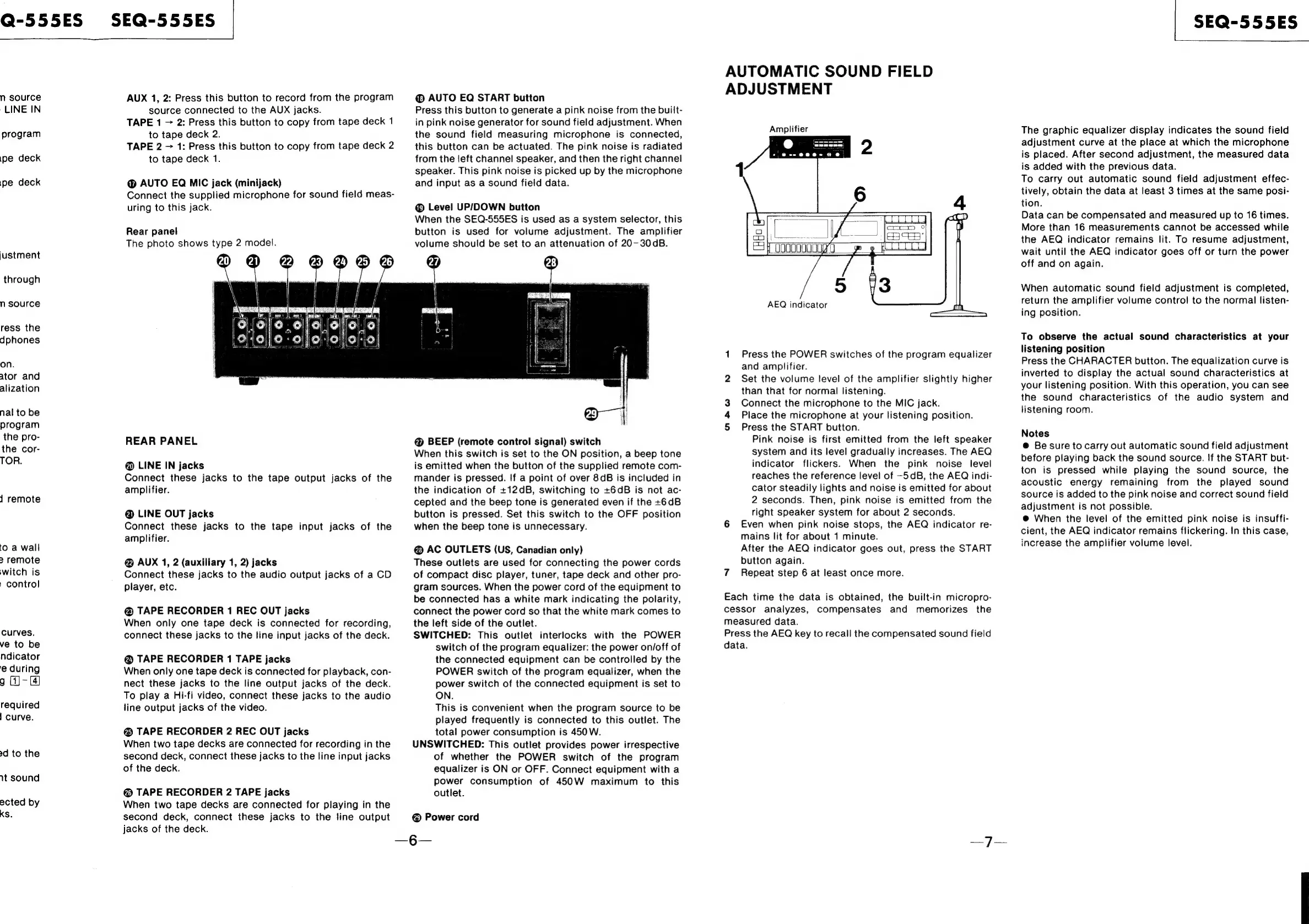
Rear
panel
The
photo
shows
type
2
model.
@®
AUTO
EQ
START
button
Press
this
button
to
generate
a
pink
noise
from
the
built-
in
pink
noise
generator
for
sound
field
adjustment.
When
the
sound
field
measuring
microphone
is
connected,
this
button
can
be
actuated.
The
pink
noise
is
radiated
from
the
left
channel
speaker,
and
then
the
right
channel
speaker.
This
pink
noise
is
picked
up
by
the
microphone
and
input
as
a
sound
field
data.
@®
Level
UP/DOWN
button
When
the
SEQ-555ES
is
used
as
a
system
selector,
this
button
is
used
for
volume
adjustment.
The
amplifier
volume
should
be
set
to
an
attenuation
of
20-30dB.
REAR
PANEL
@
LINE
IN
jacks
Connect
these
jacks
to
the
tape
output
jacks
of
the
amplifier.
@
LINE
OUT
jacks
Connect
these
jacks
to
the
tape
input
jacks
of
the
amplifier.
@
AUX
1,
2
(auxiliary
1,
2)
jacks
Connect
these
jacks
to
the
audio
output
jacks
of
a
CD
player,
etc.
&
TAPE
RECORDER
1
REC
OUT
jacks
When
only
one
tape
deck
is
connected
for
recording,
connect
these
jacks
to
the
tine
input
jacks
of
the
deck.
@
TAPE
RECORDER
1
TAPE
jacks
When
only
one
tape
deck
is
connected
for
playback,
con-
nect
these
jacks
to
the
line
output
jacks
of
the
deck.
To
play
a
Hi-fi
video,
connect
these
jacks
to
the
audio
line
output
jacks
of
the
video.
@®
TAPE
RECORDER
2
REC
OUT
jacks
When
two
tape
decks
are
connected
for
recording
in
the
second
deck,
connect
these
jacks
to
the
line
input
jacks
of
the
deck.
@
TAPE
RECORDER
2
TAPE
jacks
When
two
tape
decks
are
connected
for
playing
in
the
second
deck,
connect
these
jacks
to
the
fine
output
jacks
of
the
deck.
@
BEEP
(remote
control
signal)
switch
When
this
switch
is
set
to
the
ON
position,
a
beep
tone
is
emitted
when
the
button
of
the
supplied
remote
com-
mander
is
pressed.
If
a
point
of
over
8dB
is
included
in
the
indication
of
+12dB,
switching
to
+6dB
is
not
ac-
cepted
and
the
beep
tone
is
generated
even
if
the
+6dB
button
is
pressed.
Set
this
switch
to
the
OFF
position
when
the
beep
tone
is
unnecessary.
@
AC
OUTLETS
(US,
Canadian
only)
These
outlets
are
used
for
connecting
the
power
cords
of
compact
disc
player,
tuner,
tape
deck
and
other
pro-
gram
sources.
When
the
power
cord
of
the
equipment
to
be
connected
has
a
white
mark
indicating
the
polarity,
connect
the
power
cord
so
that
the
white
mark
comes
to
the
left
side
of
the
outlet.
SWITCHED:
This
outlet
interlocks
with
the
POWER
switch
of
the
program
equalizer:
the
power
on/off
of
the
connected
equipment
can
be
controlled
by
the
POWER
switch
of
the
program
equalizer,
when
the
power
switch
of
the
connected
equipment
is
set
to
ON.
This
is
convenient
when
the
program
source
to
be
played
frequently
is
connected
to
this
outlet.
The
total
power
consumption
is
450W.
UNSWITCHED:
This
outlet
provides
power
irrespective
of
whether
the
POWER
switch
of
the
program
equalizer
is
ON
or
OFF.
Connect
equipment
with
a
power
consumption
of
450W
maximum
to
this
outlet.
@
Power
cord
—6—
AUTOMATIC
SOUND
FIELD
ADJUSTMENT
Amplifier
ee
|
@--
000+
0
6!
AEQ
indicator
1
Press
the
POWER
switches
of
the
program
equalizer
and
amplifier.
2
Set
the
volume
level
of
the
amplifier
slightly
higher
than
that
for
normal
listening.
Connect
the
microphone
to
the
MIC
jack.
Place
the
microphone
at
your
listening
position.
5
Press
the
START
button.
Pink
noise
is
first
emitted
from
the
left
speaker
system
and
its
level
gradually
increases.
The
AEQ
indicator
flickers.
When
the
pink
noise
level
reaches
the
reference
level
of
-5dB,
the
AEQ
indi-
cator
steadily
lights
and
noise
is
emitted
for
about
2
seconds.
Then,
pink
noise
is
emitted
from
the
right
speaker
system
for
about
2
seconds.
6
Even
when
pink
noise
stops,
the
AEQ
indicator
re-
mains
lit
for
about
1
minute.
After
the
AEQ
indicator
goes
out,
press
the
START
button
again.
7
Repeat
step
6
at
least
once
more.
mw
Each
time
the
data
is
obtained,
the
built-in
micropro-
cessor
analyzes,
compensates
and
memorizes
the
measured
data.
Press
the
AEQ
key
to
recall
the
compensated
sound
field
data.
SEQ-555ES
The
graphic
equalizer
display
indicates
the
sound
field
adjustment
curve
at
the
place
at
which
the
microphone
is
placed.
After
second
adjustment,
the
measured
data
is
added
with
the
previous
data.
To
carry
out
automatic
sound
field
adjustment
effec-
tively,
obtain
the
data
at
least
3
times
at
the
same
posi-
tion.
Data
can
be
compensated
and
measured
up
to
16
times.
More
than
16
measurements
cannot
be
accessed
while
the
AEQ
indicator
remains
lit.
To
resume
adjustment,
wait
until
the
AEQ
indicator
goes
off
or
turn
the
power
off
and
on
again.
When
automatic
sound
field
adjustment
is
completed,
return
the
amplifier
volume
contro!
to
the
normal
listen-
ing
position.
To
observe
the
actual
sound
characteristics
at
your
listening
position
Press
the
CHARACTER
button.
The
equalization
curve
is
inverted
to
display
the
actual
sound
characteristics
at
your
listening
position.
With
this
operation,
you
can
see
the
sound
characteristics
of
the
audio
system
and
listening
room.
Notes
@
Be
sure
to
carry
out
automatic
sound
field
adjustment
before
playing
back
the
sound
source.
If
the
START
but-
ton
is
pressed
while
playing
the
sound
source,
the
acoustic
energy
remaining
from
the
played
sound
source
is
added
to
the
pink
noise
and
correct
sound
field
adjustment
is
not
possible.
@
When
the
level
of
the
emitted
pink
noise
is
insuffi-
cient,
the
AEQ
indicator
remains
flickering.
In
this
case,
increase
the
amplifier
volume
level.

Related product manuals