EasyManua.ls Logo

Sony SEQ-711 - Connections; Connecting to Your System

Sony SEQ-711
11 pages
Print Icon
To Next Page IconTo Next Page
To Previous Page IconTo Previous Page
Loading...
Connections
This
section
describes
about
the
connections
with
the
other
audio
equipments.
*
Connect
the
AC
power
cord
last.
Make
sure
power
is
off.
¢
Fully
insert
cable
connectors
into
jacks.
Loose
connections
may
cause
hum
or
noise.
¢
The
red
jacks
are
for
the
right-channel
(R)
connections
and
the
white
jacks
are
for
the
left-channel
(L).
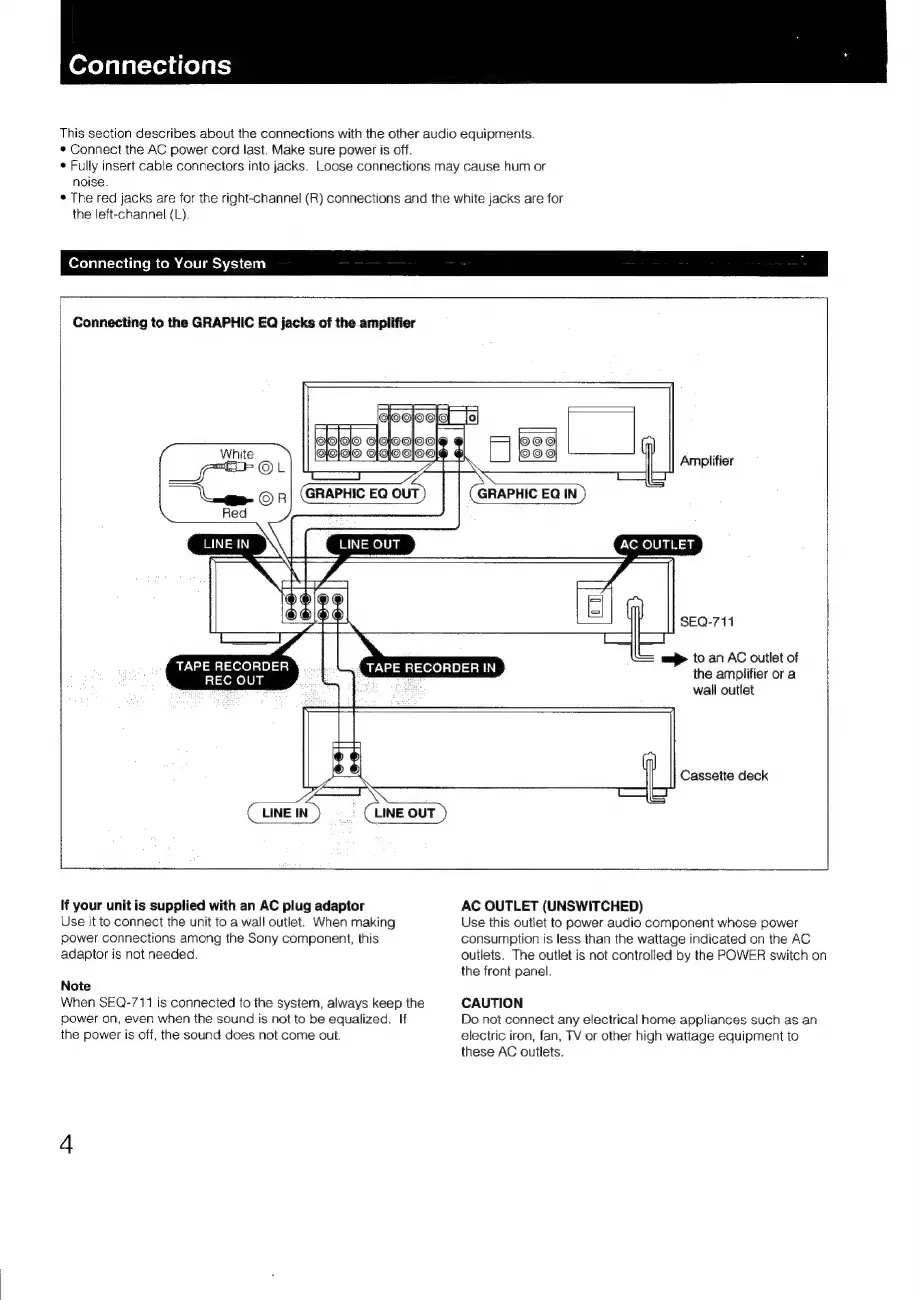
Connecting
to
Your
System
Connecting
to
the
GRAPHIC
EQ
jacks
of
the
amplifier
GOO
OOOO
G|QjOO
Q|OQ|Q|O_G|QlOo@
4
OOO
22.9)
Amplifier
LINE
IN
AC
OUTLET
SEQ-711
aaj
to
an
AC
outlet
of
the
amplifier
or
a
wall
outlet
TAPE
RECORDER
REC
OUT
TAPE
RECORDER
IN
Cassette
deck
LINE
IN
Ss
Cume
our)
If
your
unit
is
supplied
with
an
AC
plug
adaptor
AC
OUTLET
(UNSWITCHED)
Use
it
to
connect
the
unit
to
a
wall
outlet.
When
making
Use
this
outlet
to
power
audio
component
whose
power
power
connections
among
the
Sony
component,
this
consumption
is
less
than
the
wattage
indicated
on
the
AC
adaptor
is
not
needed.
ouilets.
The
outlet
is
not
controlled
by
the
POWER
switch
on
the
front
panel.
Note
When
SEQ-711
is
connected
to
the
system,
always
keep
the
CAUTION
power
on,
even
when
the
sound
is
not
to
be
equalized.
If
Do
not
connect
any
electrical
home
appliances
such
as
an
the
power
is
off,
the
sound
does
not
come
out.
electric
iron,
fan,
TV
or
other
high
wattage
equipment
to
these
AC
outlets.

Related product manuals