EasyManua.ls Logo

Sony SL-HF550 - Page 28

Sony SL-HF550
32 pages
Print Icon
To Next Page IconTo Next Page
To Previous Page IconTo Previous Page
Loading...
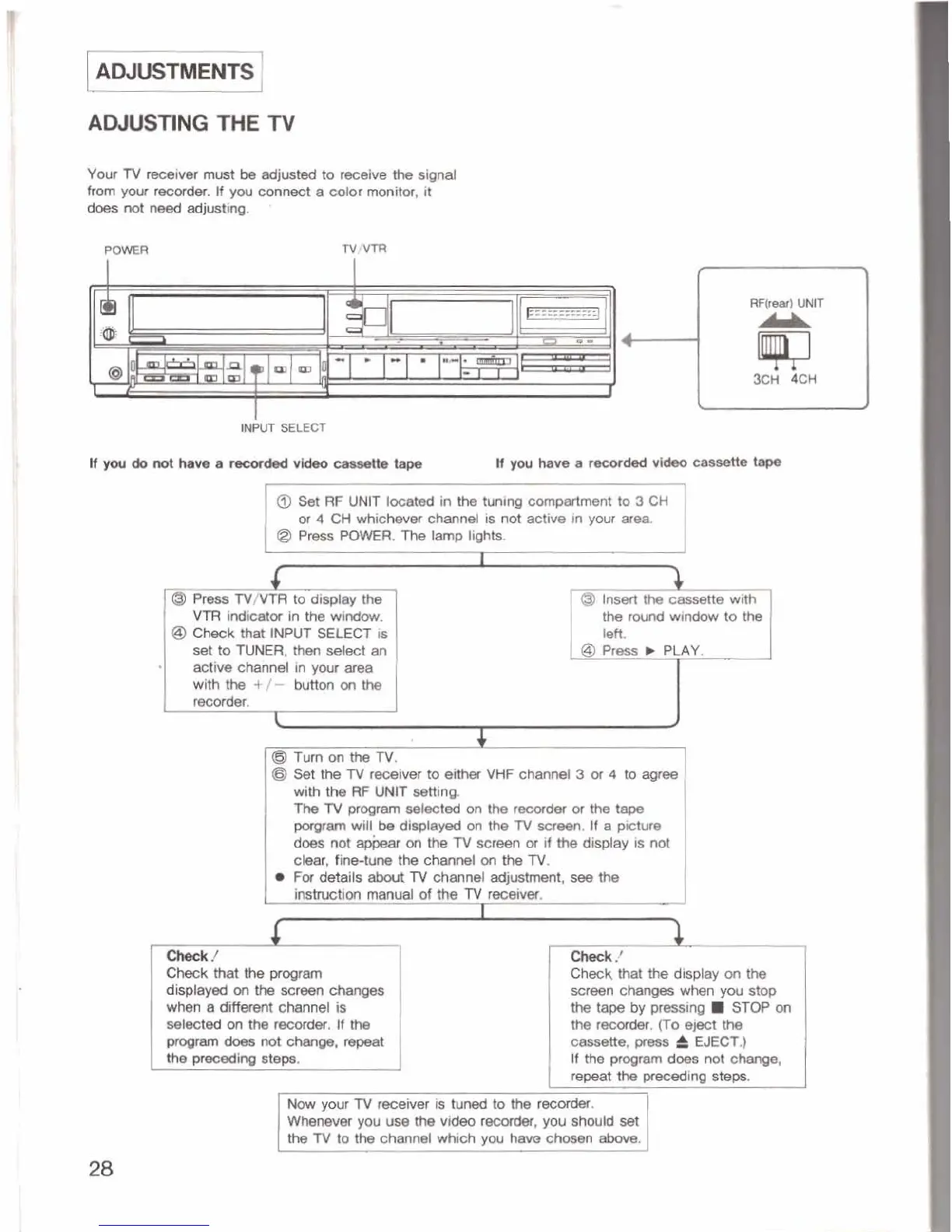
AWUSTlNG
THE
XV
Your
TV
receiver
must
be
adjwtd
to
recelve
the
signal
from
your
recorder.
tf
you
connect
a
color
monitor,
it
does
not
need adjusting.
,
PQWER
1
@
Set
RF
UNIT
located
in
the
tuning
compartment
to
3
CH
I
ar
4
CH
whichever
channel
is
not
active
in
your
area
/
@
Press
POWER.
The
tamp
lights.
-
@
Prerss
TV/VTR
to
display
the
Vl7
indicator
In
the
wlndow.
@
Chmk
that
INPUT
SELECT
is
set
to
TUNER,
then
select
an
active
channel
in
ywr
area
with
the
+/-
buttm
on
the
reccder.
@
Turn
on
the
TV,
@I
Set
the
fV
rweh
to
either
VHF
channel
3
or
4
to
agree
with
the
RF
UNlT
setting.
Ttm
TV
program
med
on
the
mdw
or
the
tape
warn
wtll
be
displayed
on
the
lV
screen.
If
a
picture
does
not
on
the
lV
screen
oi
if
the
display
is
not
clew,
fine-tune
the
channel
m
the
TV.
Fu
details
abwt
TV
channel
adjuslmmt,
sei
the
imhtctlcm
manual
of
the
lV
meek.
I
Check
that
the
pro~rrtm
Check
that
the
display
on
the
dbplayed
on
the
screen
changes
screen
change6
when
yuu
mp
when
a
different
channel
is
the
by
pressing
W
STOP
an
selected
on
the
m,
If
the
tb
recorder.
(To
eject
tM
proOram~~~ge,W
cmette,
pms
6
EJECT.)
If
the
progrem
does
not
change,
repeat
the
preceding
steps.
Now
your
lV
me*
is
tuned
to
the
recarder.
Wlwnwer
you
use
the
video
mmiw,
you
shwld
set
the
TV
to
th-a
channel
which
you
haw
dwmn
dmve.