EasyManua.ls Logo

Sony SL-HF550 - Page 30

Sony SL-HF550
32 pages
Print Icon
To Next Page IconTo Next Page
To Previous Page IconTo Previous Page
Loading...
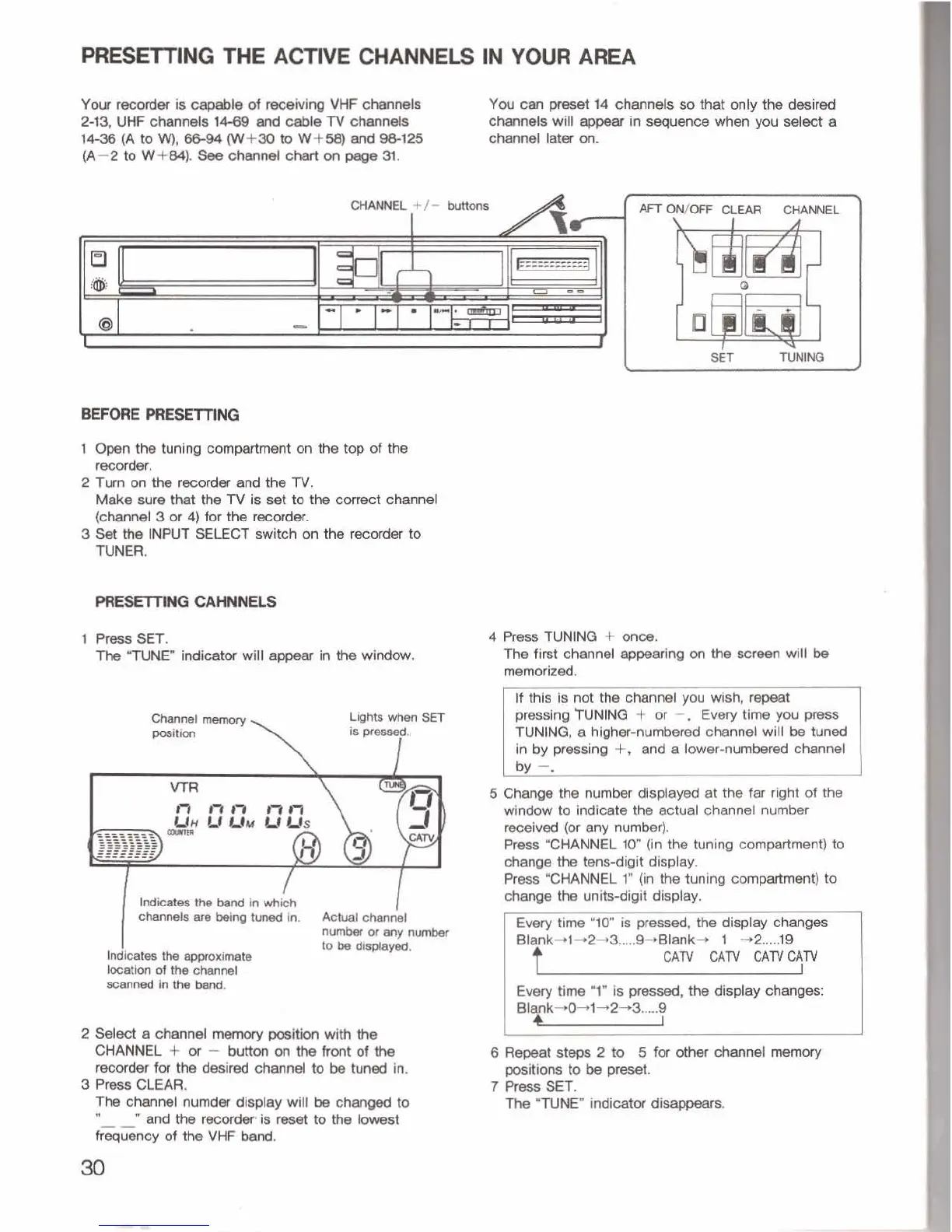
PESElTlNG
THE
ACTIVE
CHANNELS
IN
YOUR
AREA
Yov
recorder
is
mle
of
ming
VHF
chennela
2-43,
UW
channels
1-
and
ceMe
TV
chmnels
l~(AtoW),~(w+30toW+50)and9&125
(A-2toW+&l).8eectrennelrnanpeoe31.
Youcan~f4chnneCssohtontytWdeai~
channels
will
apptxw
in
when
you
s8I-t
a
channel Iakw
on.
1
Open
ttw
tunlng
compartment
on
the
top
of
the
recorder.
2
Turn
an
the
reoorder
and
the
TV.
Make
we
that
ttm
TV
is
wt
to
the
cmt
channel
{channel
3
or
4)
for
the
recorder.
3
Set
the
INPUT
SELECT
switch
on
the
recorder
to
TUNER.
Lights
when
SET
::I:'"""\
'7
Indii
the
band
In
which
I
channels
am
belng
tuned
In.
Actual ohannel
numb#
or
any
numbw
Mhtea
the
mx1m
tolmd@ayed.
locationofmchanr#l
mnsd
in
ib
bend.
2
Select
a
channel
memwy
podtian
with
the
CHANNEL
+
or
-
button
on
the
front
of
the
murder
fw
the
hired
channel
to
be
tuned
in.
3
Pms
CLEAR.
The
channel
numder
display
will
be
changed
to
u
"and
therecorderIsreSabothebwd
fiGkcy
of
the
VHF
band.
AFT
wW;FClEAR
CHANNEL
4
Pmsa
TUNING
t
m.
The
first channel
appadng
on
the
swem
will
k
memized.
If
thls
Is
not
tha
channel
you
wish,
repd
prmlng 'TUNING
t
or
-.
Every
tlm
yw
press
TUNING,
a
hlgh-numbered
chnel
will
be
tuned
In
by
presalng
t,
and
a
lower-nu-
channel
5 Ch&qe
the
number
displayed
at
the
far
right
of
the
window
to
lndlcate
the
actual
channel
number
mlved
(or
eny
number).
Press
'CHANNEL
10"
(in
the
tuning
compartment)
to
chenge
the
tens-digit disptay.
Pme
'CHANNEL
1"
(in
the
tuning
corn-)
to
change
the
unitsdi~it
display.
Emy
time
"10"
is
pre#ed,
the
display
changes
Blank-.ld2-.3
.....
9-tBIank-
I
+2
.....
1
Q
t
CATW
CATV
CAlVCATV
€my
tlm
7"
Is
m.
the
display
ckwx
Blrk+O+l+2+3 .....
9
6
Repat
steps
2
b
5
for
otb
dmd
memary
positions
to
be
preset.
7
SET.
The
"TUNE"
indicatw
dl-.
Sony SL-HF550 - Page 30