Getting Started
44
Setting up VCR Plus+
(continued)
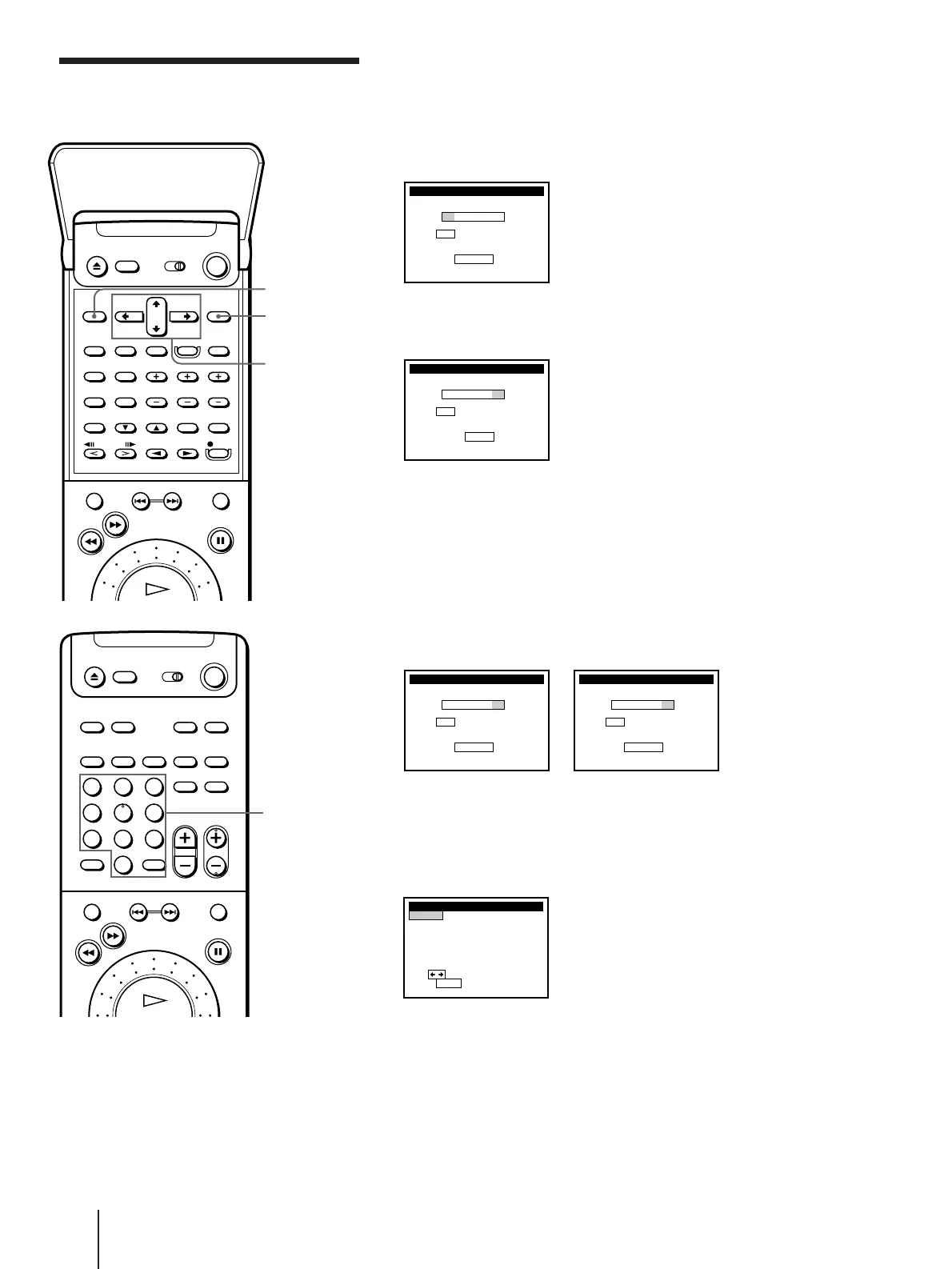
1 Press MENU. Then press CURSOR >/. to move the cursor (I) to
VHS MENU, and press EXECUTE.
2 Move the cursor (I) to SET VCR Plus+ CHANNELS and press
EXECUTE.
3 Enter the channel number assigned in the program guide and press
ENTER.
4 • If you made Hookup 1, 2 or 3: Enter the actual number on your TV
(and VCR) and press ENTER.
• If you made Hookup 4: Enter the cable output channel (usually 2,
3 or 4) and press ENTER.
• If you made Hookup 6: Enter the actual number on your TV (and
VCR) for an unscrambled channel and press ENTER. For a
scrambled channel, enter the cable box output channel (usually 2,
3 or 4) and press ENTER.
5 Repeat steps 3 and 4 for each channel whose numbers don’t match.
6 When you have set all channels, press EXECUTE to confirm your
channel settings.
7 When you’ve finished, press MENU to exit.
123
456
789
0
>
10
Number
buttons,
ENTER
MENU
EXECUTE
CURSOR
>/./?//
SET VCR Plus+ CHANNELS
GUIDE
VCR Plus+ CHANNEL LIST
Or to
CH TV CH
–– – ––
Push 0–9 keys to set
P r og r am GUIDE CH
,
push
see
EXECUTE
y
Then push
ou r TV CH
SET VCR Plus+ CHANNELS
GUIDE CH TV CH
33 – 33
Push 0–9 keys to set
ENTER
SET VCR Plus+ CHANNELS
GUIDE CH TV CH
33 – 5
VCR Plus+ CHANNEL LIST
Or to
Push 0–9 keys to set
P r og r am GUIDE CH
,
push
see
EXECUTE
SET VCR Plus+ CHANNELS
GUIDE CH TV CH
33 – 3
VCR Plus+ CHANNEL LIST
Or to
Push 0–9 keys to set
P r og r am GUIDE CH
,
push
see
EXECUTE
GUIDE TV
2–73
5– 4
7–55
8– 9
3– 5
1
2
3
GUIDE TV
9–47
1– 3
7–35
6– 0
0–22
7
8
9
5
6
21
Pus h
to quit
Use to change page
SET VCR Plus+ CHANNELS
p1age
MENU



 To Next Page