30
Selecting a language
Selecting a language
Tip
• If you want to return to the previous menu, highlight RETURN and press OK.
You can change the on-screen display
language.
Before you start…
• Turn on the VCR and the TV.
• Set the TV to the VCR channel (channel 3
or 4). If your TV is connected to the VCR
using A/V connections, set the TV to video
input.
• Press TV/VIDEO to display the VIDEO
indicator in the VCR’s display window.
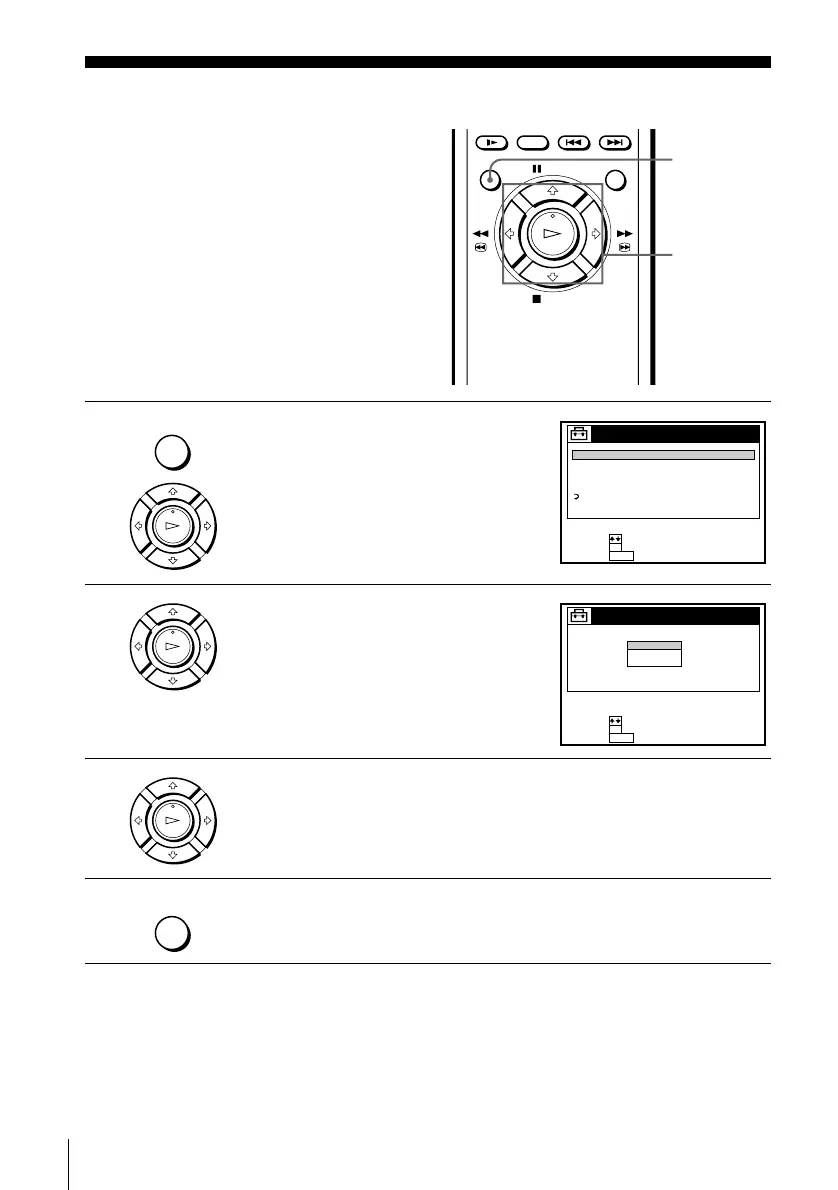
1
Press MENU, then press M/m to highlight
SETTINGS and press OK.
When using the EASY SET UP procedure,
skip steps 1 and 2.
2
Press M/m to highlight LANGUAGE, then
press OK.
3
Press M/m to highlight ENGLISH, ESPAÑOL, or FRANÇAIS, then press
OK.
4
Press MENU to exit the menu.
M/m
OK
MENU
MENU
PLAY
OK
SETTINGS
TUNER PRESET
SET VCR Plus+ CHANNELS
CABLE BOX CONTROL
CLOCK SET
LANGUAGE
RETURN
SET :
SELECT :
OK
MENUQUIT :
PLAY
OK
LANGUAGE
ENGLISH
ESPAÑOL
FRANÇAIS
SET :
SELECT :
OK
MENUQUIT :
PLAY
OK
MENU





 To Next Page