74
Recording TV programs using the VCR Plus+ or VCR Plus+ GOLD system
To stop recording
To stop the VCR while recording, press x STOP.
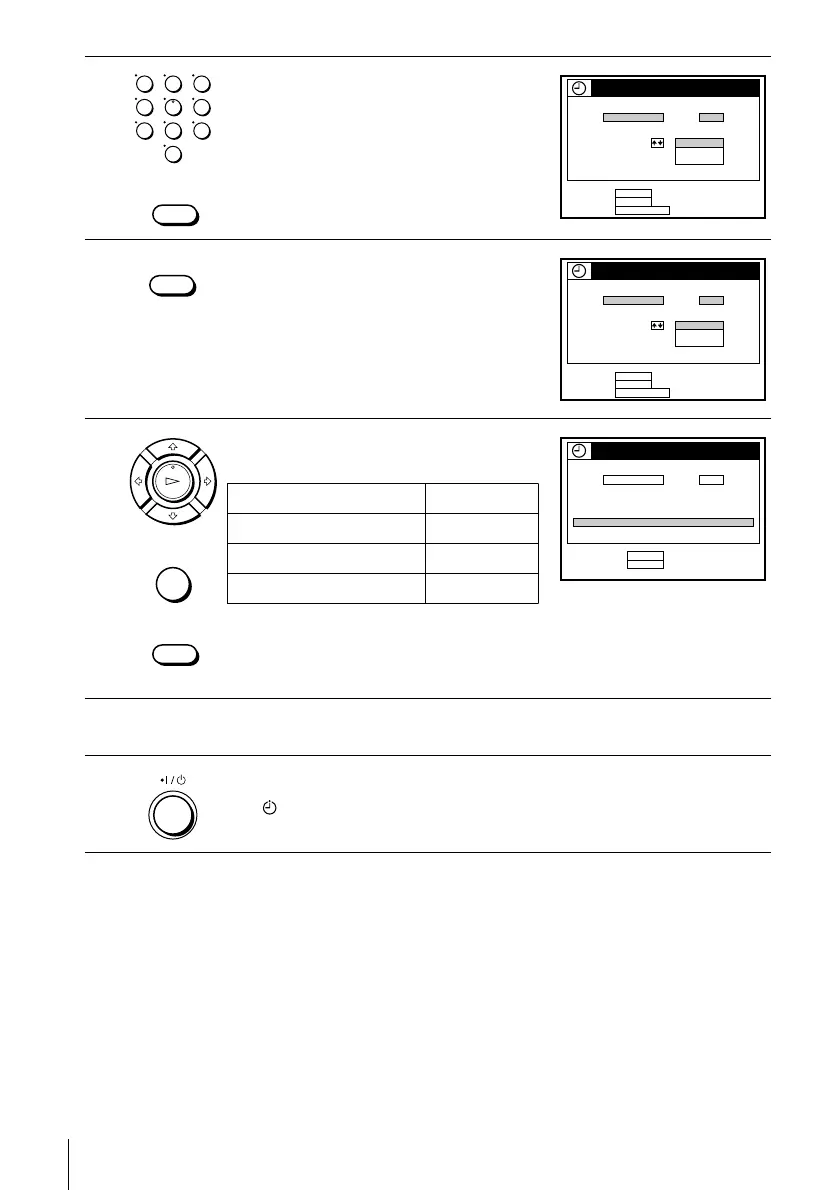
2
Press the number buttons to enter the
PlusCode number.
If you make a mistake, press CLEAR and
re-enter the correct number.
3
Press SP/EP to select the tape speed, SP or
EP.
4
Press M/m to highlight ONCE, DAILY, or
WEEKLY, then press ENTER:
The date, start and stop time, channel number (or station ID for SLV-N80
only), and tape speed appear on the TV screen. If the information is not
correct, press CLEAR to cancel the setting.
5
To enter another setting, repeat steps 1 to 4.
6
Press ?/1 to turn off the VCR.
The indicator appears in the display window and the VCR stands by for
recording. When using a cable box, leave it on.
123
456
789
0
CLEAR
VCR Plus+
–
PlusCode SP / EP
1
USE
EP2345––
CANCEL :
CONFIRM :
VCR Plus+QUIT :
ENTER
CLEAR
:
ONCE
DAILY
WEEKLY
SP / EP
VCR Plus+
–
PlusCode SP / EP
1
USE
SP2345––
CANCEL :
CONFIRM :
VCR Plus+QUIT :
ENTER
CLEAR
:
ONCE
DAILY
WEEKLY
PLAY
OK
CLEAR
• ENTER
VCR Plus+
–
PlusCode SP / EP
1
RECORDING TIME
SP2345––
CANCEL :
SET TIMER :
POWER
CLEAR
DATE STOP CHSTART
90SAT 80
PM
0:90
PM
053SP:3/
To record Select
Only once ONCE
Everyday Monday to Friday DAILY
Once a week WEEKLY





 To Next Page