Getting Started
5
Setting up the remote commander
Step 2 : Setting up the remote commander
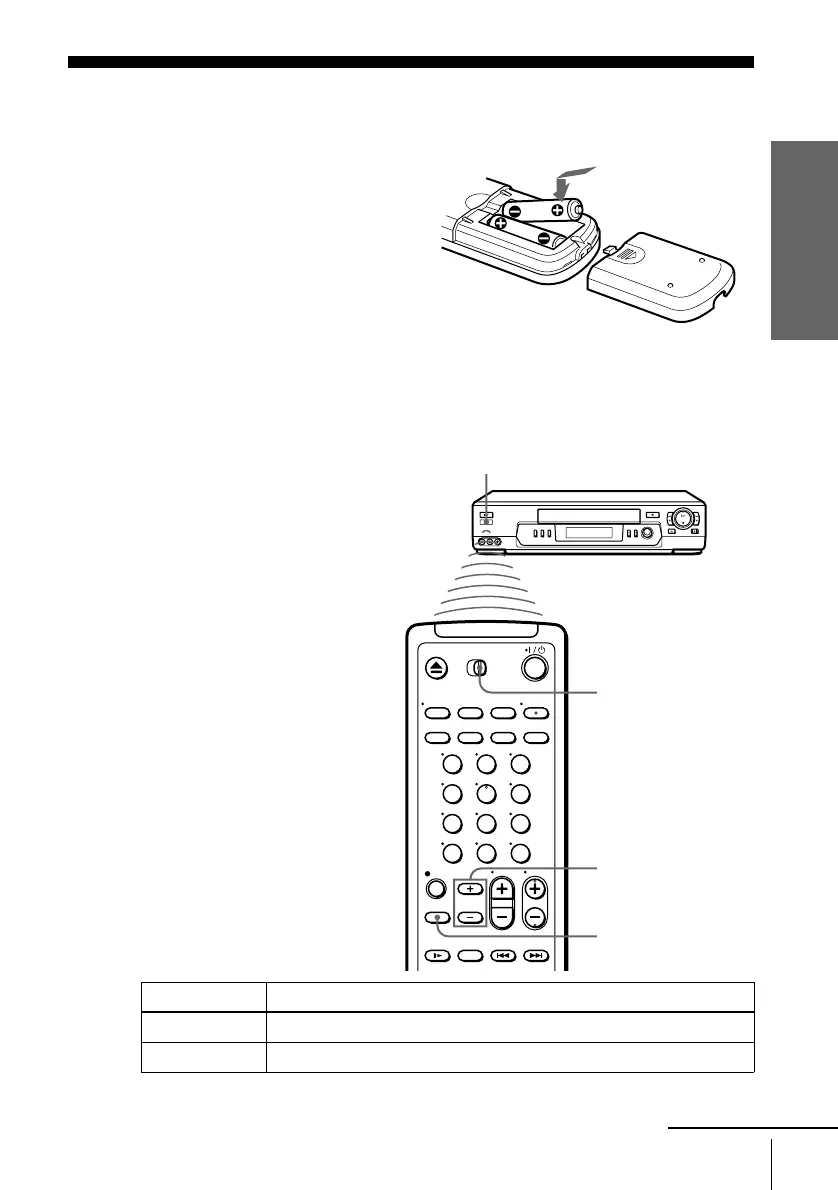
Inserting the batteries
Insert two size AA (R6) batteries
by matching the + and – on the
batteries to the diagram inside the
battery compartment.
Insert the negative (–) end first,
then push in and down until the
positive (+) end clicks into
position.
Using the remote
commander
You can use this remote
commander to operate this VCR
and a Sony TV and/or AV receiver.
Buttons on the remote commander
marked with a dot (•) can be used
to operate your Sony TV.
The RECEIVER VOL +/– and
MUTING buttons can be used to
operate your Sony AV receiver.
To operate Set [TV] / [VIDEO] to
the VCR [VIDEO] and point at the remote sensor at the VCR
a Sony TV [TV] and point at the remote sensor at the TV
123
456
789
0
RECEIVER VOL +/–
[TV] / [VIDEO]
Remote sensor
MUTING
continued








 To Next Page