1-9
Basic Operations
36
Notes
• The counter resets to “0:00:00” whenever a tape is reinserted.
• The counter stops counting when it comes to a portion with no recording.
• The time counter does not appear on the TV screen when using an NTSC-recorded
tape.
• Depending on your TV, the following may occur while playing an NTSC-recorded
tape:
– The picture becomes black and white.
– The picture shakes.
– No picture appears on the TV screen.
– Black streaks appear horizontally on the TV screen.
– The colour density increases or decreases.
• While setting the menu on the TV screen, buttons for playback
on the remote
commander do not function.
Starting playback automatically with one button
(One Touch Play)
If you use the SMARTLINK connection, you can turn on the VCR and the
TV, set the TV to the video channel, and start playback automatically with
one button.
1 Insert a tape.
The VCR automatically turns on.
If you insert a tape with its safety tab removed, the TV turns on and
switches to the video channel. Playback starts automatically.
2 Press PLAY.
The TV turns on and switches to the video channel automatically.
Playback starts.
Tip
• When there already is a tape in the VCR, the VCR and the TV turn on, the TV is set
to the video channel, and playback starts automatically in one sequence when you
press
PLA
Y.
Note
• When you use the One Touch Play function, leave the TV on or in the standby
mode.
Playing a tape (continued)
·
·
Basic Operations
Basic Operations
37
Recording TV
programmes
r REC
PROG +/–
SP/LP
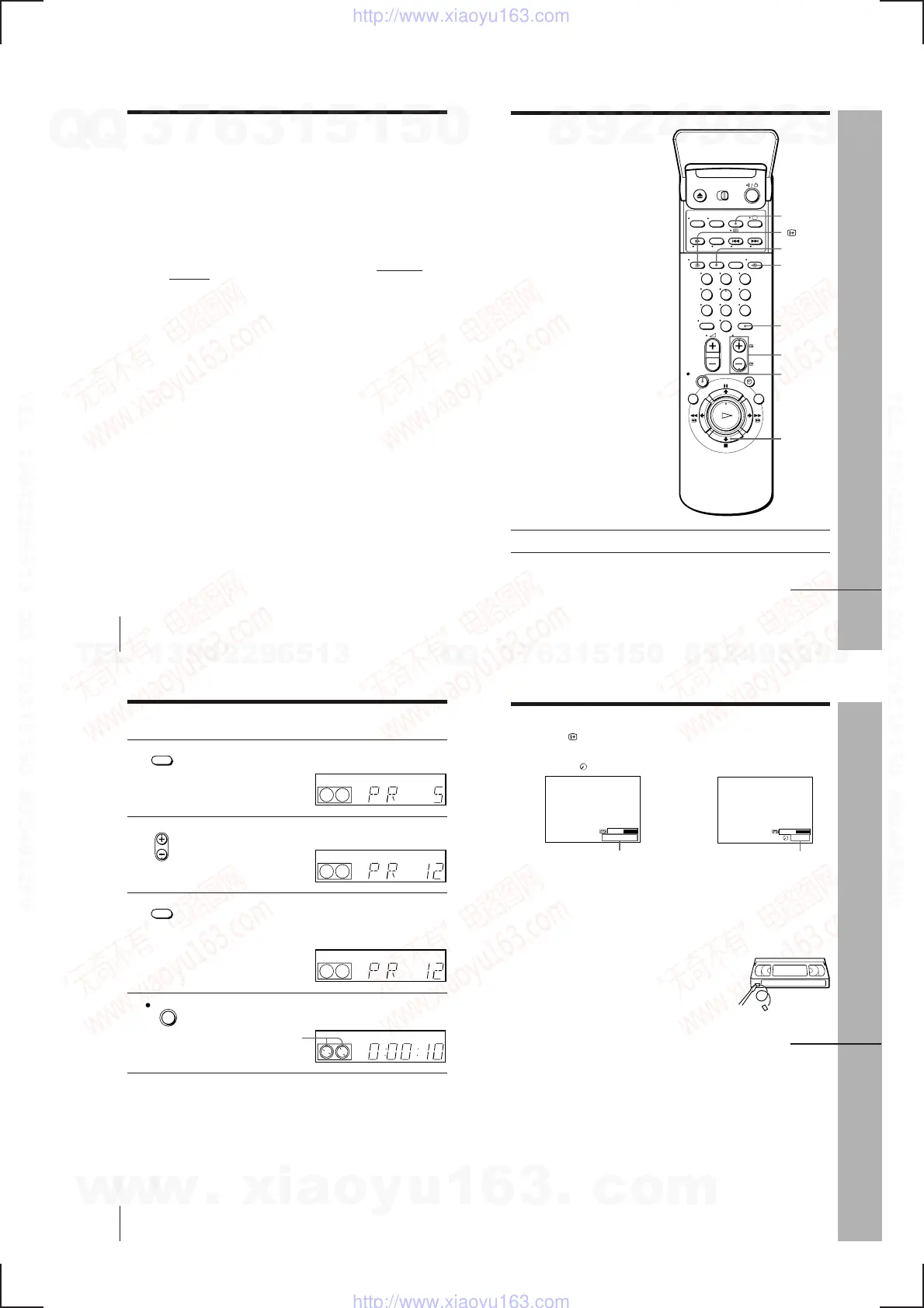
1 Turn on your TV and set it to the video channel.
2 Insert a tape with its safety tab in place.
INPUT
SELECT
COUNTER/
REMAIN
DISPLAY
TV/VIDEO
p STOP
continued
123
456
789
0
…
Basic Operations
38
Recording TV programmes (continued)
3
Press INPUT SELECT until a programme position number appears
in the display window.
4
Press PROG +/– to select the programme position you want to
record.
5
Press SP/LP to select the tape speed, SP or LP.
LP (Long Play) provides recording time twice as long as SP,
however, SP (Standard Play) produces better picture and audio
quality.
6
Press r REC to start recording.
The recording indicator lights up red in the display window.
Recording indicator
To stop recording
Press p STOP.
INPUT SELECT
REC
SP / LP
• PROG
VIDEO
SP
OPC
VIDEO
SP
OPC
LP
VIDEO
OPC
LP
VIDEO
OPC
Basic Operations
Basic Operations
39
Safety tab
To check the remaining time
Press
DISPLAY. With the display on, press COUNTER/REMAIN to
check the remaining time. Each time you press COUNTER/REMAIN, the
time counter and the remaining time appear alternately. The remaining time
with the
indicator also appears in the display window.
To correctly check the remaining time of the tape, set TAPE LENGTH in the
OPTIONS-1 menu according to the tape type you use (see page 63).
To watch another TV programme while recording
1 Press TV/VIDEO to turn off the VIDEO indicator in the display
window.
2 Select another programme position on the TV.
To save a recording
To prevent accidental erasure, break off the safety
tab as illustrated. To record on a tape again, cover
the tab hole with adhesive tape.
Time counter Remaining time
continued
SP 20:00:2
61:4
…
w
w
w
.
x
i
a
o
y
u
1
6
3
.
c
o
m
Q
Q
3
7
6
3
1
5
1
5
0
9
9
2
8
9
4
2
9
8
T
E
L
1
3
9
4
2
2
9
6
5
1
3
9
9
2
8
9
4
2
9
8
0
5
1
5
1
3
6
7
3
Q
Q
TEL 13942296513 QQ 376315150 892498299
TEL 13942296513 QQ 376315150 892498299
http://www.xiaoyu163.com
http://www.xiaoyu163.com



 To Next Page