12
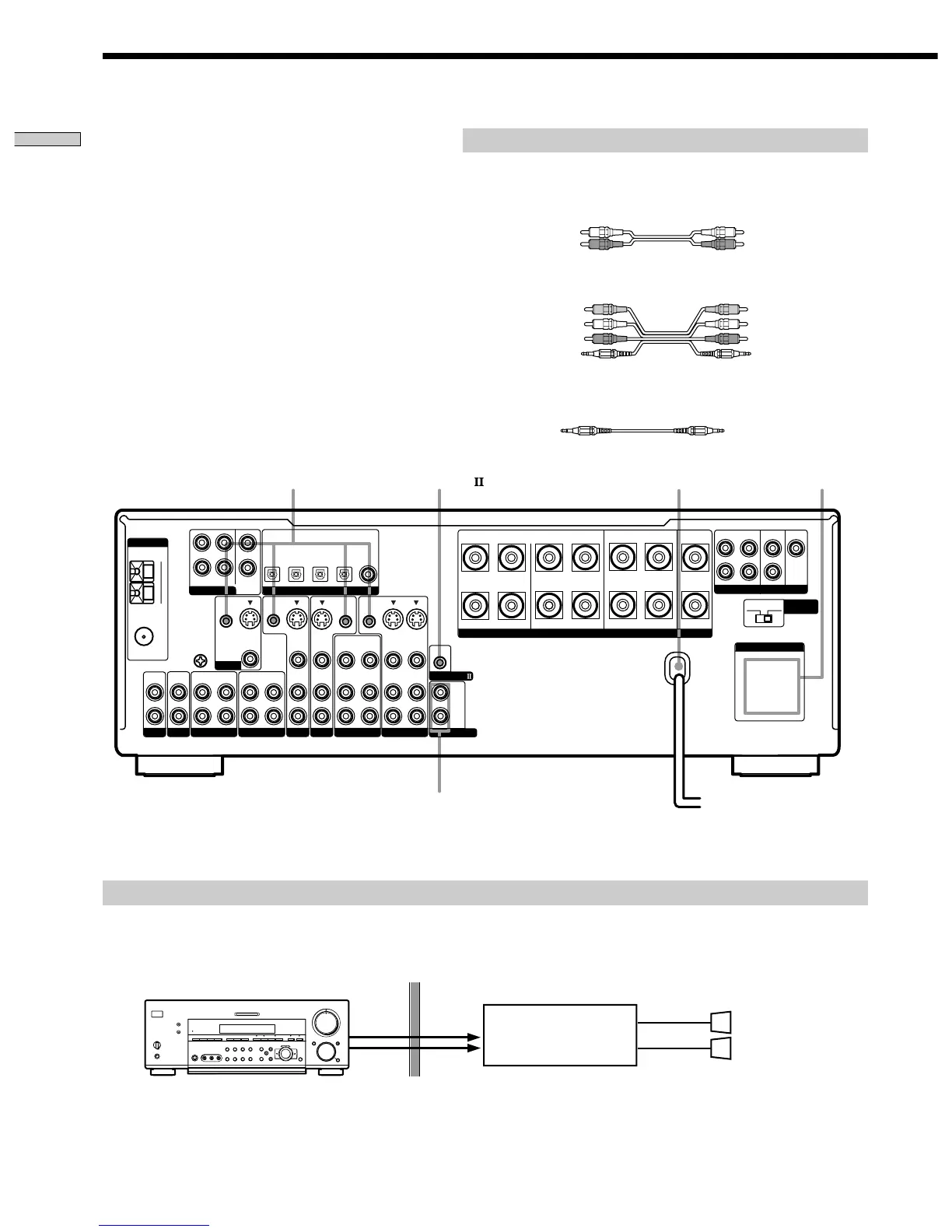
Hooking Up the Components
CTRL S (STATUS) IN/OUT** CONTROL A1
AC OUTLET
*
b
4 Ω 8 Ω
BA
RLRL
–
IN
OUT
SIGNAL
GND
COAXIAL
AM
U
U
ANTENNA
TAPE
IMPEDANCE
SELECTOR
IN
PHONO
IN
CD
REARFRONT CENTER
MONITOR
IN
OUT
MD/DAT
AUDIO
IN
IN
VIDEO
CTRL S
OUT
OUT
VIDEO
CTRL S
OUT
CTRL S
STATUS IN
CTRL S
IN
AUDIO
OUT
VIDEO 1
AUDIO
IN
TV/SAT
AUDIO
IN
DVD/LD
AUDIO
IN
AUDIO
OUT
VIDEO 2
FM
75Ω
AC OUTLET
FRONT
DVD/LD
OPTICAL
IN
DVD/LD
COAXIAL
IN
TV/SAT
OPTICAL
IN
MD/DAT
OPTICAL
IN
MD/DAT
OPTICAL
OUT
DIGITAL
L
R
REAR
FRONT
CENTER
SUB
WOOFER
5.1CH INPUT
VIDEO
S-VIDEO
IN
VIDEO
S-VIDEO
IN
2ND AUDIO OUT
CONTROL A1
VIDEO
S-VIDEO
IN
VIDEO
S-VIDEO
OUT
VIDEO
S-VIDEO
OUT
SPEAKERS IMPEDANCE USE 4 – 16Ω
RL
+
L
R
PRE OUT
REAR
SUB WOOFER
CENTER
L
R
L
R
White (L) White (L)
Red (R) Red (R)
AUDIO
OUT
AUDIO
IN
SPEAKERS
R
L
5
0
1
3
9
7
46
2
8
10
•
•
•
•
•
•
•
•
•
•
•
•
•
•
•
•
•
•
•
•
•
•
•
•
•
•
•
•
•
•
–
•
•
•
•
–+ –+
+
+
–
?/1
AC power cord
Required cords
Audio cords (not supplied)
When connecting a cord, be sure to match the color-coded pins to the
appropriate jacks on the components.
Audio/video/control S connecting cord (1)**
Control S connecting cord (1)**
Black E Black E
*
The configuration, shape, and number of AC outlets on the rear panel varies according to the model and country to which the receiver is shipped.
** Models of area code U, CA only.
To a wall outlet
Other Hookups
Yellow (video) A
White (L/audio) B
Red (R/audio) C
Black (control S) D
Yellow (video) A
White (L/audio) B
Red (R/audio) C
Black (control S) D
You can use the 2ND AUDIO OUT jacks to output the audio signal of the selected component to a stereo amplifier located
in another room. Use MODE and FUNCTION (4 on pages 26 and 27) to switch the audio signal output to the sub room.
Example of a sub room hookup using the 2ND AUDIO OUT jacks (STR-DB940 only)
Speaker (L)
Speaker (R)
Main room
Stereo amplifier
Sub room
2ND AUDIO OUT
(STR-DB940 only)
Note
This function is not available when 5.1CH INPUT is selected.


 To Next Page