EasyManua.ls Logo

Sony STR-AV880 - Hi-Fi Video Recording

Sony STR-AV880
45 pages
Print Icon
To Next Page IconTo Next Page
To Previous Page IconTo Previous Page
Loading...
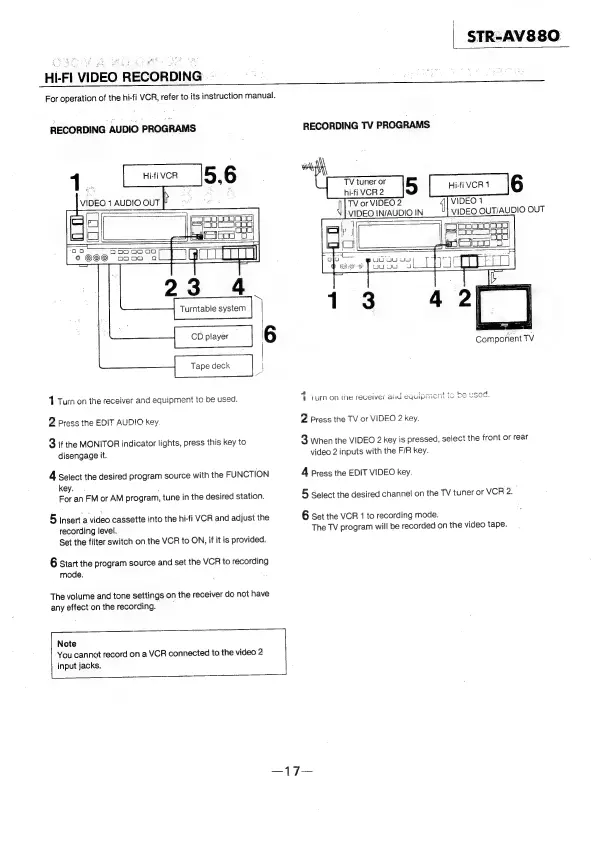
HI-FI
VIDEO
RECORDING
-
For
operation
of
the
hi-fi
VCR,
refer
to
its
instruction
manual.
RECORDING
AUDIO
PROGRAMS
1
Turn
on
the
receiver
and
equipment
to
be
used.
2
Press
the
EDIT
AUDIO
key
3
If
the
MONITOR
indicator
lights,
press
this
key
to
disengage
it.
A
Select
the
desired
program
source
with
the
FUNCTION
key.
;
For
an
FM
or
AM
program,
tune
in
the
desired
station.
5
Insert
a
video
cassette
into
the
hi-fi
VCR
and
adjust
the
recording
level.
Set
the
filter
switch
on
the
VCR
to
ON,
if
it
is
provided.
6
start
the
program
source
and
set
the
VCR
to
recording
mode.
The
volume
and
tone
settings
on
the
receiver
do
not
have
any
effect
on
the
recording.
Note
You
cannot
record
on
a
VCR
connected
to
the
video
2
input
jacks.
STR-AV&88O
RECORDING
TV
PROGRAMS
VIDEO
14
TV
or
VIDEO
2
VIDEO
OUTACBIO
OUT
VIDEO.
IN/AUDIO
IN
BOUL
UU
190)
WU
J
Component
TV
4
:
atts
Lee
aet
te
Aaaad
§
(umn
On
ihe
receiver
aii
CYUIPc
ri
we
We
wows,
2
press
the
TV
or
VIDEO
2
key.
3
When
the
VIDEO
2
key
is
pressed,
select
the
front
or
rear
video
2
inputs
with
the
F/R
key.
4
Press
the
EDIT
VIDEO
key.
5
Select
the
desired
channel
on
the
TV
tuner
or
VCR
2.
6
Set
the
VCR
1
to
recording
mode.
The
TV
program
will
be
recorded
on
the
video
tape.