EasyManua.ls Logo

Sony STR-AV880 - Video Tape Editing; Adding New Sound on a Video Tape During Editing

Sony STR-AV880
45 pages
Print Icon
To Next Page IconTo Next Page
To Previous Page IconTo Previous Page
Loading...
STR-AV880
ADDING
NEW
SOUND
ON
A
ee
VIDEO
TAPE
EDITING
-
TAPE
DURING
EDITING
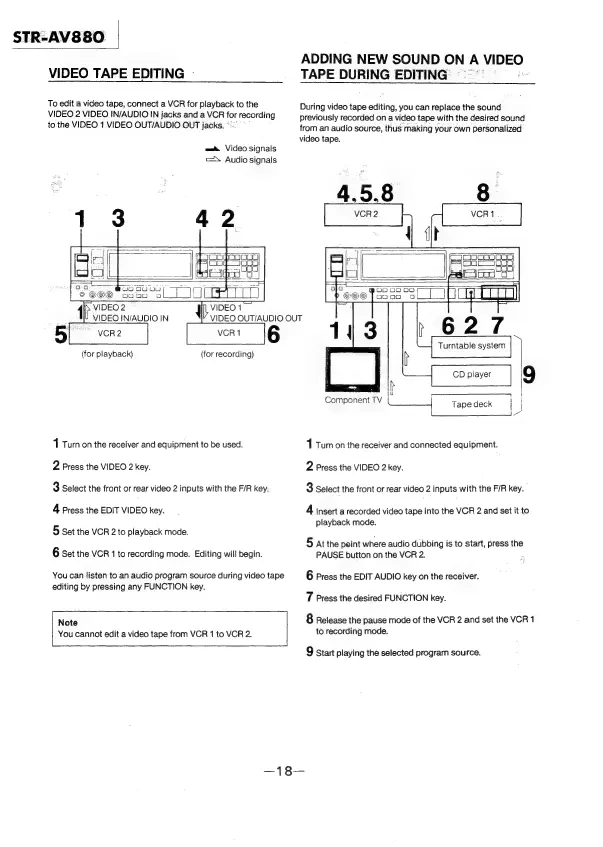
To
edit
a
video
tape,
connect
a
VCR
for
playback
to
the
—
During
video
tape
editing,
you
can
replace
the
sound
VIDEO
2
VIDEO
IN/AUDIO
IN
jacks
and
a
VCR
for
recording
previously
recorded
on
a
video
tape
with
the
desired
sound
to
the
VIDEO
1
VIDEO
OUT/AUDIO
OUT
jacks.
°
from
an
audio
source,
thus
making
your
own
personalized
video
tape.
ma
Video
signals
=
Audio
signals
Pe,
On
4.5.8
8
|
yore
©©@©
Sooo
ao
IN
VIDEO
2
—
VIDEO1
VIDEO
IN/AUDIO
IN
VIDEO
QUT/AUDIO
OUT
@
OD
oO
es
ee
>
)
©©©
onaa
a
(for
playback)
(for
recording)
CD
player
.e]
mee
|
|
Component
TV
Tape
deck
i
“
1
Turn
on
the
receiver
and
equipment
to
be
used.
1
Turn
on
the
receiver
and
connected
equipment.
2
Press
the
VIDEO
2
key.
2
Press
the
VIDEO
2
key.
3
Select
the
front
or
rear
video
2
inputs
with
the
F/R
key.
3
Select
the
front
or
rear
video
2
inputs
with
the
F/R
key.
4
Press
the
EDIT
VIDEO
key.
4
insert
a
recorded
video
tape
into
the
VCR
2
and
set
it
to
playback
mode.
5
Set
the
VCR
2
to
playback
mode.
5
atthe
point
where
audio
dubbing
is
to
start,
press
the
6
Set
the
VCR
1
to
recording
mode.
Editing
will
begin.
PAUSE
button
on
the
VCR
2.
You
can
listen
to
an
audio
program
source
during
video
tape
6
Press
the
EDIT
AUDIO
key
on
the
receiver.
editing
by
pressing
any
FUNCTION
key.
7
Press
the
desired
FUNCTION
key.
8
Release
the
pause
mode
of
the
VCR
2
and
set
the
VCR
1
Note
to
recording
mode.
You
cannot
edit
a
video
tape
from
VCR
1
to
VCR
2.
9
start
playing
the
selected
program
source.