EasyManua.ls Logo

Sony STR-AV880 - Connection Diagrams

Sony STR-AV880
45 pages
Print Icon
To Next Page IconTo Next Page
To Previous Page IconTo Previous Page
Loading...
STR-AV88O
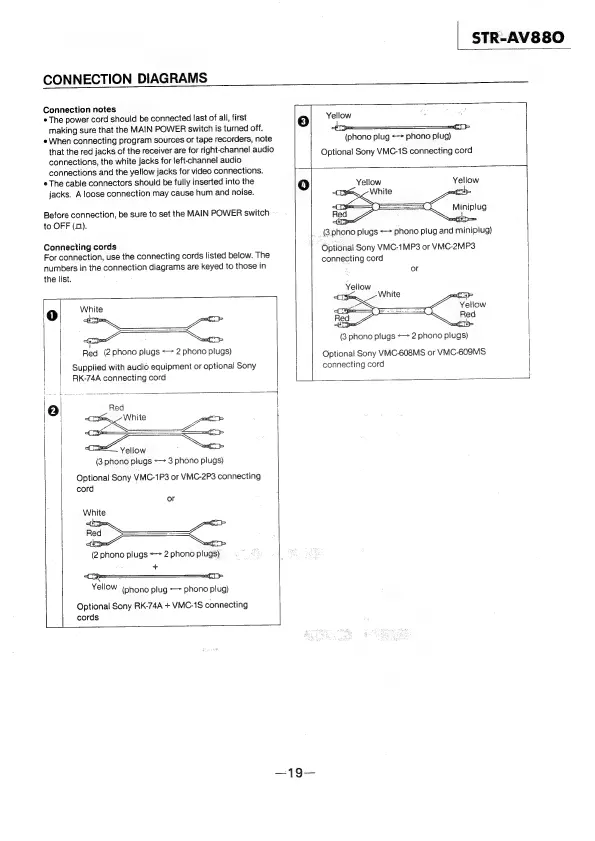
CONNECTION
DIAGRAMS
pact
lath
Aye
fA
ch
Ranta
ee
reo
Connection
notes
;
m7)
¢
The
power
cord
should
be
connected
last
of
all,
first
3)
Yellow
‘
7
making
sure
that
the
MAIN
POWER
switch
is
turned
off.
e
When
connecting
program
sources
or
tape
recorders,
note
(phono
plug
<>
phono
plug)
that
the
red
jacks
of
the
receiver
are
for
right-channel
audio
Optional
Sony
VMC-1S
connecting
cord
connections,
the
white
jacks
for
left-channel
audio
connections
and
the
yellow
jacks
for
video
connections.
i
¢
The
cable
connectors
should
be
fully
inserted
into
the
4)
Yellow
Yellow
jacks.
A
loose
connection
may
cause
hum
and
noise.
p
a
Miniplug
ree
p=
(3.phono
plugs
<>
phono
plug
and
minipiug)
Before
connection,
be
sure
to
set
the
MAIN
POWER
switch
to
OFF
(0).
Red
8
CEs,
~
White
pti
=
.
Connecting
cords
a
|
MC-1M
VMC-2MP3
For
connection,
use
the
connecting
cords
listed
below.
The
peau
Sony
VMC:IMP3
or
VMC-2
:
:
:
;
connecting
cord
numbers
in
the
connection
diagrams
are
keyed
to
those
in
ve
the
list.
Yellow
ver
te
rit
ry
White
2
Yellow
Epa
ey
Red
<Gepm
nn
|
(3
phono
plugs
«>
2
phono
plugs)
Red
(2
phono
plugs
=>
2
phono
plugs)
Optional
Sony
VMC-608MS
or
VMC-609MS
Supplied
with
audio
equipment
or
optional
Sony
|
connecting
cord
RK-74A
connecting
cord
:
:
Yellow
(3
phono
plugs
«>
3
phono
plugs)
Optional
Sony
VMC-1P3
or
VMC-2P3
connecting
cord
or
(2
phono
plugs
<->
2
phono
plugs)
+
YellOW
(phono
plug
—>
phono
plug)
Optional
Sony
RK-74A
+
VMC-1S
connecting
|
cords