EasyManua.ls Logo

Sony STR-D715 - Page 19

Sony STR-D715
35 pages
Print Icon
To Next Page IconTo Next Page
To Previous Page IconTo Previous Page
Loading...
Adding
New
Sound
on
a
Video
Tape
during
Video
Editing
You
can
record
audio
from
various
audio
program
sources
while
recording
video,
LD
or
TV
pro^ams
on
a
video
tape
instead
of
their
original
sound.
your
VCR,
LD
player
or
TV's
instruction
manual
if
you
need
help.
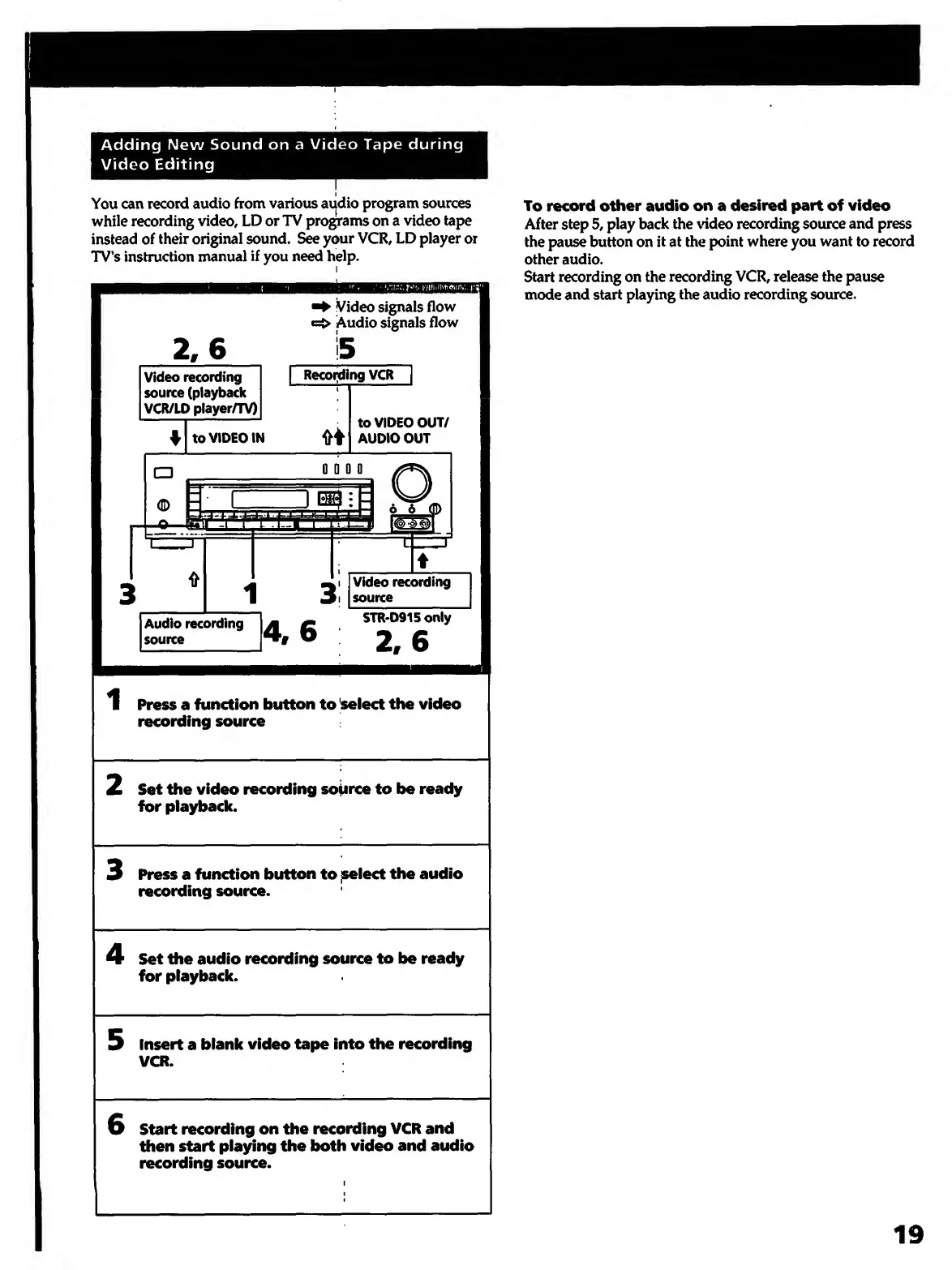
2,6
Video
recording
source
(playback
VCR/ID
player/TV)
f
to
VIDEO
IN
Video
signals
flow
e:>
Audio
signals
flow
Recoi]ding
VCR
^
to
VIDEO
OUT/
AUDIO
OUT
0
D
0
0
Audio
recording
source
4,6
I
Video
recording
source
STR*D915only
2,6
1
Press
a
function
button
to
^select
the
video
recording
source
2
Set
the
video
recording
soiirce
to
be
ready
for
playback.
3
P
ress
a
function
button
to
jseiect
the
audio
recording
source.
4
S
et
the
audio
recording
source
to
be
ready
for
playback.
5
I
nsert
a
blank
video
tape
into
the
recording
VCR.
6
S
tart
recording
on
the
recording
VCR
and
then
start
playing
the
both
video
and
audio
recording
source.
To
record
other
audio
on
a
desired
part
of
video
After
step
5,
play
back
the
xddeo
recording
source
and
press
the
pause
button
on
it
at
the
point
where
you
want
to
record
other
audio.
Start
recording
on
the
recording
VCR,
release
the
pause
mode
and
start
playing
the
audio
recording
source.
19

Other manuals for Sony STR-D715

Related product manuals