EasyManua.ls Logo

Sony STR-D715 - Page 18

Sony STR-D715
35 pages
Print Icon
To Next Page IconTo Next Page
To Previous Page IconTo Previous Page
Loading...
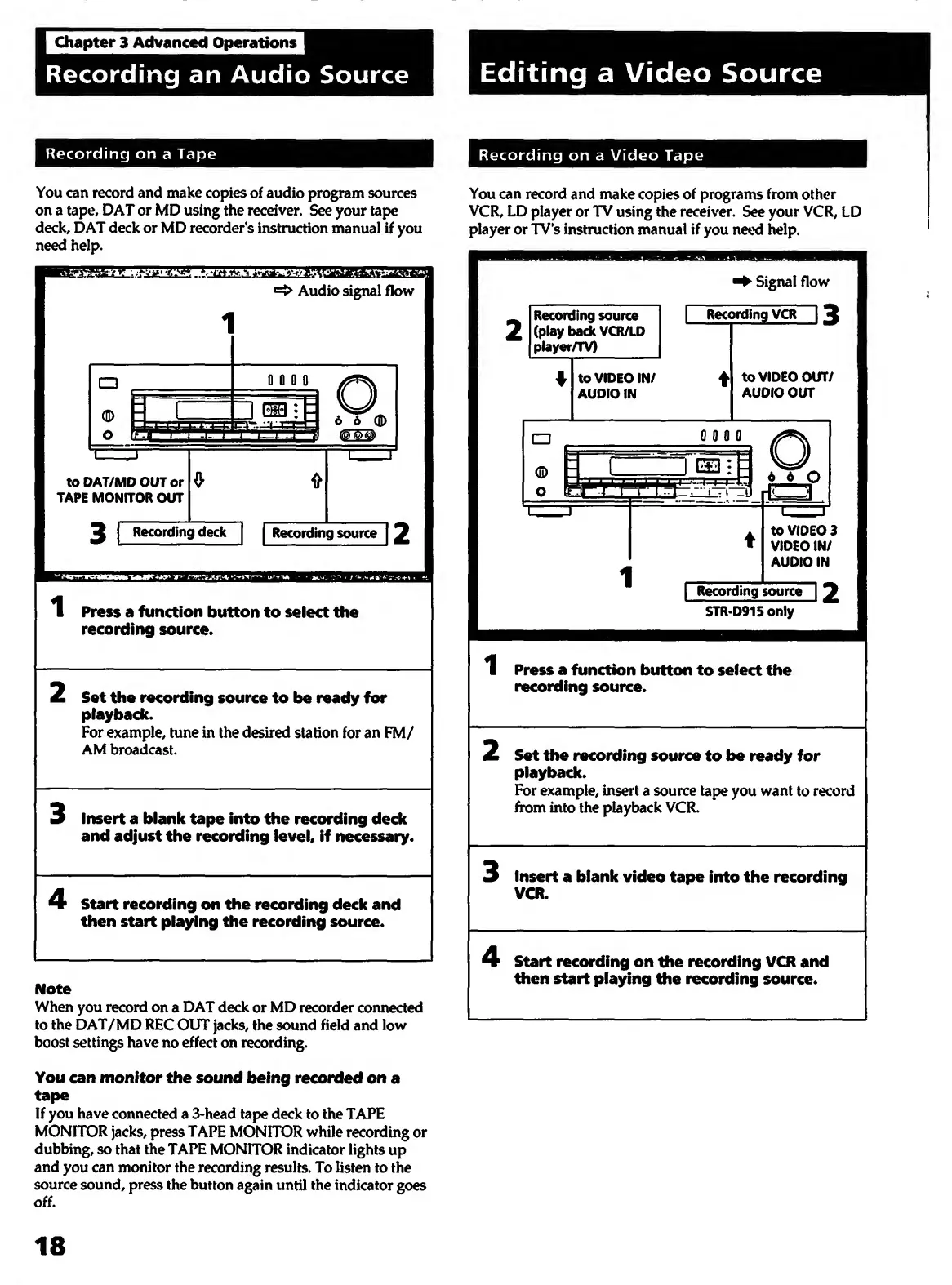
You
can
record
and
make
copies
of
audio
program
sources
on
a
tape,
DAT
or
MD
using
the
receiver.
See
your
tape
deck,
DAT
deck
or
MD
recorder's
instruction
manual
if
you
need
help.
You
can
record
and
make
copies
of
programs
from
other
VCR,
LD
player
or
TV
using
the
receiver.
See
your
VCR,
LD
player
or
TV's
instruction
manual
if
you
need
help.
1
P
ress
a
function
button
to
select
the
recording
source.
2
S
et
the
recording
source
to
be
ready
for
playback.
For
example,
tune
in
the
desired
station
for
an
FM/
AM
broadcast.
3
I
nsert
a
blank
tape
into
the
recording
deck
and
adjust
the
recording
level,
if
necessary.
4
S
tart
recording
on
the
recording
deck
and
then
start
playing
the
recording
source.
When
you
record
on
a
DAT
deck
or
MD
recorder
coimected
to
the
DAT/MD
RFC
OUT
jacks,
the
sound
field
and
low
boost
settings
have
no
effect
on
recording.
You
can
monitor
the
sound
being
recorded
on
a
tape
If
you
have
connected
a
3-head
tape
deck
to
the
TAPE
MONITOR
jacks,
press
TAPE
MONITOR
while
recording
or
dubbing,
so
that
the
TAPE
MONITOR
indicator
lights
up
and
you
can
monitor
the
recording
results.
To
listen
to
the
source
sound,
press
the
button
again
until
the
indicator
goes
off.
1
P
ress
a
function
button
to
select
the
recording
source.
2
S
et
the
recording
source
to
be
ready
for
playback.
For
example,
insert
a
source
tape
you
want
to
record
ftom
into
the
playback
VCR.
3
I
nsert
a
blank
video
tape
into
the
recording
VCR.
4
S
tart
recording
on
the
recording
VCR
and
then
start
playing
the
recording
source.
18

Other manuals for Sony STR-D715

Related product manuals