EasyManua.ls Logo

Sony STR-D715 - Page 17

Sony STR-D715
35 pages
Print Icon
To Next Page IconTo Next Page
To Previous Page IconTo Previous Page
Loading...
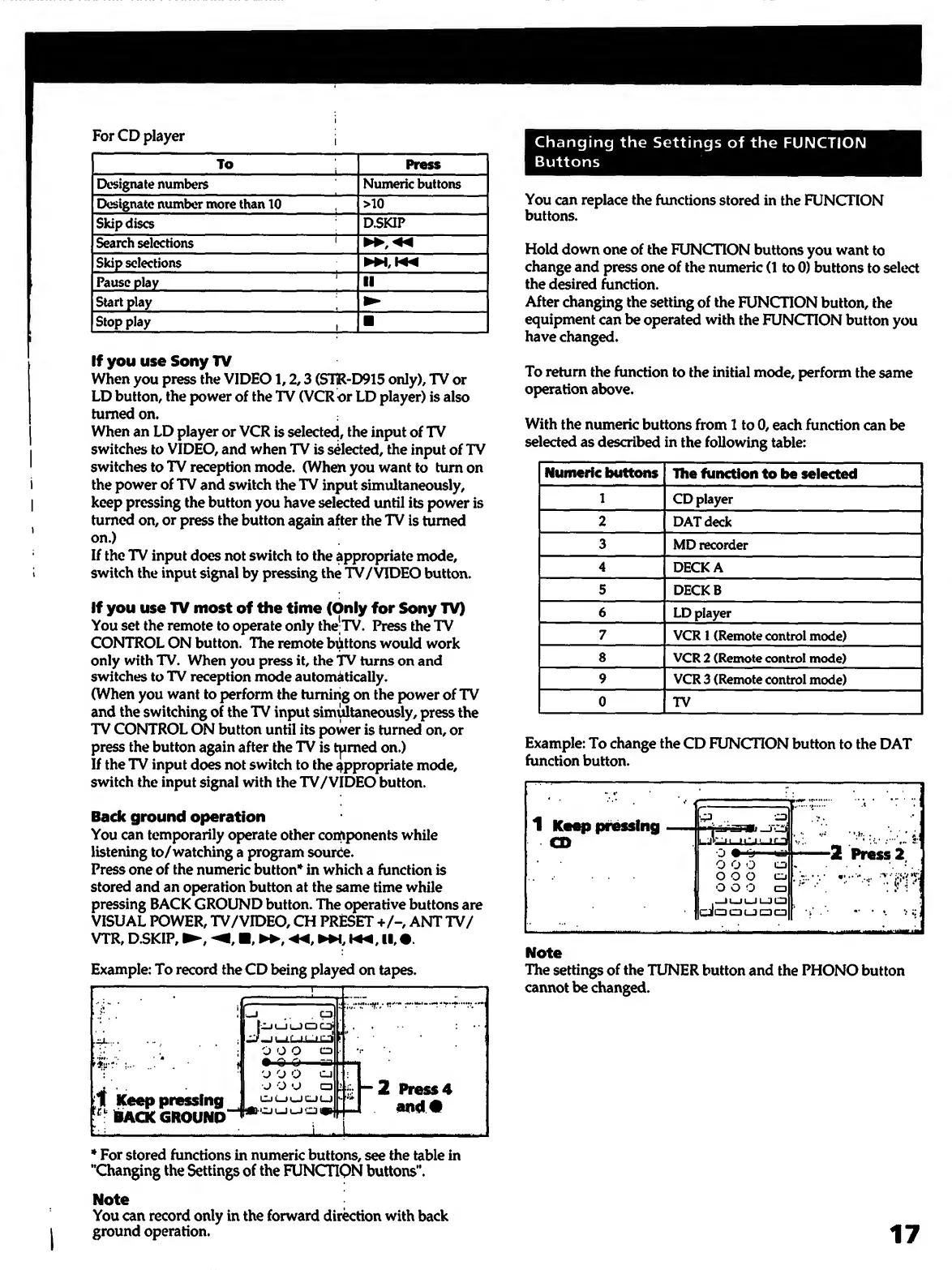
For
CD
player
To
Press
Designate
numbers
Numeric
buttons
Designate
number
more
than
10
>10
Skip
discs
D.SKIP
Search
selections
'
Skip
selections
Pause
play
'
II
Start
play
Stop
play
,
If
you
use
Sony
TV
When
you
press
the
VIDEO
1,
2
,3
(SliR-D915
only),
TV
or
LD
button,
the
power
of
the
TV
(VCR
or
LD
player)
is
also
turned
on.
When
an
LD
player
or
VCR
is
selected,
the
input
of
TV
switches
to
VIDEO,
and
when
TV
is
sdected,
the
input
of
TV
switches
to
TV
reception
mode.
(When
you
want
to
turnon
the
power
of
TV
and
switch
the
TV
input
simultaneously,
keep
pressing
the
button
you
have
selected
until
its
power
is
turned
on,
or
press
the
button
again
after
the
TV
is
turned
on.)
If
the
TV
input
does
not
switch
to
the
appropriate
mode,
switch
the
input
signal
by
pressing
the
TV/VIDEO
button.
If
you
use
TV
most
of
the
time
(Only
for
Sony
TV)
You
set
the
remote
to
operate
only
the-TV.
Press
the
TV
CONTROL
ON
button.
The
remote
bilittons
would
work
only
with
TV.
When
you
press
it,
the
TV
turns
on
and
switches
to
TV
reception
mode
automatically.
(When
you
want
to
perform
the
turning
on
the
power
of
TV
and
the
switching
of
the
TV
input
sim^taneously,
press
the
TV
CONTROL
ON
button
until
its
power
is
turned
on,
or
press
the
button
again
after
the
TV
is
tjimed
on.)
If
the
TV
input
does
not
switch
to
the
appropriate
mode,
switch
the
input
signal
with
the
TV/VIDEO
button.
Back
ground
operation
You
can
temporarily
operate
other
components
while
listening
to/watching
a
program
source.
Press
one
of
the
numeric
button*^
in
which
a
function
is
stored
and
an
operation
button
at
the
same
time
while
pressing
BACK
GROUND
button.
The
operative
buttons
are
VISUAL
POWER,
TV/VIDEO,
CH
PRESET
+/-,
ANT
TV/
VTR,
D.SKIP,
,
,
II,
#.
Example:
To
record
the
CD
being
played
on
tapes.
---1-
rz
-^
1
..
.
;
1
Keep
pressing
Hack
grouno"^
j
t—<
ii-tL-j
O
O
O
CD
Q
O
aa
'j
O
O
cj
J
O
O
CD
CjLJi^C.JUJ
_
r
)
k.
~2
Press4
and#
*
For
stored
functions
in
numeric
buttons,
see
the
table
in
‘‘Changing
the
Settings
of
the
FUNCTION
buttons“.
Note
You
can
record
only
in
the
forward
direction
with
back
ground
operation.
Changing
the
Settings
of
the
FUNCTION
Buttons
You
can
replace
the
functions
stored
in
the
FUNCTION
buttons.
Hold
down
one
of
the
FUNCTION
buttons
you
want
to
change
and
press
one
of
the
numeric
(1
to
0)
buttons
to
select
the
desired
Unction.
After
changing
the
setting
of
the
FUNCTION
button,
the
equipment
can
be
operated
with
the
FUNCTION
button
you
have
changed.
To
return
the
function
to
the
initial
mode,
perform
the
same
operation
above.
With
the
numeric
buttons
from
1
to
0,
each
function
can
be
selected
as
described
in
the
following
table:
Numeric
buttons
The
function
to
be
selected
1
CD
player
2
DAT
deck
3
MD
recorder
4
DECK
A
5
DECKB
6
LD
player
7
VCR
1
(Remote
control
mode)
8
VCR
2
(Remote
control
mode)
9
VCR
3
(Remote
control
mode)
0
TV
Example:
To
change
the
CD
FUNCTION
button
to
the
DAT
function
button.
Note
The
settings
of
the
TUNER
button
and
the
PHONO
button
cannot
be
changed.
17

Other manuals for Sony STR-D715

Related product manuals