EasyManua.ls Logo

Sony STR-D715 - Remote Controls and Operations; Using the Remote Commander

Sony STR-D715
35 pages
Print Icon
To Next Page IconTo Next Page
To Previous Page IconTo Previous Page
Loading...
Chapter
2
Basic
Operations
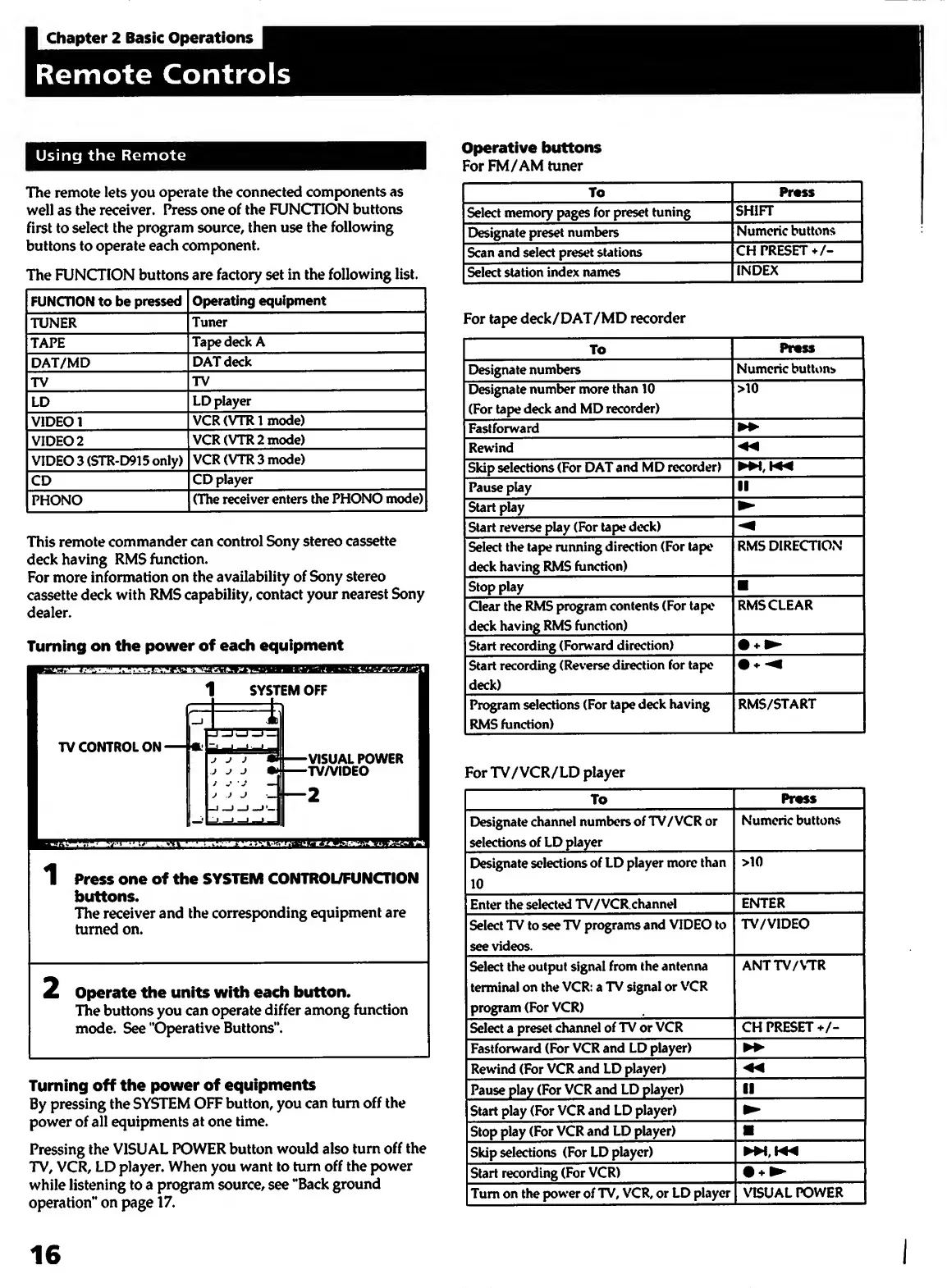
The
remote
lets
you
operate
the
connected
components
as
well
as
the
receiver.
Press
one
of
the
FUNCTION
buttons
first
to
select
the
program
source,
then
use
the
following
buttons
to
operate
each
component.
The
FUNCTION
buttons
are
factory
set
in
the
following
list.
FUNCTION
to
be
pressed
Operating
equipment
TUNER
Tuner
TAPE
Tape
deck
A
DAT/MD
DAT
deck
TV
TV
LD
LD
player
VIDEO
1
VCR
(VTRl
mode)
VIDEO
2
VCR(VTR2mode)
VIDEO
3
(STR-D915
only)
VCR(VTR3mode)
CD
CD
player
PHONO
(The
receiver
enters
the
PHONO
mode)
This
remote
commander
can
control
Sony
stereo
cassette
deck
having
RMS
function.
For
more
information
on
the
availability
of
Sony
stereo
cassette
deck
with
RMS
capability,
contact
your
nearest
Sony
dealer.
Turning
on
the
power
of
each
equipment
ii
rif
ni(
fi
I
|iiii
ill
Press
one
of
the
SYSTEM
CONTROUFUNCTION
buttons.
The
receiver
and
the
corresponding
equipment
are
turned
on.
2
Operate
the
units
with
each
button.
The
buttons
you
can
operate
differ
among
function
mode.
See
‘‘Operative
Buttons”.
Turning
off
the
power
of
equipments
By
pressing
the
SYSTEM
OFF
button,
you
can
turn
off
the
power
of
all
equipments
at
one
time.
Pressing
the
VISUAL
POWER
button
would
also
turn
off
the
TV,
VCR,
LD
player.
When
you
want
to
turn
off
the
power
while
listening
to
a
program
source,
see
“Back
ground
operation”
on
page
17.
Operative
buttons
For
FM/AM
tuner
Select
memory
pages
for
preset
tuning
Designate
preset
numbers
Scan
and
select
preset
stations
Select
station
index
names
For
tape
deck/DAT/MD
recorder
Numeric
buttons
CH
PRESET
+/-
INDEX
Designate
numbers
Designate
number
more
than
10
(For
tape
deck
and
MD
recorder)
Fasiforward
Rewind
Skip
selections
(For
DAT
and
MD
recorder)
Pause
play
Start
play__
Start
reverse
play
(For
tape
deck)_
Select
the
tape
running
direction
(For
tape
deck
having
RMS
function)_
Stop
play
Clear
the
RMS
program
contents
(For
tape
deck
having
RMS
function)
Start
recording
(Forward
direction)_
Start
recording
(Reverse
direction
for
tape
deck)
Program
selections
(For
tape
deck
having
RMS
function)
For
TV/VCR/LD
player
To
[>esigndte
channel
numbers
of
TV/VCR
or
selections
of
LD
player
_
Designate
selections
of
LD
player
more
than
10
Enter
the
selected
TV/VCR.channel
Select
TV
to
see
TV
programs
and
VIDEO
to
see
videos.
Select
the
output
signal
from
the
antenna
terminal
on
the
VCR:
a
TV
signal
or
VCR
program
(For
VCR)
Select
a
preset
channel
of
TV
or
VCR
Fastforward
(For
VCR
and
LD
player)
Rewind
(For
VCR
and
LD
player)
_
Pause
play
(For
VCR
and
LD
player)
_
Start
play
(For
VCR
and
LD
player)
Stop
play
(For
VCR
and
LD
player)
_
Skip
selections
(For
LD
player)
_
Start
recording
(For
VCR)
_
Turn
on
the
pow'er
of
TV,
VCR,
or
LD
player
Pr«ss
Numeric
buttons
>10
RMS
DIREtmON
RMS
CLEAR
RMS/START
Pr«s$
Numeric
buttons
ENTER
TV/VIDEO
ANTTV/VTR
CH
PRESET
\aSUAL
POWER
16

Other manuals for Sony STR-D715

Related product manuals