EasyManua.ls Logo

Sony STR-D715 - Chapter 2 Basic Operations; Listening to and Watching Programs; Audio Adjustments

Sony STR-D715
35 pages
Print Icon
To Next Page IconTo Next Page
To Previous Page IconTo Previous Page
Loading...
j
A
o€iMt»
vptgrtfiwn
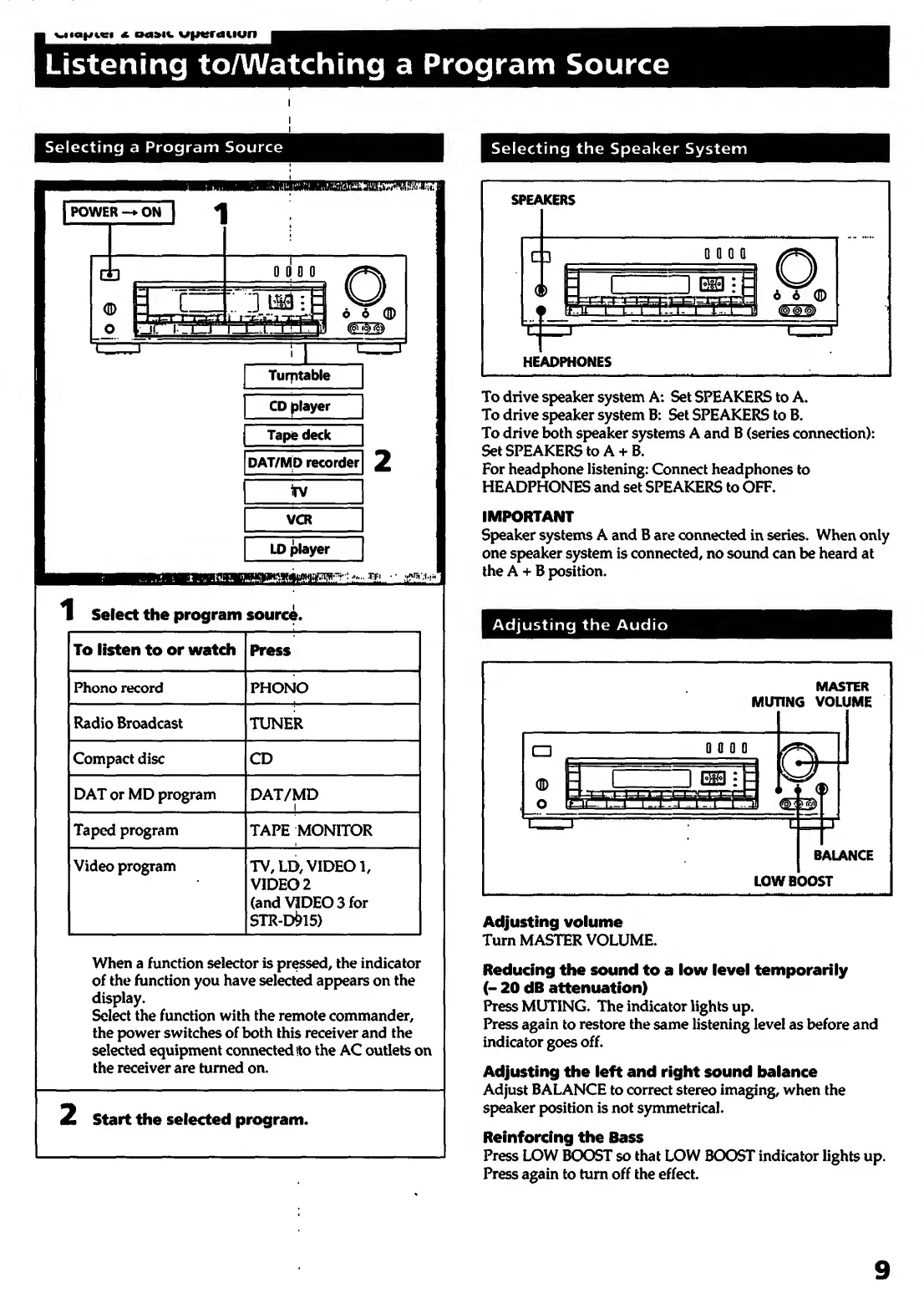
Listening
toAA/atching
a
Program
Source
I
I
Selecting
a
Program
Source
Selecting
the
Speaker
System
1
Select
the
program
source.
To
listen
to
or
watch
Press
Phono
record
PHONO
Radio
Broadcast
TUNER
Compact
disc
CD
DAT
or
MD
program
DAT/MD
1
Taped
program
TAPE
MONITOR
Video
program
TV,
LD,
VIDEO
1,
VIDEO
2
(and
VIDEO
3
for
STR-D^15)
When
a
function
selector
is
pressed,
the
indicator
of
the
function
you
have
selected
appears
on
the
display.
Select
the
function
with
the
remote
commander,
the
power
switches
of
both
this
receiver
and
the
selected
equipment
connected
ito
the
AC
outlets
on
the
receiver
are
turned
on.
Start
the
selected
program.
SPEAKERS
HEADPHONES
To
drive
speaker
system
A:
Set
SPEAKERS
to
A.
To
drive
speaker
system
B:
Set
SPEAKERS
to
B.
To
drive
both
speaker
systems
A
and
B
(series
connection):
Set
SPEAKERS
to
A+
B.
For
headphone
listening:
Connect
headphones
to
HEADPHONES
and
set
SPEAKERS
to
OFF.
IMPORTANT
Speaker
systems
A
and
B
are
connected
in
series.
When
only
one
speaker
system
is
connected,
no
sound
can
be
heard
at
the
A
+
B
position.
Adjusting
the
Audio
Adjusting
volume
Turn
MASTER
VOLUME.
Reducing
the
sound
to
a
low
level
temporarily
(-
20
dB
attenuation)
Press
MUTING.
The
indicator
lights
up.
Press
again
to
restore
the
same
listening
level
as
before
and
indicator
goes
off.
Adjusting
the
left
and
right
sound
balance
Adjust
BALANCE
to
correct
stereo
imaging,
when
the
speaker
position
is
not
symmetrical.
Reinforcing
the
Bass
Press
LOW
BOOST
so
that
LOW
BCXDST
indicator
lights
up.
Press
again
to
turn
off
the
effect.
9

Other manuals for Sony STR-D715

Related product manuals