Operations Using the Remote RM-AAE001
masterpage:Right
lename[E:\SEM_Janet\Revision
ata\J9050000_2580805131DA2100ES_US\2580805131\US08REM_STR-DA2100ES-U.fm]
49
US
model name1[STR-DA2100ES]
[2-580-805-13(1)]
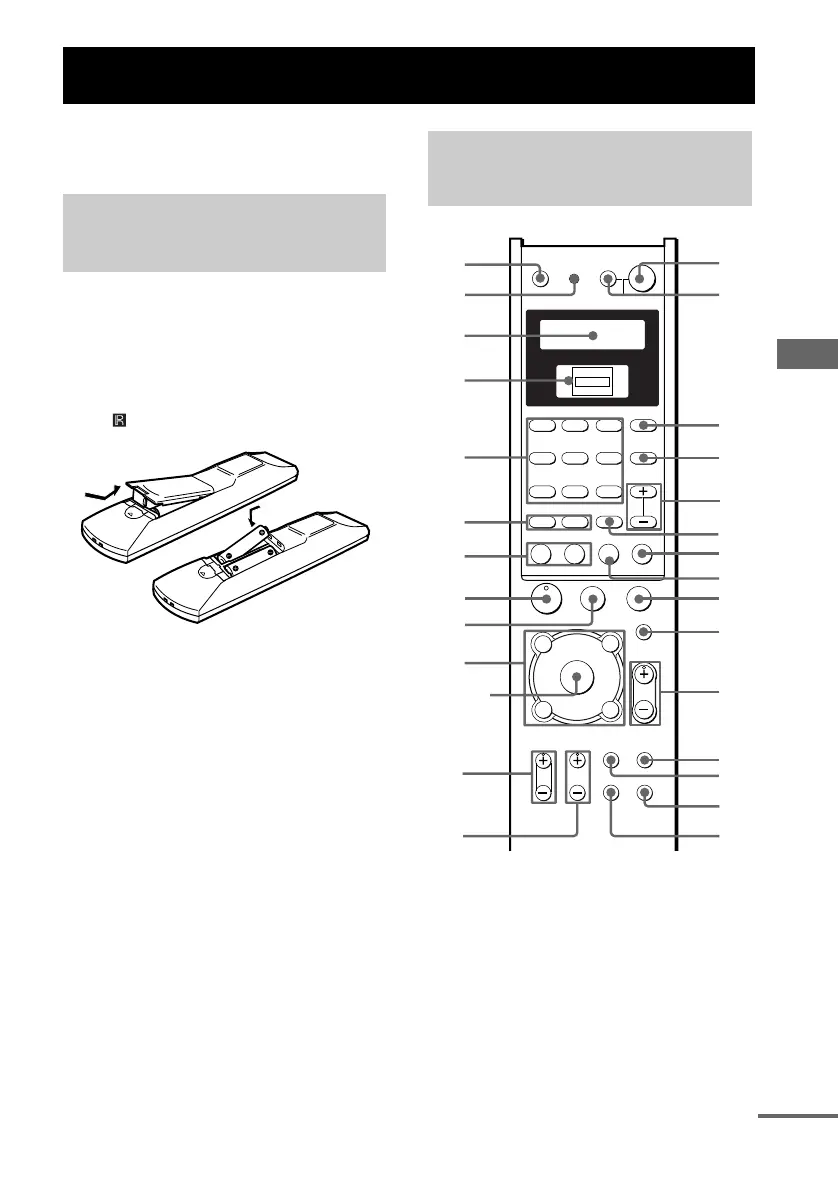
You can use the remote RM-AAE001 to operate
the components in your system.
Inserting batteries into the
remote
Insert R6 (size-AA) batteries with the + and –
properly oriented in the battery compartment.
When using the remote, point it at the remote
sensor on the receiver.
Tip
Under normal conditions, the batteries should last for
about 6 months. When the remote no longer operates
the receiver, replace all batteries with new ones.
Notes
• Do not leave the remote in an extremely hot or humid
place.
• Do not use a new battery with an old one.
• Do not expose the remote sensor to direct sunlight or
lighting apparatuses. Doing so may cause a
malfunction.
• If you do not use the remote for an extended period
of time, remove the batteries to avoid possible
damage from battery leakage and corrosion.
* The H, TV VOL +, TV CH + and MASTER VOL
+ buttons have a tactile dot. Use the tactile dot as a
reference when operating the receiver and other
audio/video components.
Operations Using the Remote RM-AAE001
Before you use your
remote
Remote button
description
H
X
m
M
.
>
-
RM SET UP
SYSTEM STANDBY
SLEEP
TV ?/1 AV ?/1
SHIFT
TOP MENU/
GUIDE
AV MENU
MUTING
MASTER
VOL
DISPLAY
TV VOL TV CH
WIDE ON SCREEN
TV/
VIDEO
MAIN
MENU
RETURN/EXIT
D.TUNING DISC ALT
ANT
CLEAR
SEARCH MODE
2CH
A.F.D.
123
456
789
0/10 >10/11 12
MOVIE
SUBTITLE ENTER
MUSIC
AUDIO
SWAP/
ANGLE
JUMP/
TIME
PRESET/
CH/D.SKIP
TEST
TONE
SB
DECODINGDIRECT
DUAL
MONO
x
?/1
PL
O
f
F
G
g
v
V
PUSH
wj
wh
wg
wf
wa
w;
qk
qh
qg
qd
qf
qj
*
ws
ENTER
1
2
9
0
*
qa
3
4
5
6
7
*
qs
*
8
ql
wd
continued
US01COV_STR-DA2100ES-U.book Page 49 Wednesday, July 13, 2005 2:17 PM














 To Next Page