22
GB
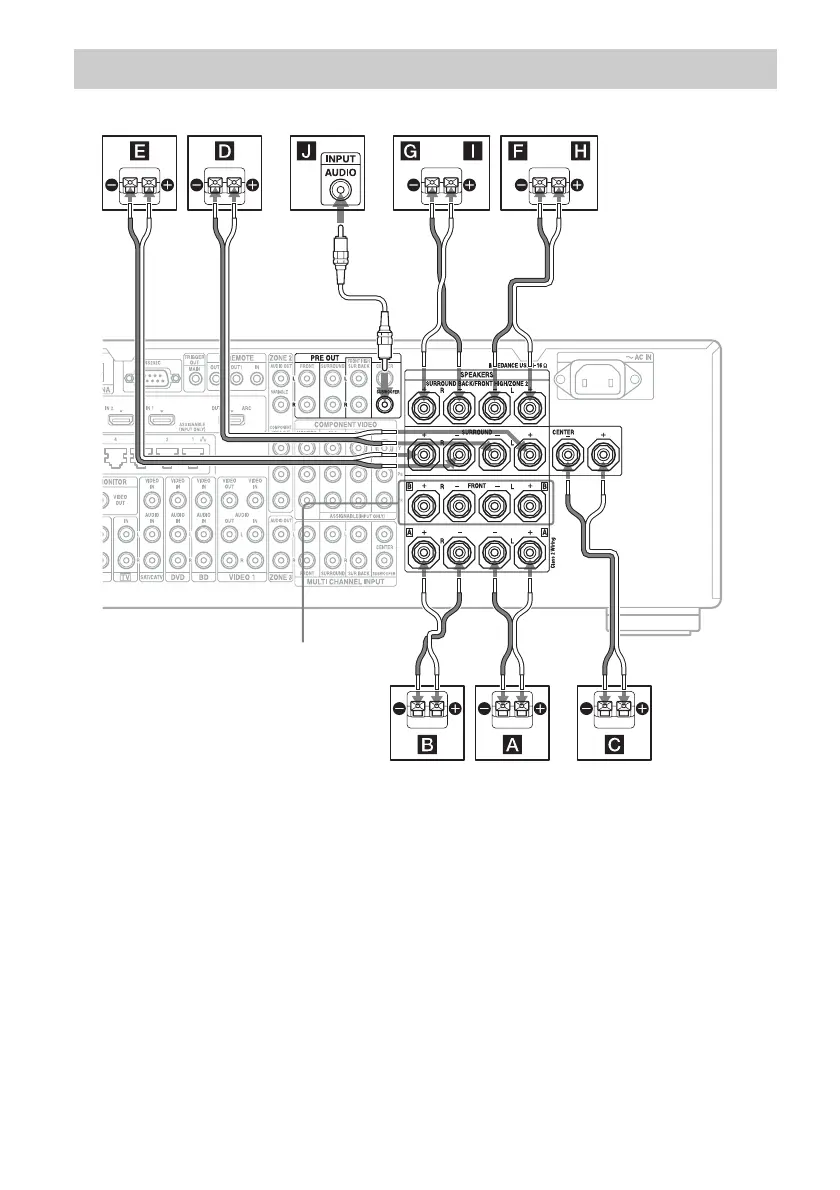
Before connecting cords, make sure to disconnect the AC power cord (mains lead).
A Monaural audio cord (not supplied)
B Speaker cords (not supplied)
AFront speaker A (L)
BFront speaker A (R)
CCenter speaker
DSurround speaker (L)
ESurround speaker (R)
FSurround back speaker (L)
2)
GSurround back speaker (R)
2)
HFront high speaker (L)
IFront high speaker (R)
JSubwoofer
3)
1)
If you have an additional front speaker
system, connect them to the FRONT B
terminals. You can select the front speaker
system you want to use with SPEAKERS on
the front panel (page 45).
2)
If you connect only one surround back
speaker, connect it to the SURROUND
BACK/FRONT HIGH/ZONE 2 L terminals.
3)
When you connect a subwoofer with an auto
standby function, turn off the function when
watching movies. If the auto standby
function of the subwoofer is set to on, it goes
into standby automatically based on the level
of the input signal to a subwoofer, then
sound may not be output.
Connecting speakers
AB
FRONT B terminals
1)
B
B
BB
or or















 To Next Page