32
Sound Adjustment
*
1
If you select DOLBY, be sure to adjust the volume level of the center and/or rear speakers to get the most out of the Dolby
Digital (AC-3) Surround Sound (see page 22).
*
2
This parameter has no effect on music sources that have a separate vocal channel (e.g., a Video CD containing karaoke tracks).
*
3
If you select ACOUSTIC, the hookups of the center and/or rear speakers are unnecessary.
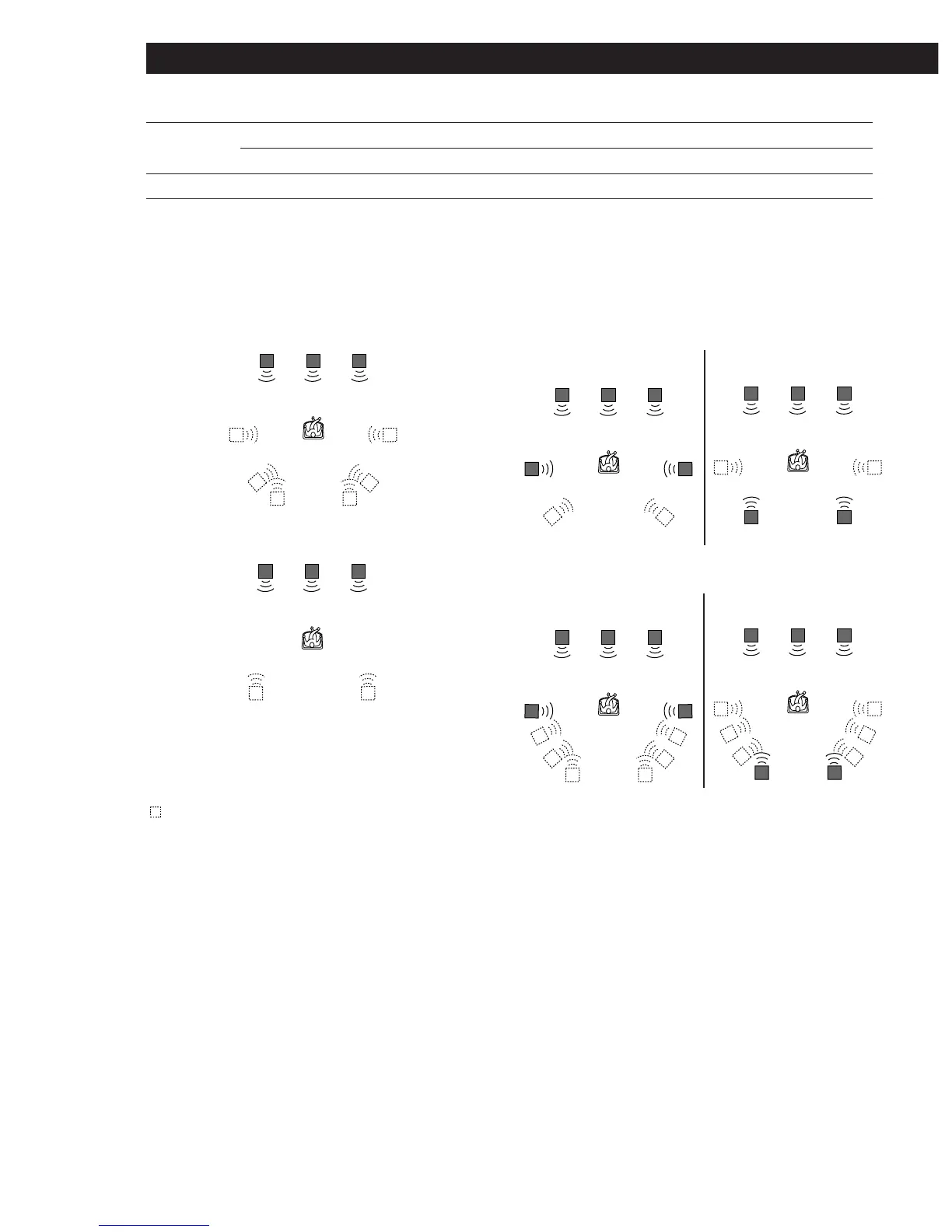
Ill.A VIRTUAL ENHANCED (SURROUND) A
Ill.B VIRTUAL ENHANCED (SURROUND) B
Ill.C VIRTUAL REAR SHIFT
For REAR SP [SIDE]*
For REAR SP [BEHIND]*
Ill.D VIRTUAL MULTI REAR
For REAR SP [SIDE]*
For REAR SP [BEHIND]*
L : Front speaker (left) * See page 22 for details on
R : Front speaker (right) how to set the rear speaker
C : Center speaker place.
SL : Rear speaker (left)
SR : Rear speaker (right)
: Virtual speaker
LCR
LCR
LCR
SRSL
SPORTS ARENA Reproduces the feeling of a large concert arena. Great for rock and roll.
STADIUM Reproduces the feeling of a large open-air stadium. Great for electric sounds.
GAME GAME Obtains maximum audio impact from video game software.













 To Next Page