Hooking Up the Components
STR-DE995/895 4-244-963-12(1)GB
15
GB
CONTROL S hookup
(STR-DE995 only)
When making CONTROL S hookups, use a
monaural mini-plug cord (not supplied).
CONTROL S is an original Sony control
system.
• If you connect the CONTROL S OUT jack on
another component to the CTRL S STATUS IN
jack on this receiver.
The remote sensor on the CONTROL S OUT
component receives remote codes the same way
as the remote sensor on this receiver. This is
useful if you have placed this receiver in a rack,
etc.
• If you connect the CONTROL S IN jack on
another component to the CTRL S STATUS
OUT jack on this receiver.
The remote sensor on this receiver receives
remote codes the same way as the remote
sensor on the CONTROL S IN component.
This is useful if you place the other component
away from this receiver.
2ND ZONE hookup
(STR-DE995 only)
You can use the 2ND ZONE OUT jacks to
output the audio signals of the selected
component to a stereo amplifier located in
another room (page 27).
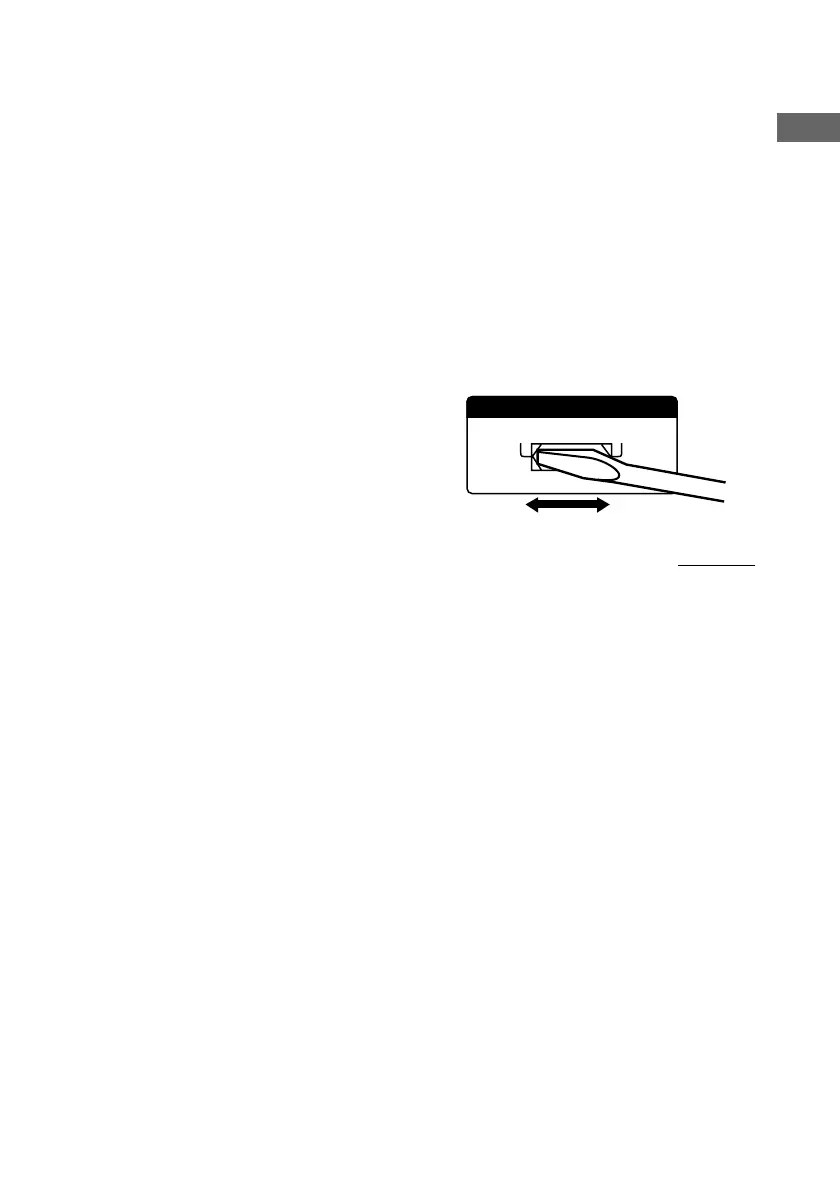
Setting the voltage selector
If your receiver has a voltage selector on the
rear panel, check that the voltage selector is set
to the local power supply voltage. If not, use a
screwdriver to set the selector to the correct
position before connecting the AC power cord
to a wall outlet.
continued
120V
240V 220V
VOLTAGE SELECTORVOLTAGE SELECTOR


 To Next Page