27
GB
Getting Started
Notes
• The Auto Calibration function does not work when
headphones are connected.
• If you activate the muting function during Auto
Calibration, the muting function will automatically
be set to off.
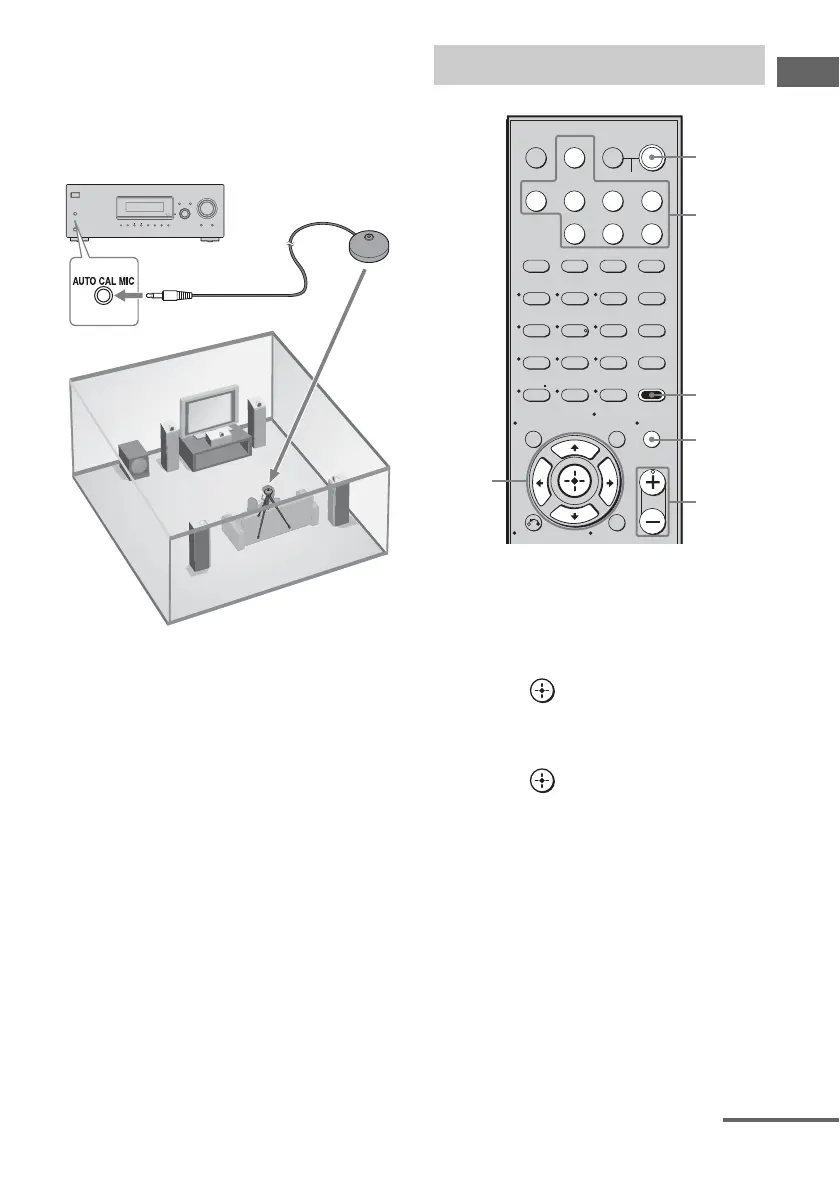
1 Connect the supplied optimizer
microphone to the AUTO CAL
MIC jack.
2 Set up the optimizer
microphone.
Place the optimizer microphone at your
listening position.You can also use a stool
or tripod so that the optimizer
microphone remains at the same height as
your ears.
Tip
When you face the speaker towards the optimizer
microphone, you will get a more accurate
measurement.
1 Press AMP MENU.
2 Press V/v repeatedly to select
“7-A. CAL”.
3 Press or b to enter the
menu.
“AUTO CAL” appears on the display.
4 Press or b to enter the
parameter.
5 Press V/v repeatedly to select
“A.CAL YES”.
Measurement starts in 5 seconds and the
display changes as follows:
A.CAL [5] t A.CAL [4] t A.CAL [3]
t A.CAL [2] t A.CAL [1]
While the time is counting down, stand
away from the measurement area to avoid
measurement error.
The measurement process will take a few
minutes to complete.
?/1
SPEAKERS
(ON/OFF)
PHONES
MEMORY/
ENTER
TUNING
MODE
TUNING
2CH A.F.D. MOVIE MUSIC
ANALOG
DIRECT
MUTING
INPUT SELECTOR
AUTO CAL MIC
DISPLAY INPUT MODE
MASTER VOLUME
Optimizer microphone
Performing Auto Calibration
123
46
78
0/10
ENTER
9
SYSTEM STANDBY
TV INPUT
SLEEP DMPORT
TV
?/1
AV
?/1
VIDEO BD DVD SAT
2CH A.F.D.
RETURN/EXIT
MENU/HOME
MOVIE MUSIC
MEMORY AMP MENU
CLEAR
TOOLS/
OPTIONSDISPLAY MUTING
MASTER VOL
TV VOL
D.SKIP
D.TUNING
DVD/BD
MENU
SA-CD/CD
TV TUNER
?/1
-
5
>10/
2-5
Input
buttons
?/1
switch
MUTING
MASTER
VOL +/–
1
continued














 To Next Page